
 Look how old this is!
 I post at SearchCommander.com now, and this post was published 16 years 2 months 23 days ago. This industry changes FAST, so blindly following the advice here *may not* be a good idea! If you're at all unsure, feel free to hit me up on Twitter and ask.
I’ve had my share of issues with Comcast in the past, and this one is just as frustrating.
Just like many of my issues with them so far, it’s completely inconsistent from market to market, so their support department seems to know nothing about it.
Anyone hosting their own domain somewhere, yet having Comcast as an ISP is continually being forced to jump through new hoops in order to send mail from their own domain.
Until now these hoops have been to verify your outgoing mail settings and change your SMTP port to 587 (or another port for your local market).
Now there’s another inconsistent change that’s not affecting everyone.
As a Portland web host we have three mail servers that our clients use, and for the past three days, all users that are on our #1 server are unable to send mail to other Comcast addresses.
To make matters worse, Comcast is then misreporting the problem, sending the end user a link, where their page says that their mail server is “blocked as spam”. (For the record, this mail server is not on any spam blacklists at this time).
So, now we are forced to explain to each complaining customer that this is some sort of problem or mistake on Comcasts end, AND we then have to explain that Comcast is also showing them incorrect information.
I have verified that even when you change to port 587 for your outgoing mail server, if the address you are sending to is another Comcast address, then the mail bounces back with this message –
<[email protected]>:
Connected to 76.96.62.116 but greeting failed.
Remote host said: 554 IMTA02.westchester.pa.mail.comcast.net comcast 208.70.160.19 Comcast block for spam. Please see http://help.comcast.net/content/faq/BL000000
This message says that our mail server (208.70.160.19) has contacted the Comcast mail server, who is blocking the message as spam. WRONG.
Visiting the help.comcast link is of no use to the end user, but as the server administrator I was able to follow the directions and submit our removal request at www.comcastsupport.com/rbl as directed.
Imagine my surprise when I got this e-mail back –
Thank you for contacting Comcast Customer Security Assurance. We have received and reviewed your RBL removal request.
Below each IP address you submitted in your request, we have included the result of our research. Please do not reply to this message.
208.70.160.19
Your request for IP block removal has been denied for the following reason:
– You have been blocked from emailing the Comcast network because we have determined that you are sending email from a dynamic/residential IP within the Comcast domain.
Comcast does not allow subscribers to send email from a mail server other than smtp.comcast.net. All mail should be sent through Comcast’s mail server.
For information on configuring your machine to use smtp.comcast.net, please follow the link below.
http://help.comcast.net/content/faq/BL002
If you need to run your own mail server, please contact our Commercial Services organization at [email protected]
Sincerely,
Comcast Customer Security Assurance
Did you note the bolded statement that “Comcast does not allow subscribers to send email from a mail server other than smtp.comcast.net” ?
If that’s really a policy, then why is only ONE of our mail servers affected, and then, only for mail which is sent to other Comcast email addresses?
Do you suppose this is just a mistake by a server administrator who misunderstood the direction he was given?
Or, do you think they were really told to block all outgoing mail from any servers other than their own, and that the change outbound port 25 to 597 fix will no longer work soon?
If you are suddenly having this problem here is a workaround to fix it:
Open your e-mail program and change your outgoing mail server from mail.yourdomain.com. (Screenshots are from Outlook 2007, another nightmare)
Change Outgoing SMTP – smtp.comcast.net and go to “Advanced”
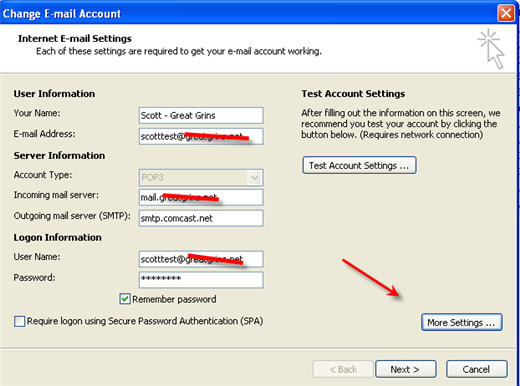
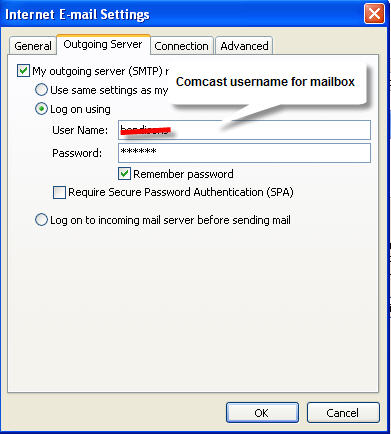
Be sure to CHECK THE BOX (or leave checked) – My outgoing Server requires Authentication”
Then change to “Verify using” and type in your comcast username and pw
BUT WAIT – THERES MORE
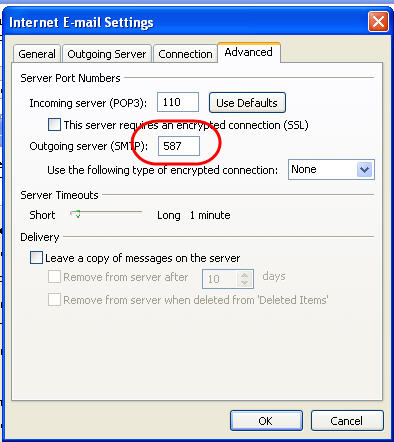
In order to get this working, you MUST ALSO change your outgoing computer port to 587 – So I THINK they’ll be screwing this up too.
WTF is going on, Comcast?














***UPDATE***
Someone named Jordan from Comcast phoned me after seeing the Google Alert on their name, and claims to have fixed the problem.
KUDOS to you Jordan, and thank you. I’m sorry, my phone wigged out mid-call and I lost you – I’d love to have you phone me back to get your contact info please?
I’ve had some issues like this before when trying to run Exchange from a residential IP. To resolve this I set up an SMTP forwarder to forward all my outgoing mail through smtp.comcast.net and I don’t remember having to put in any credentials or even changing the port.
James
I am having the spam problem, except when I report to Comcast. I got:
We have received your request for removal from our inbound blocklist. After investigating the issue, we have found that the IP you provided for removal is currently not on our blocklist.
Great, then why is it telling me:
554 IMTA12.westchester.pa.mail.comcast.net comcast 75.146.162.210 Comcast block
for spam. Please see http://help.comcast.net/content/faq/BL000000
I don’t get emails back telling me I’m blocked, I get this error testing via a telnet session. I’ve verified the telnet protocol with other servers I manage.
I too need to speak with Jordan at Comcast.
The only other thing I have to add is that on the April 23 (the day this started happening), there was a problem with my Comcast connection. It was super slow, but not dead. The tech said the area had a signal strength loss.
For Joe bove and other hosts, ISP’s and server admins having this problem, (not end users) visit Comcast Customer Security Assurance to reach them – phone number is there…
This loss of signal and spam blocking actually sounds like a user on the system that is spamming. (Have you possibly checked to see if there is a ghost user on your system causing this? WiFi users see this problem all the time in the city where there is a confluence of people and an unlocked wireless signal! 🙂 First thing to do, check your users. Second, try sending mail from a different mailbox on the same server, telnet sessions may get bounced from comcast servers because they dont want you telnetting into thier smtp server. lol (Which ironically may cause you to get your whole domain blocked)
I’m having this same problem with Comcast. This is a really stupid policy. The solution has to go deeper than this though. You’ll need to add “smpt.comcast.net” to all your domains SPF records. If you send out mail using Comcast mail servers the receiving mail server should check the SPF record for valid sending smtp servers. And, if ANYONE has Comcast residential service and sends out mail through their own mail server the server is subject to being blocked again. And Comcast provides no information about which account actually “abused” their policy and caused the server to be put on their blacklist. Very frustrating.
Thanks Matt – I’m pretty sure this might be a different issue though –
SPF is Sender Policy Framework, but for the record –
Are you saying mail to Comcast addresses is bouncing with the “SPF pobox” message sending people here? If thats true, and if Comcast is really starting to require SPF verification then it hasn’t hit that many users yet. ahh, yep, people are talking about it already…
It may be a different issue, but certainly related. If you don’t add Comcast’s mail server to your SPF record then other mail servers will think the Comcast mail server is a forgery and block your email. I believe this will affect more email than the blocked emails to Comcast.
SPF … “allows the owner of a domain to specify their mail sending policy, e.g. which mail servers they use to send mail from their domain.”
Yep, you’re right, I remember now, and we stopped using SPF altogether almost 18 months ago on our servers because it was such a pain. Every once in a while, some user needs SPF turned on, and in those cases, we do have to add the Comcast info.
Totally inconsistent across the company, these policies. Fricken Internet Nazis. On another note, SPAMMERS break the world again. Unreal what we have to go through just to address a core exploit of the Internet, Spam.
I’ve had the same experience. Great tech support in Michigan, lousy in Seattle.
But none of this applies to my problem. I am not sending mail from anyone but comcast. I am forwarding any emails I get from my ISP to my comcast address. I get the same bounce back message shown above. And I got the same response from comcast when I sent in a request to unblock my IP (IP not blocked). Then I looked at the error code (554) and entered that into Comcast support page. It is not a direct block of Spam but a claim that they require Reverse DNS and that my ISP has not configured Reverse DNS on that email server. When I tell my ISP this they say it is a comcast problem (pointing me to this blog) and say goodbye.
Does anyone have any good ideas about resloving this without spending another 24 hours on the phone?
Thanks!
I am having the same issue as “Werner” above. I am simply having all incoming email from my work email address forwarded to my Comcast email address. Starting Sunday, anybody that emailed my work email addy got the error message displayed above from Comcast. I submitted my work’s email server IP to Comcast and they say it’s not blocked and are no help further than that. Great.
This is probably because your PTR records are mismatched, please check your reverse DNS.
I’m having a similiar issue. I can’t sent to comcast.net e-mail accounts from any of 5 or 6 domains I’ve tested. They are not on any RBL and Comcast says they are not blocked.
I don’t get any indication that the recipients are not getting my e-mails, no bounces, etc., just goes into a blackhole. Comcast can’t seem to figure it out. Frustrating.
I for one am GLAD Comcast blocks outbound port 25 from their users. You obviously are not, but that’s because you don’t suffer a deluge of illegitimate traffic that is 99.99% of dynamic/non-static/dialup/too-clueless-to-configure-a-PTR-on-your-mailserver.
If you want to send mail, get yourself a static IP and learn how to configure a PTR. OR gateway your email through a real mailserver (Google ‘what is a SmartHost’ to learn more).
If you don’t – that’s your choice – but you’re literally standing in the middle of a pack of zombie systems and then deluding yourself why you’re getting labeled as a bad apple. You’re probably running an Exchange configuration which auto-replies to spam, sending it back to the forged “From:” address (this is an actual default configuration in Exchange).
Oh yeah, I forgot: SPF is good to help prevent spammers from forging your email domain… but it’s not perfect at all other facets of fighting spam.
NEVER enable SPF on your domain if you send email from random hotspots, or you use the “free” email provided by your ISP, or you “forward” your mailbox from one mailserver to another (like from your company mailserver to gmail, etc). If you enable SPF in these conditions, you don’t know what SPF really means and you will be asking other sites to delete or spam score your email.
I send emails to 50-60 friends via Comcast.
I have 30-40 websites where I am registered for website emails.
My outbound emails seem to be going into a black hole and my inbound emails from respectable commercial websites are coming through. EXAMPLES: KimKomando.com; Newsmax.com; TurboTax.com.
Can anyone explain in layman’s language what is happening and what is to be done?