
 Look how old this is!
 I post at SearchCommander.com now, and this post was published 18 years 9 months 4 days ago. This industry changes FAST, so blindly following the advice here *may not* be a good idea! If you're at all unsure, feel free to hit me up on Twitter and ask.
As a user of Microsoft Office for nearly 15 years now, (wow) I’ve become quite familiar with the pain of upgrading from one version to another, but this one really has a lot to hate.
Something came over me this summer, and I finally installed my MS Action Pack version of Office 2007, which of course updated my Outlook, Word, Excel and Powerpoint.
Within minutes, I wrote a post about them moving the status flags (incredibly stupid) but within hours the next item popped up and so I started to keep a list.
Over the past couple of months, the list has been growing and growing, and I finally decided to post my dirty dozen this morning, after determining that I will never actually take the time to post screenshots. Feel free to add to the list!
1. Flags moved
I wrote a blog post about this already, but it REALLY bothers me. After going for years with my “flag status” appearing in the top left pane of my window, Microsoft has decided to move it to the right side by default, and the ability to relocate it is “broken”. This is stupid. Fix it Microsoft.

2. Program overhaul – One Note
I’ve used office One Note 2003 for quite awhile now, for keeping track of client projects and information. It’s quite useful for me as a project manager, because it’s simple, and I really didn’t have to think much about learning to use it.
If there was one thing I dislike about one note 2003, it was that if you had multiple projects open at any given time, there was no way to sort them, you simply had to close the ones you didn’t want to appear at all times.
Well now I’m longing for the days of One Note 2003, because not only is there STILL no way to sort them, but it forces you to display all of your projects in tabs across the screen at any given time. No longer can I only have the eight to 10 projects open that I wish to have, I’m forced to keep all of my projects open at all times, even if I haven’t touched or looked at any of them for months.
Microsoft One note used to make me more productive – and now it’s just like having a hundred sticky notes all over your monitor and you can’t find anything.
Over the time it’s taken me to write this article, I’ve now gotten used to this, and figured out that there is a fairly efficient way of getting to every file on the left side. Still, this was an incredible pain in the neck and served no real purpose that I can tell other than to confuse the user.
3. Changing my Time Zone
Day three I woke up to find a message on my screen “Change calendar time zone”
Here’s what it said –
A change has occurred from (GMT -08:00) Pacific time (US and Canada) to (GMT -08:00) Pacific time (US and Canada)
Updating personal folders from (GMT -08:00) Pacific time (US and Canada) to (GMT -08:00) Pacific time (US and Canada)
What? Oh well…
Since I have a 5 user license, I have seen that on all three PC’S, too.
4. Slower and more sluggish than you think
Although it was to be expected, office 2007 is slower, way slower, and uses much more of my RAM, nearly double Outlook version 2003.
I have a dual core Intel chip and four gigs of RAM, but am usually operating Camtasia, Dragon Naturally Speaking, and Outlook, as well as several browser windows.
Office 2007 sluggishness is even less tolerable than version 2003…. sigh.
I think a good rule of thumb would be not to buy any version of any Microsoft software that comes out after you buy your computer, without anticipating a big performance hit.
5. Copy/paste into e-mail is odd and frequently colors are incorrect.
I frequently have to copy FTP paths out of my WSftp software into e-mail. For some reason, typing “http:/” and then pasting the entire FTP path /domain.com/folder/folder/filename.etc now suddenly leaves a space between the first two slashes after the : which makes the link inoperable. Agggh – fixing this repeatedly is absurd.
Also, are there different clipboards? I use Ctrl-C more frequently than right click and paste, but I interchange often, sometimes right in the same few seconds. They’ve always been the same thing before, but now I frequently find myself attempting to paste one thing that I just copied, but Ctrl-V pastes something from a few minutes earlier.
I’ve actually gotten stuck to the point of having to use only “right click copy” and “right-click paste” just to be able to send an e-mail. I haven’t taken the time to troubleshoot and replicate, but it happens every day.
6. Cannot look up contact?
In the past, I could right click on the e-mail address of someone in a mail message, and choose Lookup – Outlook contact. When I attempt to do that now, I’m greeted with a message saying that is not possible. It says – “cannot perform the requested operation. The command selected is not valid for this recipient”.
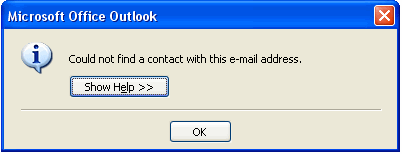
Then I choose, “Show Help” and I get another message:
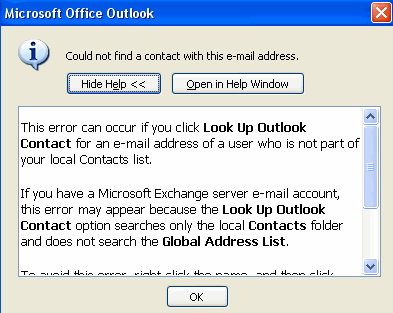
This error usually occurs when you attempt to view the calendar for a user who has one or more of the following issues:
Is not part of your domain.
Is not listed in the LDAP.
Is not a member of your Exchange Server.
Has not granted you the necessary permissions to view their calendar.
To avoid this error message, use the Open Calendar command only if the user is using Exchange Server. If the user uses Exchange Server and you still encounter an error message, ask the user for the appropriate permissions to view their calendar. If they are not part of your network, you will probably not gain access to their calendar.
For more information see the Microsoft knowledge base article and gives a link.
THEN – Clicking on the link gives this –
The Knowledge Base (KB) Article You Requested Is Currently Not Available
The article you are looking for is currently not available. Please try one of the following options for assistance: Suport Home, Customer Service and other MS links. UNREAL.
You’ll notice that the error message I get says
“…when you attempt to view the CALENDAR for a user…” which is not what I chose.
But all I did was choose to “view CONTACT” in my own sincgle user Outlook! sigh.
7. Mystery Mail Arrival
Mail does not consistently show up in my inbox automatically after a send and receive.
I hit send and receive, can see I’m “receiving numbers 1 through however many emails”, then it says “send/receive complete” but all the new messageare not in the inbox that I can see. No kidding.
I have to actually click a different mail folder, wait for the contents to render on the right, then click back on the “inbox”, on the left side, and “voila” there it is.
I’m sure this is “not a Microsoft problem” and there “must be something wrong with my computer” but it sure is coincidental that it started the very moment I upgraded to Office 2007, and continues to this day.
8. Word 2007 can’t remember?
Microsoft Word refuses to save occasionally, citing “not enough memory available” error. This is crap.
Apparently four gigs of memory is enough to do what I want using office 2003 without ever encountering this error, but Office 2007 has stretched the limits of my measly four gigs of ram?
This may be loosely related to #4 above, but the error is specific enough that I thought I would give it its own place on my list.
9. Ribbons of Shame
For over 15 years now, (wow) the world has been been used to standard command menus being across the top of the window in Microsoft Excel and Microsoft Word, and pretty much all software windows in general.
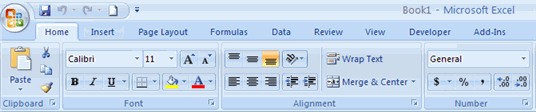

“File”, “Edit”, “view”, “tools” “help” etc. suddenly aren’t there any more in version 2007, and Microsoft has introduced what they are calling “Ribbons” as some sort of revolutionary way of bringing more options to users fingertips.
I suppose it’s possible that in a year or two I will appreciate these improvements, but for now, while I’m trying to get work done, it’s a big pain in the neck.
The inability to figure out how to do something simple, such as sorting columns in Excel, or Spellchecking in Word is infuriating and stupid.
When Windows XP changed everything about the control panel from Windows 98, they offered a “switch to classic view” that allowed busy people to remain productive without having to learn their new “warm and fuzzy user friendly interface”. I appreciated that and use it to this day (I wonder if that’s in Vista?)
No such option exists that I can find in Office 2007, and that really sucks bigtime, and has cost me a lot of time.
10. A link is not a program
Occasionally lately, clicking on a link in an e-mail leads to an error box popping up…
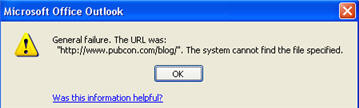
“Microsoft office outook”
General failure. The URL was “http://www.turbols.com/”. The system cannot find the file specified.
OK
There’s a link for “was this information helpful”, but all that did was thank me and disappear.
Dear Microsoft,
The reason you can not “find the program” is because it’s a link and not a program. It’s clearly a link, and my friend did indeed type it correctly.
I suspect this is a ploy to get me to use IE 7 as my default browser, but I’m not giving up Firefox to try, because it happens less than three times a week.
*** – Update 1/2008 – Here’s the fix for that issue if you’re using Firefox, and here’s the directions to fix if you’re using Internet Explorer
11. Cannot edit email signatures with .html
I wanted to use the feed burner headline animator for my signature, but Office 2007 longer lead you to your e-mail signatures with HTML directly from the program.
Instead, we’re forced to use a third-party HTML editor or manually edit the file with notepad, which is located in c:/Documents and Setting/Username/Application Data/Microsoft/Signatures
12. Default Microsoft Blue is not acceptable anymore.
I like to use royal blue text on all my html e-mail replies, and I have for years. There now seems to be a “richer color scheme” available to choose from, which is fine, but viewing “standard colors” does not show the normal shade of Microsoft blue that I’ve used for years.
On the one hand, I suppose it’s time for a change, but on the other hand, why have they suddenly decided that standard royal blue, as defined by every previous version of Windows is suddenly not good enough for 2007?
At least let me CHOOSE to use it if I want to!
Bonus –
Things I have always hated about Office that they still haven’t fixed.
1. Still cant sort your “favorite” mail folders alphabetically (sort by name)
2. Still can’t view a folder inside of another favorite folder
3. Still cannot jump to an alphabetized list of folders by typing more than one character. For example, typing ‘sm’ will jump to your S folders, and then to the M folders, instead of to the sm folders.
I’ve only been using office 2007 for a couple of months, and I’m sure I’ll come up with more, but would love to see comments on this post with thoughts from others…
UPDATES:
Here’s another one –
Outlook Won’t Allow Permanent Access to Files
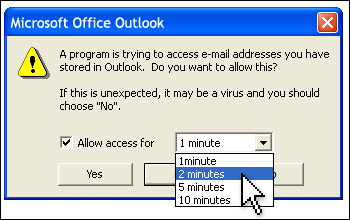
I recently had to allow a program (Dragon Naturally Speaking) to access my files, and this warning kept popping up.
According to Microsoft “in general, you cannot prevent this from happening”. Nice.
They also say this – “You should not get this message if your synchronization software is a trusted add-in that can properly identify itself to Outlook as a safe program”
What does that mean? It means they pay a fee to Microsoft – a large one, no doubt.
While I’m not opposed to the warning, LET ME CHOOSE MORE THAN !) MINUTES! I needed access for hours, necessitating multiple clicks, every 10 minutes. And if I didn’t click? The progress stopped.
Here’s the “warning” and here’s where they’ve known about it since Office 2003
Update: Summer 2009
Some company made an Office 2007 “add-on” that gives you back everything you’d grown to know and.. “tolerate”, if not “love” 😉 about the old Office menus that were in use from the 1990’s right up until 2007.
It’s called “Classic Menus”, and It’s become quite popular. so much so in fact, that they’re already working on the version for Office 2010.
*** Update 10/2009
UNDO (Ctrl-Z) does not work if you mark something as “Not Junk email while inside the junk email folder.
Instead, the action BEFORE that gets “undone”. In my case, that action was to UNdelete about 150 at once, after picking my way through them to choose deletion in the first place. Sigh… I’m sure 2010 will be fine though….
This ad was on during the Yankees Angels game last night, and could easily apply to MS Office too… Great ad 😉














Updating software, particularly from Microsoft can be really frustrating. The glitches and settings accompanied by the fact that a lot of people don’t switch right away, thus causing incompatibilities between various programs (when you’re sending attachments or working with files with your clients, etc.) make working a challenge. These issues are why I tend to recommend to clients not to update their systems until far into the future. Thanks for pointing out some inconsistencies. It definitely makes me think about when and how I should update certain bits of software and operating systems.
Thanks for taking the time to comment… Yeah, a good rule of thumb might be to upgrade my PC before upgrading to new versions of MS software 😉
RE: #6 – I believe this has something to do with the Sync tool accessing the Outlook PST file. Sometimes I get these errors and the backup tool does not work when my phone is plugged in.
I maintain many systems and I have used MS Office since it started. Office 2007 has caused me so much frustration and annoyance that it feels like aliens took over writing Microsoft software. What a crazy idea to move all those easily accessible useful functions that could be accessed with a couple of clicks, to really hard to find places with tiny areas to click on to locate them. Add to that a new file format for WORD, and the lack of ability to Customise to what the USER needs. It stinks. And really I hear a lot of people saying – “Who needs it?” Possibly this will open the door for competitors. Bad mistake Microsoft!
Dapete –
Thanks, might be a clue! I’ll investigate further.
Jim –
Well put! The fact that an Office 2003 user can’t open the damn file is just pathetic, but I expected no less from Microsoft, did you? Yes I do think this fiasco software opens the door to a competitor, likely Google Docs.
I’ll bet 10 years from now, we’re all saying, “Remember Microsoft Office?” if not “Remember Microsoft?” LOL
I gave MS Office 2007 two weeks. I spent more time looking for menus than working.
Office 2007 is being uninstalled and replaced with OpenOffice 2.3.
If Microsoft had just given us the option of using classic menus I may have given it more of a chance.
Thanks for commenting –
Open Office huh? I haven’t used that for years, but I’m thinking that the Google Apps will likely become the defacto standard, and be most widely adopted.
Yep, a classic interface would have been great. I think that stupid interface was yet another nail going into the Microsoft coffin that’s slowly being built.
I would have loved to sat in on user acceptance testing for office 2007 and watch perfectly productive people in Office 2003 reduced to tears looking for something as simple as Thesaurus. It is awful. It is 90% useless crap you would never need and you can’t find the 10% that you do actually use. I’m buying a Mac.
Thanks Scott for taking the time to share your experiences. After reading yours, and hearing numerous other people share their problems too, I’ll post-pone using Office 2007 until after I either Retire, or die.
dp
Just got Office 2007 on a new PC for a new job. What a nightmare!
Just when I’m trying to get in sync with my new job, work, colleagues, etc. I have to learn a whole new interface. My problem today is figuring out how to design forms in Access. I’ve been doing them for 10+ years and now I can’t seem to move one field at a time. I won’t even mention the “ribbon” of pain as a menuing system in this and all other apps. I’m just glad I don’t have to support users right now. Ugh, ugh, ugh!
Yep Babs, nearly every week, i find something else to hate.
Thanks for the input Writerdesigns – Mac might be a choice for OS, but still gotta run some sort of office apps!
After 6 months of frustration and reduced productivity, I am un-installing office 2007 professional and re-installing office xp professional. Microsoft no longer follows good GUI design practices with too many colors, too many fonts, too many large icons (rather, too many pictures) and very poorly placed commands within a non-productive menu system. Instead they have created GUIs that were meant for those who can’t remember where they saved their pictures or for those who can’t navigate through simple menus. – I want my money back.
Yep Olley, I can’t say I blame you. I’m going to be moving towards Google Apps myself soon, but need to break the Outlook addiction!
I am uninstalling Microsoft Office 2007 right now and my MS Office 2003 is ready. It really sucks, the new format (.docx) sucks big time its not compatible to other MS Office versions. That is plainly STUPID!!
Glad I found this oasis of sanity – I thought I was the only one. I am a huge Microsoft fan, an actual MS bigot you might say, but Office 2007 sucks, sucks, sucks, sucks, sucks. I use a number of PCs at work, and daily this upgrade causes me to gnash my teeth. I can’t express how much I hate it, and because people are ugrading all around me I will eventually be forced to upgrade on my own desktop, the last bastion of common sense software design. Whoever signed off on this redesign is a jackass.
Jopskie and Dan – thanks for commenting, and I couldn’t agree more. I’m going to make it my mission to be Office free sometime this year. Have you had t ofind “character count” yet in Word? –
(Review tab – Proofing group – the teeny abc123 icon square)
Hi Scott,
Thanks for your post. I founf it while with tears in my eyes yesterday noon…
The IT people here installed my new PC and didn’t even ask me if I want Office 2007 or not, they simply put it there.
So now, casual tasks I’m used to do – take me forever.
I found some other things in the last 24 hours, since I started using Office 2007, that simply drive me crazy:
1. The flags in Outlook – well, you’ve mentioned that.
2. The Styling popup that appears in Excel whenever I right click somewhere… am I the only person bothered by it…? Why don’t I have the option NOT to display it…? My eyes always jump to it, although I hardly need to use any of the buttons there… errgrggjhh…
3. I have some charts that I update daily, by adding a row to the range, that is sometimes splitted.
So let’s say my range is:
=Sheet1!$A$1:$A$5,Sheet1!$C$1:$C$5
And now I want to add row 6 to it.
I right click the chart, select “Select Data…” and then try to move with the keyboard right or left in the range box, to get to the “5” and change it to “6”… ha ha… MS is laughing at me… this doesn’t work anymore.
So let’s say I select with the mouse the first “5” and change it to “6”, then click the “END” key, so I will get to the end of the range and change the second “5” to “6”, but hey – the “END” is not working here anymore…
And that’s not all – If I try to change the range of a chart that was created in office 2003 – the mouse scroll wouldn’t work for a while, after I confirm the change… so how do I get to the next chart you ask? Right, I have to manually hold the scroll bar on the right, and drag it down… 😛
I used to do this daily, as part of my job, and it took me 2 seconds! Now it forces me to use the mouse, and gives me headache (and I’m pregnant, after all…)
sigh. sigh. sigh.
4. As for the Ribbons – I hate them…!
Is there no option to set it to diplay smaller icons at least?
Or – customize the ribbon’s tabs to display what I usually use…?
Luckily, I found this tool, and I think I’m going to ask to buy it ASAP:
http://www.addintools.com/english/menuexcel/default.htm
5. In Outlook – why cann’t I add the “Calendar” under the “Mailbox” main node? I used to have it in 2003, but now – I can’t…?
6. In Outlook – I was used to colorful flags… Now I have to separately select a flag and a “category” if I want the colors back – why are the 2 damn steps needed? and why every mail I flag now – becomes a TASK…? What…? Why?
7. As I still work with the very complex Excel sheets I created back in good old office 2003 – I now occasionally get a message that a feature I’ve selected is not supported in older versions. But, hell – what have I selected??? I don’t even know what I’ve done that cause this warning, and I do not know what may get lost when 2003 users will open this worksheet and use it…
This is so frustrating…
I will give it a chance of a few more days, but I have a bad feeling I’m going to ask to go back to Office 2003 very soon…
Thanks for listening,
Karin.
Best of luck Karen – I feel your pain.
Wow! Please do provide some feedback on that add on if you buy it! That might be well worth having…
*update: there’s apparently a version to get classic menus for all of Office 2007 – I’ve not tried it, but may… If anyone does, please leave feedback
Google or Open Office products are not an alternative for me because I use many VBA macros with Excel. And since I need to support users of both Office 2003 and 2007 I need to use the 2007 version.
But I never save in the new format, I always save as .xls and work in compatibility mode.
I lose some new features while working (for example the sheet is smaller) and other while saving (for example the new auto-filters are not saved), but overall it works well.
Ribbon vs toolbar + menu
1) Menus have a name, a standard order across all the software (MS and others), a set of standard keyboard shortcuts, a useful hierarchical organization, easy to use for both beginners and experienced.
Toolbars have a standard size, can be turned on and off, moved where you like them, customized adding/removing buttons, created from scratch.
Ribbons… suck.
2) With a 2003 toolbar you can click on the arrow button to show the list of borders, then you can either click on one button to apply a style or you can drag the little pane and create a new temporary toolbar, very useful when you work on many borders or insert many shapes or change many colors in the next 2 minutes.
With the ribbon… no way. It takes me 5 the average of five clicks to do one Excel 2003 click. That is on average five time slower!
3) Menu and toolbars are there to stay. If you change the Excel window size, the less used buttons will temporarily disappear and nothing else will change.
With the ribbon you need to learn for each button different versions. For example the Wrap Text button can appear with icon+text, only icon half height, only icon on third of the height.
4) Menu and toolbar are well organized, commands are where it makes sense.
Since it is impossible to organize stuff in the ribbon then some commands are duplicated (sort is both in the right of the home and in the middle of the data ribbons), and they have different icons, perhaps just to make it more difficult to learn and remember them.
5) Shift+F1 and click on a menu item or a toolbar button and you used to get a nice and clear help page.
Not only the ribbon loses this feature, but the help in Office 2007 is just horrible. I gave it up using it because it takes longer to find out what the page you are reading is about (it is just one big Office help, not Excel help + Word help + etc.) than figuring it out by my self. And I also have the feeling that they cut a lot of stuff from the good old help. Now it’s just useless.
Usually the upgrade to the new version of a software is hard because the new version has new features, new file format, new hardware requirement, etc., and this is the case also for Excel 2007, but it doesn’t bother me much.
Usually the new version comes with new bugs, and this is the case also for Excel 2007, but it doesn’t bother me much.
The most frustrating part is the loss in productivity caused by the new stupid ribbon (this bothers me a little), and the so stupid decision to remove the standard menus and toolbars.
I have to go now, good, it was getting too long.
Thanks for reading,
Stefano
And here’s one more little thing that is simply driving me crazy:
I’m used to send mails by using the ALT+S shortcut. This worked well in Outlook 2003 when I was writing mails both in English and in Hebrew.
But now, using Outlook 2007, when I type Hebrew mails (which are about 30-40% of my sent mails) and I try to send them with ALT+S – it simply does nothing!!!
The mail is not sent.
I have to switch to English, using LeftAlt+Shift, and then I can send it as I’m used to.
Or – I can use the mouse, but I’m not used to that in this case (but since when MS cares about what I’m used to…?)
How annoying is that, ha?!
😐
Karin.
i hate microsoft’s office 2007………..i want the old xp verson but i have vista instead and can’t install it, please someone help me……..this program is driving me crazy.
hmm… I can’t help much…
I eventually went back to Office 2003.
I couldn’t stand the changes in Office 2007.
If you have this option – I would go for it.
I’m fairly competent in Excel and I did find a way to crete a custom tool bar at the top of the page under the F***ing Ribbon — BUT — over the years, I’ve created a standard [for me] toolbar on the left side of the screen. I updated said toolbar everytime I got a new version of Excel — now I’m pissed. What a waste of time — a friend who teaches software at a local college has had to create a whole course just on the the stupid Ribbon.
My latest gripe with Office 2007 is that I designed a spiffy PowerPoint presentation using the default font (Calibri), accessed it on a system not running Office 2007, and all the text was too big & didn’t fit on the slides. Had to change the font back to Arial to get it to look right.
I have been using the Kubuntu distribution of Linux for almost a year now, and was getting spoiled by OpenOffice.org’s office suite. However, at work, we just recently downgraded to Office ’07. My job is all of a sudden much more difficult, all thanks to the inflexibility and poor design of this software. It’s beautiful to look at, but as efficient as a yacht on land. If our computers had a little bit of a slow responce before, but now, it’s almost intolerable.
Of course, now I have the pleasure of stretching my legs while waiting for a document to open. Um…Thanks for that, MS. Sure, I get less done, but at least my screen looks flashy when it’s loading. I wish I could convince my organization to use Linux. Then, at least, hardware issues would not be a problem, and I could take a walk anytime I wanted to- not because my documents were loading, but because I would already be done with my work.
AHA – When you “lose your ribbon”, and “auto fades” on you, just double click the menu item name and the ribbon comes back permanently. This was driving me crazy for over a week…
I’m an accountant and have used Excel for over a decade. With Office 2007 I have never been so frustrated. The first time I tried to make a chart, I highlighted the range like I’ve always done and clicked the chart button. I let it build the chart and then tried to figure out for the next 30 minutes how to get my header on the chart. It turns out that putting a title on the chart is actually on a different ribbon from the chart creation icon. How’s that for intuitive design? Then try to figure out how to delete or add a row to the chart. It used to be a simple right-click on the chart and you could go right in and tweak the settings. Not anymore. I’m an Office 2003 user for life until Open Office really hits its stride (hoping for 3.0).
Oak
Thanks Oak – Yep, this is the blog post that keeps on growing, isn’t it?
Just got forced into getting Office 07 at work. It has more cartoons than the Disney channel on a Saturday morning. The least they could do is let the user define their own work space. Is that too much to ask?
I wish I had read 2007 feedback first. I never imagined how horrible it is. I actually just wanted to upgrade to 2003, but that is not longer available in stores. I feel cheated and wish I could have a refund. All I do is try to figure out how to do what I used to do in 2003 at work and the XP version I had. I am exasperated and it doesn’t appear that Microsoft is listening.
DON’T UPGRADE TO 2007 UNLESS YOU KNOW WHAT YOU ARE GETTING INTO. If you like it fine, but if you buy it thinking you are getting an enhancement to 2003, THINK AGAIN!
I will also be looking for any alternative to 2007 in the future.
The ONLY way I will feel better is if Microsoft listens and offers a service pack that installs classic menus.
CLASSIC MENU OPTION FOR OFFICE 2007! Who is in favor?
Yes, Jarrod, I agree with you about the menus.
BUT my ace in the hole is that I have been using WordPerfect since it was a gleem in the eyes of a couple of MIT guys.
So, even though I have the 2007 MS Office, right next to it is WordPerfect Office suite.
As an example, I compose slide presentations in Corel Presentations and convert to Power Point.
The spread sheet application is not different than Excel and WordPerfect is a powerful word processor. Especially since I can ‘reveal code’ and find out what is controlling certain functions. If the font size changes, I can pinpoint the place in the document where the code was accidently introduced and then DELETE THE CODE. That then changes the whole document.
And Corel upgrades are not terrible difficult. The only thing I have done over the years is continue to use the CODE for the first keyboard that I learned with this program. It is a simple adjustment made under the Tools -Options button.
Love Corel — Hate MS Office 2007
I HATE (sorry for yelling) 2007! What were these idiots thinking? I’m trying to create a simple outline.
I’m taking this to my IT guy tomorrow and he can blow off this steroid dumb-ass version that is 2007. I’ll take another version 2003 or even 2000 that is simple and doesn’t take up so much space.
Hell, I’ll just put on openoffice on this and save my time.
I am convinced that the ribbon interface was designed so that illiterates may now use Office.
@john – either that, or it was designed to make others feel illiterate 😉
I think you guys hit the nail on the head…I feel illiterate when I am using it and I can’t help but wonder who this software is being marketed at. It has been a long time since a program has made me fuming mad…this one does. I am out there looking for Office 2007 Classic menu add-ins…I found one that is okay, but it isn’t a true classic menu.
I think MS just needs to realize that lots of people hate the ribbon, and it their fault because they trained us for the past 15 years. If I could get a refund, I would trade my 2007 for 2003 immedidately.
Am I the only one who loves the new version of Office 2007?
I’ve been working with Office for the past 15 years and although there was a learning curve I find Office 2007 (since SP1) the best version to date.
I love the fact that in Outlook I can now create a task reminder for emails with the flag and the new ToDo Bar is great.
Also, the integration with SharePoint adds a whole new dimension to corporate use.
Dave, the subject here is “Things to Hate About Office 2007”, that’s why I listed a few points in my previous post.
I’m not saying Office 2007 is bad. For example I love many new things in the new Excel.
I’m saying that the Office 2007 guys must have smoked something rotten when they decided to remove useful, popular, good features from the software with no reason.
In office 2003 I could reach any command very quickly with the menu bar and my customized toolbars. In Office 2007 they decided to remove the menu bar and prevent you from customizing the toolbars, and created that slow, inconsistent, big ugly ribbon.
I have been working every single day with Excel 2007 for 1 year now, and still I’m much much much faster when I go back to an old computer with my old configuration.
Stefano
I just can’t believe what they have done with Office 2007.. and I can’t believe that they’re seriously going to leave it this way. It’s not intuitive and even now I’ve used it for several weeks I still can’t find many functions.. and hate it even more!
Does anyone know whether they’re listening and will change it back?
I doubt they’re listening, and I’ll bet 100-1 that they never change back – at least not until everyones used to it 😉
I’m an MBA student and trying to run regression analysis. I did my undergrad in business & computer science and spent 5 years before going back to school working on excel and writing advanced modeling. My school has required us to use the new version of Excel and I’m still frustrated after using it now for 4 months.
It’s horrible! I used to make Pivot Tables in a matter of seconds, but the new version requires so many other steps. Ohh, and how awesome is it to have to switch tabs every three seconds. Thanks for the extra mouse clicks Microsoft! I’ll send my Carpal Tunnel Syndrome bill to Mr. Gates.
I would use the old version but now that every emails in the docx format even the conversions don’t work well.
I would tack this product as being as fantastic as Vista — OSX here I come!
Office 2007 has been a disaster for me. Hello Microsoft, are you listening? Office 2007 sucks. Why would you release a product with such a major loss in productivity. I’m your customer and I trust you. You let me down big time. I haven’t seen such a bad follow up since “Smart and SmartII” You better fix this or you are going to loose me and many more.
Help!
What the heck happened creating 2007. Microsoft needs to fire the Gucci coders and get someone in there that can appreciate the K.I.S.S principal. A word processor is a tool I need to do my work. It’s not something I’m going to spend time at learning all the rearranged features like it was some game. The old one wasn’t broke…stupid.
Bad news Bryan: it is not even worth learning again what you already knew. Even after learning and customizing the new interface you will never reach the same productivity. You can decide to work without any customization (as many users do) and it will take more clicks, or you can decide to customize your environment (as some expert users do) and it will still take more clicks. No matter what you do, the new version is less productive than the old one.
Office 2007 repeatedly brings me to a level of frustration and desperation that evokes the desire to physically harm those who brought it into the world. MS developers are insulated in their self-aggrandizing world, convinced their ideas and the dramatic changes will please the user community when in fact, it has damaged the brand. I can’t even find the frigging Help function. Funny that would be something that would be so hard to find. I really hate MS for this. I hate them for not making their SW intuitive, for turning upgrades upside down, for making it so hard to do what I need to do. I was hoping to get some release by venting but it’s not working.
Office 2007 seems to be made for the home user who has no computer experience whatsoever. It’s full of useless effects that slow it down to a slug’s pace and make doing my job harder. One size does not fit all. Most of us use “Office” in an office. We don’t need special effects, cartoons, or pretty colors. We don’t need our software to think for us. Just having to undo what the software thinks we want to do takes time. And forcing us to conform to a new toolbar and totally different command structure that we can’t even personalize is not only non-productive, it’s demeaning. It’s like being forced to use a playskool cell phone with big yellow and red buttons.
Access – display of query, table, etc no longer available in columns. This is just plain goofy, a needless and purposeless change that interferes with normal usage. Just to amplify, most of the changes in Office appear to be purposeless, goofy, stupid, etc.
I just installed the Classic Menu for Office 2007 from http://www.addintools.com and it’s marvelous. All the menus are back in Word the way they were in Office 2003. This doesn’t fix all of the problems with Office 2007 but at least I can find things again.
Thanks I’ve heard it’s good too – (I wish they had an affiliate program 😉 – After all this time i’ve gotten used to it, and I’d hate t ochange at this point not because it’s better, just for efficiency sake.
My partner installed 2007 without consulting me and it has been the source of much frustration both in terms of trying to use it AND in terms of griping at each other!!!
When I open a new webpage and try to log into a site (eg Facebook, banking etc), there is a delay of many seconds before the system realises I am typing – or halfway through typing log in details, it realises it forgot to delay and so halfway through a password or log in, it delays – leaving passwords and log in details mising characters so therefore incorrect.
Partner tells me that this is a worldwide problem with 2007.
Can anyone comment on this,as I find it hard to believe that the whole world is not so annoyed by this that there hasn’t been a cry so loud we all hear it!!
Cheers from Australia!
Every time I start up my computer with XP and use one of microsoft programs, I mean any one, Excel, Word, Explorer and try to save or insert a file, as soon as I click on the browse triangle, start analyzing folders which takes a few minutes to do it, I do not know how to fix this problem if it is only a setting somewhere.
If this Microsoft people want to be productive, they should be doing something else in life than creating software.
Does anybody have reported all of this comments to them?, do they care about them?.
Whats up with powerpoints word art?
This guy nailed in right on the head. After 15 years Microsoft screwed up a time tested winner. Everything is different!! It’s like the made some business decision to change it so that everyone that actually depends on MS Office to get their work done HAS TO take a class to get as proficient as they were based on the last 15 years of MS Office. Someone at Microsoft probably thought..”Hey, we can ALSO get kick backs on all the classes people with have to take, because they’ll get so frustrated they’ll be ready to throw their PC against a wall” (or something like that). So not only are the selling this retched application, they’re likely get paid to high heaven for the classes people have to take. To the person/people at Microsoft that decided to change almost EVERYTHING in MS Office…you’re an idiot!! I’m moving to OpenOffice and will never look back at Microsoft! You suck…ya jack*ss
I found this blog by googling something about office 2007 and how to change it back, plus the word “sucks”
This is new coke. Time tested, easy to use program that my mother was FINALLY figuring out how to use properly, now completely in the toilet. I am very computer literate and I am reduced to googling commands because I cant get this program to do simple things.
Office suite 2003 was near perfect, if you ask me. What were they thinking? How can they POSSIBLY consider this an improvement?
The Ribbon is the worst change I have seen in my 25 years as a computer user. (I started using a wordprocessor in 1984 on an Atari 400) The Ribbon has destroyed my productivity. Practically every application I use has a Help drop down menu. The first time I used Excel 2007, it took me several minutes to find the dang help button!
The Ribbon takes up too much space. Some of the Icons are four times normal size and some are small. The Icons are arranged in a random order with headings for each section at the BOTTOM of the Ribbon. Why would anyone put a heading at the bottom?
Sometimes I wish the Computer Icon had never been invented. I am fluent in English, Spanish and French. My German is a bit rusty, but not too bad. I would much prefer words than Icons.
The Ribbon just defies imagination.
totally agree. I will keep 2003 or use open office. 2007 version is really stupid design.
I have made a major blunder by installing this awful package of office products on one of my computers. It has been a major source of many wasted hours in the last month, with more waste to come. How could any major company sell such a horrible product? Did ANYONE actually let an experienced user try this out before scrambling every useful menu item into a ribbon of confusion? I have been using office related products sine VisiCalc in 1982. This is the worst piece of crap i have seen in over 25 years of use. Way to go MicroDolts!
Nobody seems to have commented on the clipboard fiasco that Scott Hendison mentioned as his #5 issue. It’s worse than Scott indicates. You’re in Outlook, say, and copy some text. The annoying clipboard panel shoulders over your window, but at least it’s showing the text was copied to the clipboard, right? Wrong! You open PowerPoint and say Paste. No, you try to say Paste but Paste is not available. Okay, you go back to the email which is still open and copy again. Go back to PowerPoint and say Paste. Now it works. Oh, I see. I didn’t have PowerPoint open before I copied from another program. My bad. Wait. I see now. I can go to the clipboard icon on the taskbar. Okay, but isn’t that the same thing as copying it again in terms of unnecessary work? Apparently something as basic to computing as the clipboard is no longer important to Microsoft. It should work. It doesn’t.
@JOHNNY –
You are the first person I’ve EVER heard of that’s also noticed this, but it IS REAL. I’ve seen it on 3 or 4 pc’s now even after reinstalls of Windows.
This is real, thank you, i’m not going crazy!
it’s really bad in Outlook – thats where I go nuts. I’ve said “Oh, I see” out loud before, but NOOOOO, the next time, all you “see” is that you were wrong! UNREAL…
I hate it. Everything takes ten times longer now. The copy and paste problem is ridiculous. I spent two hours this morning trying to paste a stupid Excel table into a Powerpoint slide. Nothing worked right. I finally ended up just retyping everything. I don’t give a sh*t about Sharepoint integration. I have a real job to do and Office 2007 is nothing but an obstacle.
I’ve been trying for two days to find the ADJUST ROW HEIGHT command in EXCEL 2007. I can’t find it anywhere!!!!!!!!
I’m going back to Office ’97 (I still have it on CD here somewhere).
GAWD. Office 2007 STINKS.
I googled “I hate Microsoft Office 2007” and got this. It is awful! I wish I had never bought it, but transferred to Vista – which is another story.
Hi everyone, found your site when googled “Hate Office 2007” and yes, I too have been bought to tears by this beastly offering.
If Microsoft made cars, then they have gone from basic utility to having their own back seat driver. In 2003 the backseat driver climbed into the front seat and started giving over-helpful advice, but at least we could switch it off.
With Office 2007 the backseat driver has now got into the driver’s seat, and says it can drive the car better than I can. In fact I feel as if I am not needed at all, and I should stay where I am and let the car ‘speed’ off without me.
Bye Bye Microsoft
:o(
PS Did you see that Microsoft are boasting that less people are pirating Vista than XP.
Can’t for the life of me think why.
I swear that’s not even funny. I literally WAS brought to tears.
When you’re in a super hurry and your expected to be on top of everything and you can’t get what was once the most minor of Office tasks completed, you might just lose out on an excellent opportunity.
Can you sue Microsoft for causing such undue stress with such a horrendous Office Version?
I can only imagine that as 2010 comes out, that it’s going to get worse…
It IS worse. It’s ’07 with Whipped Cream and Cherries on top. It’s just about as frustrating. I SO dislike everything bubbly and smoothed out about XP and Vista, that every chance given to make it look “Classic” I take.
I’m totally Old School Windows and I’m damn proud of it!
Fara – I really felt for you. I started using it on the fly, too, and under pressure. Take a look at my tip for getting through that if you haven’t figured it out already. I don’t want to waste space Scott’s blog explaining it, but the short of it is, you put all your most common commands on the bar at the top until you figure out where the heck things are. http://tribeofadmins.com/who-loves-office-2007 about 3/4 down if you need it.
I’ve really enjoyed this post – it’s nice to see I’m not alone out there!
Every time I have to download something important, it’s a f***ing Word 2007 file. In December I tried to open a 50th birthday invitation: Word 2007! Today I tried to download a file I need tomorrow: Word 2007. I can’t use other computers because they have Word 2007 and it takes me an hour to type a 5 minute letter because I have to figure out everything in Word 2007. If I were a corporate executive, I’d kill everyone at Microsoft because of the lost productivity in not only compatibility issues, but in having to retrain so many employees to use the new fancy ribbons instead of simple, straightforward menus.
I’ve had exactly the same allergic reactions to Office 2007 “new improved interface”. I wasted 3 hours looking for formatting options, in one night, trying to write a report in Word and Excel 2007, that I already knew where they were located on the classic menu. I too wanted to cry.
We know who to blame though. The following is an article in the sydney morning herald and it looks like she’s going to force this garbage on the rest of microsoft software.
Microsoft, if you’re watching I’ve already ordered Sun’s staroffice and in future we are moving to linux boxes where we can.
———————————
Meet Microsoft’s antidote to Vista
April 20, 2009 – 3:33PM
Microsoft’s Julie Larson-Green.
Microsoft’s Julie Larson-Green.
Julie Larson-Green hopes you’ll like Windows 7. If not, well, now you and a billion other people know who to blame.
Microsoft is counting on Larson-Green, its head of “Windows Experience,” to deliver an operating system that delights the world’s PC users as much as its last effort, Vista, disappointed them.
She’s in charge of a wide swath of the system, from the way buttons and menus work to getting the software out in January as scheduled.
Given Microsoft’s history, Larson-Green’s plan seems downright revolutionary: Build an operating system that doesn’t require people to take computer classes or master thick manuals.
“We want to reduce the amount of thinking about the software that they have to do, so that they can concentrate all their thinking on the task they’re trying to get done,” Larson-Green said in an interview.
Microsoft relies on Windows for half its profit, which helps fuel money-losing operations like the pursuit of Google online. Windows was still profitable after Vista’s 2007 launch, but its poor reception dinged the software maker’s reputation at a critical time.
Vista was designed for powerful, pricier PCs just as nimble rivals like Google were releasing web-based programs that could run on inexpensive computers. Microsoft appeared to be clinging to an endangered world order that spawned its operating system monopoly.
What’s more, Vista’s initial incompatibility with many existing programs and devices, and its pestering security warnings, exposed Microsoft to ridicule in Apple commercials that helped Macintosh computers gain market share. Businesses didn’t give up Windows, but many delayed upgrading to Vista.
Microsoft’s executives have since distanced themselves from Vista, acknowledging its flaws. Now the company needs Windows 7 to widen that distance even more.
You probably don’t know her name, but if you’re using Office 2007, the sleeper hit of the Vista era, you’re already familiar with Larson-Green’s work.
She was the one who banished the familiar system of menus on Word, Excel and other programs in favour of a new “ribbon” that shows different options at different times, depending on what a user is working on. It seemed risky, but it was grounded in mountains of data showing how people used the software.
Focusing on real customers might seem obvious, but Microsoft’s programs more often have reflected the will of techie insiders.
One reason is that Windows’ dominance relies heavily on third-party software developers who keep churning out compelling new programs. To give those developers as many options as possible for reaching PC users, over the years Windows spawned confusingly redundant features.
For example, you can tweak antivirus software settings by opening the program; by clicking on shortcuts from the desktop, task bar or “Start” menu; by responding to notifications that pop up uninvited from the bottom-right corner of the screen; or by poking around in a control panel.
Another bit of dysfunction stemmed from Microsoft’s corporate structure. Windows employs thousands of people divided into groups that focus on search, security, networking, printing – the list goes on.
With Vista and earlier versions, each group built the best solutions for its isolated goals. For example, two separate groups added similar-looking search boxes to Vista’s control panels and its Start menu. Yet typing the same query into both boxes produced completely different results.
Larson-Green, a 16-year Microsoft veteran, grew up in tiny Maple Falls, Washington, about 220 km north of the software maker’s headquarters in Redmond. She waited tables to put herself through Western Washington University, then took a job in 1987 answering customer support calls at Aldus, a pioneering software company in Seattle.
During six years at Aldus, Larson-Green worked her way into software development and earned a master’s in computer science on the side. But she credits her waitressing and customer-service work for making her good at her current job.
“The primary things that help you create a good user experience are empathy, and being able to put yourself in the place of people who are using the products,” she said. “User interface is customer service for the computer.”
Larson-Green, 47, is engaging and eager in person – to the point that in one interview, she couldn’t keep from repeatedly interrupting her boss, Steven Sinofsky, as he sketched the history of Windows. But while giving product demos on stage, she lacks the showman’s panache that a surprising number of Microsoft employees display. At a developer conference last year, she seemed nervous as she showed off Windows 7’s new features.
Later, she explained that as a woman, she worried that honing the softer skills of marketing might prompt colleagues to take her less seriously as a technologist. Larson-Green has spent her Microsoft career working deeply on many Microsoft programs, including the Internet Explorer web browser.
When she landed in the Office software group a few years ago, Larson-Green was dubious that much could be done to improve the software, which dominates the market for “productivity” programs.
“I felt like it had been that way for a long time, (and) everyone was pretty happy with it,” she said.
Yet customers weren’t quite as happy with Office as they might have thought.
For years Microsoft had tested software with focus groups and gathered comments and complaints from customers. But around the time Larson-Green joined the Office team, Microsoft was trying a more precise way of garnering feedback. By deploying special software – with user permission – on computers running Office programs, Microsoft could track how people used their PCs day after day.
That helped explain one puzzle in Redmond: why Office users often asked Microsoft for features that were already in the software. The tracking data showed there were functions very few people had discovered deep in the menus and toolbars in Office.
More research and testing yielded a solution – the ribbon, which displayed different commands depending on what the PC user was doing. Then Larson-Green pushed Microsoft to get even more radical: to release Office 2007 without the hedge of a “classic mode” that would emulate the old look and feel for people who didn’t like the changes.
It worked. Just as Vista was a magnet for complaints, Office 2007 won accolades from software critics and regular users. Larson-Green proved she had the stomach to challenge a Microsoft legacy. Her reward? The assignment to help fix Windows. When Sinofsky was tapped to lead the Windows division, replacing retiring Jim Allchin, Sinofsky drafted Larson-Green to come along, in a new position created for her.
“Some people are great at having ideas, and (have) no discipline. Some people are great at discipline, not much at ideas,” Microsoft Chief Executive Steve Ballmer said in an interview. “She’s got both of those genes.”
Larson-Green’s team began with centralized planning, in contrast with the old culture that let Windows subgroups set their own agendas. For example, in the past, different groups worked on home networking. One group decided how Windows would share files among multiple computers at home; another group figured out how to get shared printers up and running. As a result, the steps for networking PCs and printers were inconsistent and harder for PC users to master.
As she did with Office, Larson-Green sought insights in a daunting mass of data.
Vista was the first version of Windows to include the remote-tracking software that had helped Microsoft hone Office, and nearly 11 million Vista users had let their PC activities be logged. Larson-Green’s team also surveyed more than 250,000 people around the world and showed other users prototypes, some as simple as sketches on paper.
From these billions of data points emerged big ideas that got boiled down into eight design principles. Larson-Green had them printed on folded slips of paper as reminders for everyone in the group.
Many of the principles come back to Larson-Green mantras of “user in control.” The team tried to build an operating system people could use without studying first, one that would let them get right to reading the news or sending email without dragging them down a rabbit hole of settings and configurations. A system with manners, not one that constantly interrupts with bubbles, boxes and warnings that, data showed, people ignored or raced to close.
The Windows groups agreed in principle but old habits often reared up. Many Windows teams still wanted to be able to create alert bubbles for their functions.
“We’ve probably talked to every team in Windows about, ‘No no no no, we don’t want you to pop your notifications. Windows is not going to use these notifications to tell users things,'” said Linda Averett, a Windows user experience manager.
Larson-Green is already planning Windows 8, though her team continues to tweak the Windows 7 user interface. Signs point to a possible release months ahead of schedule, though Microsoft still says the official plan is for January.
Microsoft’s marketing machine will pore over piles of charts to decide whether Windows 7 is a success. Larson-Green says her measure will be the conversations she overhears at Best Buy and comments posted by bloggers.
“I think people are going to like it,” she said. Her voice rose a few notes when she added, “I hope so.”
AP
I downloaded this POS because I wanted RSS feeds in Outlook. All I can say is WTF? How did one company get it SOOOOOOOO WRONG! Who is making these business decisions? Just because a developer can make a change does not mean the users want it.
This reminds me of MS Money another formerly fantastic application that gets worse each year as some developer who has never had any practical life experience keeps adding more unnecessary and unrequested bells and whistles that do nothing but hinder productivity. OK, I feel better. Now to uninstall and just use Google Reader for RSS. I would rather use MS Works than this.
A balanced view. Most reviews show a slavish uncompromising devotion the Microsoft alter.
After Wordstar & WordPerfect I took to Windows like duck to water. Likewise Lotus to Excel. Have been a staunch Microdoft USER (not worshipper) since. Was always open for change, UNTIL 2007. Different, yes; Pretty; yes. Functional; NO. That seems to be a common opinion.
Been trying to use the ribbon for 9 months, less and less impressed. Full of gizmo’s I don’t need, neccessary items buried under the psychedelic trash.
In 2003 I customised the toolbars and got what I needed with a single click In 2007 it is 2,3 or 4 click and search; “where is the sucker?” left and right over the pesky ribbon.
That “styles” occupies half of the Word ribbon is a constant irritation, likewise 6 of the 9 ribbons I have never used and normally make inactive in 2003.
2007 is a pretty toy for playboy nerds, not for working people.
My clients are the hard-fisted oil & gas majors, who all use 2003. They do not appreciate files in 2007.
I travel Europe visiting fabricators. Have only met two contractors who have been FORCED to use 2007 by enthusiastic managers who don’t need to use the software and are now cordially detested by one and all.
I dont like my Excel spreedsheets showing a consitant “minor-loss-of-minor-fidelity” nor the Word docs repeatedly being autosaved after “minor crashes”
I do not trust the 2007 stablity and don’t what to try the various conversions to classic. The system is unstable enough without trying to get smart.
That Microsoft has sold millions of Vista & 2007 is no wonder; the public has had it foisted upon then without option when buying a new computer.
If Julie Larson-Green keeps riding the ribbon band-wagon at Microsoft maybe I will retire.
Finally removed the POS that is Office 2007 from my PC and am back with 2003. I have persevered for the past 8 months as I will be expected to teach Office Applications using 2007 from this coming September – I will advising learners to stick with 2003. Top of my hate list is the Ribbon, closely followed by the inability to undock toolbars, something I use a lot when creating flowcharts using connectors.
I have tried to like 2007, really I have, but the final straw was trying to format my wife’s dissertation and create a TOC – it just went totally wrong (TU!). The new version is not designed for power users, it is designed to look pretty and be superficially easier to use, start to go in-depth and you begin to despair. I’m writing this in Word 2003 which loaded in under 1 second and is a welcome return after 8 months of frustration.
File compatibility is a non-issue as there is an Office2007 compatibility pack from M$ that will allow docx files to be read from and written to. I’m not sure how the staff at my college are going to cope, the students won’t have a problem as most of them have Vista/2007 anyway, so they won’t know any better. Bottom line – uninstall 2007 and go for 2003 or OpenOffice 3.
Are they kidding? Why does Microsoft continue to go backward when it comes to intuitive ease of use? I have no list — it’s ALL a royal pain to use.
Bought 2007 two weeks ago. Can’t stand it – hate it, loath it and will scrap it and go back to 2003 next week. I’ve been happy using Office in its various guises for years and despite a few annoyances I’ve always got on with each upgrade. But 2007 is not about getting on – it’s just sheer hard work to use and even the few good ideas are ruined by silly things such as the utterly awful colour schemes and the inability to rescale that imensely annoying ribbon. Sorry, but I think MS has finally disappeared up its own fundamentals. Unless something better comes along, I’ll be off to suites anew once I can’t run 2003. They got my money this time, but once bitten….
LOL! I was so frustrated that I wrote an entry about this myself, mostly around your number 9. (http://tribeofadmins.com/who-loves-office-2007 if you’re interested) The changing of the basic “language” of software as we know it infuriated me, as did the incredible sluggishness of the programs and the constant prompting once you’d saved backward. I ended up having to change back to 2003 and I will say this: I discovered that I had been getting used to the changes. Just as a bit of encouragement for those are stuck with it, you know – we do adapt…eventually. And perhaps it will make you all feel better to know that the Mac Version – Office 2008 – is even worse.
I bought a new computer from Dell recently which had office 2007 installed — what a terrible mistake! Microsoft engineers must have been laughing when they thought about the millions of hours of wasted time as they try to figure out where the diabolical Microsoft torturers put things. There are many things to hate, but the worst is the Ribbon, which takes up 1/3 of the screen and finding what you want is an exercise in frustration. I ended up putting some icons on top manually and minimizing the Ribbon, but it keeps coming back. The last straw is when I was trying to explain to my Mom over the phone how to change the font color, but we gave up because she couldn’t find it. I’m uninstalling this ASAP and going back to Office 2003. I am also now shopping for a Mac, I’ve had it with Microsoft, their ever-worsening products and their contempt for their customers.
“By deploying special software – with user permission – on computers running Office programs, Microsoft could track how people used their PCs day after day.
”
Few knowledgable user would ever allow this, so they based their improvements on “users” who probably click “YES” to everything that pops up on their screen. I’ve had Office 2007 since it’s release and I still hate it. Still trying to use it when I have to bring work home…still hate it. I was hopeful that MS would have wised up and fixed this for their next release, but they did not. Fool me once, shame on you, fool me twice, shame on me, here I come, OpenOffice3
All I can say is that I agree to hate Office 2007. Couldn’t believe all the people who agree… wow, can’t Microsoft read?? Now, I am trying to return to 2003 and can’t open my old documents! GRRRRRRRRRRRRRRRR. Any suggestions????
Really, about all you can do is reinstall 2007 and save your documents as .doc instead of .docx – or send them to a friend who has 2007 to save them backward for you. I had to go back to 2003, too, so I feel your pain.
Hi,
I went back to 2003 a while ago and I am able to open 2007 docs, including those with the .???x suffix, after I installed some compatibility pack for it.
I think it was automatically advised to me by MS, but I’m not sure anymore.
Anyway, I googled it quickly now, as I’m short in time, and found these links:
http://office.microsoft.com/en-us/products/HA101686761033.aspx
http://kb.wisc.edu/cae/page.php?id=5635
Hope it helps,
Karin.
Oh, good point, Karin. I forget that some people actually have control over what they install on their computers. When you work in a big company, you don’t usually have that choice unless the company opts for it, but you’re absolutely right that if you’re using your own computer, there’s a simple solution.
I’m not running a private PC either, but these kinds of installs are not blocked from us.
Anyway, if such a problem exists – I highly recommend advising your system administrator about it before reinstalling everything, as this is a simple add-on from MS, and your system administrator should normally have no problem allowing you to install it.
I’ve now been using Office 2007 for a year (I have to, it’s what we get at work) and I STILL find myself clicking one tab of the ribbon to the other, wondering where they hid things. Why do you “insert” a header rather than “view” it? Why are commands you use in sequence scattered across different ribbons? I’ve used Office for years, and previous upgrades have caused a few days of confusion, followed by productivity. This one has been a complete nightmare, and it’s wasted hours of my time just trying to get work done.
Hi,
Windows has been dumped down. Only someone with no real computer knowledge and no programming experience would have opted for that cr*p ribbon, thank you Ms Larson. How about the fundamentals of Windows design, File, Edit, I learned that at Uni in 1994. They could have at least introduced that ribbon but leave the options the same, but no lets change everything!!
Same with Windows search. Before I had the perfect search screen, search for files over 5G, search for files amended today etc. What do they do? they make it like crap Mac that doesn’t give you any option, or to do advanced search you have to click 10 buttons. Microsoft should go back to fundamentals and care for the professionals first (they are they one who pay the feeds anyway). Not everyone who uses computers have an IQ of 80, not everyone cares about nice colours. I love sharepoint 2007 but I will never install 2007 (even thought I can get it for £8 through my employer). I may be forced to use it, but then I will probably write a longer post here!
I had to laugh at your comment, Panos. When I was first forced to use Windows, the thing that drove me absolutely nuts was how limited the search feature was as compared to Mac! In Mac’s Finder, I can specify *any* parameter using a pull-down for kind, size, date created, etc and specifying my search, the click a plus sign for more filters if I want them. We get used to and like what we like, don’t we?
I did get used to the advanced search function in the Office Suite, and was relieved to find that it’s still there – you just have to choose search and pull down a little further – past all that quick search stuff. I just use key commands so I don’t have to sift through that – when I can remember! Being a duel platform user makes key commands a challenge. It’s an annoying change – I agree with you.
Melody, apologies if I have misrepresented the apple file search, the very few times I used file search on a mac at my friend’s i didn’t have a good experience. Anyway, this is not a post PC vs mac. Windows used to have a very comprehensive search, why it has been downgraded is unknown. Probably cause the executives thought users are idiots and don’t understand. Anyway, I’ve actually vented my frustration to the MS Word Blog email address. See if they will reply back! I have a more sinister idea why microsoft messed up office, so that not many people use the new more open format and therefore can just say, you know what the public doesn’t like the docx format, lets forget about it and go back to the old office in 2013!!
😀
I agree with you about the diminished capacity of the Windows search feature – I went berserk when it disappeared – I just want to make sure you know that the full advanced search feature is still there in Office 2007. It took me awhile to find it because you have to go deeper into the menu to get to it. I don’t use key commands much because I go back and forth between windows and mac and they have different commands (grrrrrrr), but if you’re only in windows, you can skip all those menus with the keyboard shortcut ( think it’s alt ctrl F, but I can’t remember and I’m on mac right now). Sorry if you already know this – I just want to relieve a fellow sufferer of any pain I can!
I would like to see Julie Larson-Green’s Wardrobe (She works at Microsoft – see point 11).
If its anything like windows folders, as soon as she opens the door she sees just a towel and a sheet, opened out, and then another towel – it would need to be a walk-in wardrobe as she would need to walk a long way to find the towel she wanted.
An observer may ask why she doesn’t fold them up and pile them up so that they can easily be found. Her reply might be that the house builders dictate that home owners don’t want that…
… besides she has done it in the past and the house builder nipped in to check the plumbing and the towels are all flattened out again.
Its strange (she adds) but everyone makes that comment.
“Larson-Green, 47, is engaging and eager in person…” – engage this
B!TCH…
all I want to do make a chart out of two columns of info. One column is a set of year numbers.
I am an engineer and a lawyer, and my colleague is also a lawyer and a doctor of neurology.
Together we could not (and still have not) figure out how to make one column of info the Y-axis of the chart.
When you try and get help from the program, it takes you online (not always available) and makes you join underground societies of software developer, or alternately makes you insert the bloody applications install code (or something to that effect). For GODS SAKE all I want is a tiny bit of info!!
I tried to get to an alternate helpline by going directly to the microsoft website – but was told that it would cost me $75!
Come ON MS!!
The people that brought out Office 2007 and their help functions should be shot and then fired!!
I don’t think the language is really necessary, but on the other hand… Hey, Ms. Larsen-Green, do you see how ANGRY people are?!?
Mother *(&*&^&^$$##@@$&**!!! This is pissing me off! And I got this when they “upgraded” everyone at work (didn’t ask for my vote). Only thing irritating me more than trying to find the freakin’ “view in classic” option is reading Ms. What’s-her-face congratulating herself on being so “bold” as to disallow the “select classic view” option so as she can force people to use what she knows is best for them, as opposed to what they think is best for them in their small pea brains. Who the H made you the decider of my freakin’ computer! I HATE MICROSOFT! But at least I have this gay light blue border to my windows now, even after selecting “windows classic view” in my XP display settings. Have avoided Vista so far, but can’t wait for the next upgrade. Maybe they’ll just put all the menus in heiroglyphics (sp?) as they have determined that to be the most efficient language, and we should all learn it anyway. Anyway to talk my company into using ANY software other than office 2007 or any other new MS products? Might just go to the abacus for improved productivity. I hate this. (Did I mention that already?)
Thank you for understanding my frustration with Office 07 – I thought it was just me. I have been typing & wordprocessing for 35 years and love Office 03 and then I get introduced to Office 07 and thought man – did Microsoft ask wordprocessors what they wanted when they were developing 07 – what were they thinking? Why fix what is not broken – Thank the Lord that my main computer at work has Office 03 on it – I only use Office 07 when I really have no choice. I mean what a joke – would you believe I had trouble insert a line in Excel 07 – I was thinking to myself “Am I stupid or something, Ive been doing this for years, what am I missing – I gave up in the end” Shame Microsoft – go back to the Office 03 format please
Document Size
If I take a 68Kb 2003 .DOC file, open it in Word 2007 and then save it as a .DOC file it makes it a whopping 194Kb.
This has just happened with my CV, so it is now too large to upload into some job sites.
(Interestingly saving it as a .DOCX file makes it 70Kb. Have Microsoft no shame!)
Grrr.
Spell Checker
I created as a DOCX document which I quickly saved as DOC to allow the rest of the world to read it.
The spell check then wouldn’t work. When I unticked the box to turn it off (yes the logic is reversed) it was ticked again next time I checked the box.
This only happened in part of the document, but still many pages of straight text.
The Microsft help goes into great detail on how to edit the registry to turn on the spellcheck feature. It never asks if the spell check was working elsewhere before suggesting this drastic course of action.
Unfortunately there is no flashing light to show that the spell checker is not working.
Folder lists
Can anyone suggest how I fix the folder listing so that it gives the details of the files in a straight list EVERY TIME I open the folder?
I have found out how to fix it sometimes in Explorer, but crucially when opening files in Office or attaching to emails, I always get a view of a few identical Icons crammed into a small space.
Every user I have ever watched use 2007 immediately sets the view to DETAILS. This time wasting may be repeated 100s of times a day.
The most annoying by far is SMALL ICONS which looks like DETAILS – except that 2 out of 3 files are missing from the first column. Just when you think you are cracking up (“I’m sure that I just saved that important file here!!!!”) you realise that the file you want is in a column that the window isn’t displaying, despite having the right column headers.
Bring back XP
I’m glad to see it’s not just me. The missing link that makes me the craziest about Office 2007 is the Help tab. Where is it? Or am I not supposed to seek help? I can’t even type a letter anymore because there is no letter wizard. Thank God I remembered ctrl P is the macro for print. I couldn’t find the print tab for the longest time. I finally found it, by accident. When we bought our new Dell computer, it didn’t come with a MS Office 2007 manual. Why should it? You aren’t supposed to know how to use MS Office 2007. Someday Karma is going to come back and bite Microsoft in the backside for this one.
Or in the wallet, hopefully.
Julia, you may know these two things already, but in case you don’t”
– Help is that little teeny question mark on the right of the list of panes – the menu bar.
-I circumvented a lot of annoyance by adding my most common tasks to that little icon bar in top right. If you don’t know how, check my post about 2007 (http://tribeofadmins.com/who-loves-office-2007) – I had a HUGE icon bar until I started getting used to where things were, but it was worth it.
I don’t have a PC at the moment, but I *think* the letter wizard is still there, on the “mailings” tab.
Good luck!
MS Office 2007 is wasting so much of my time, I feel my blood pressure rising whenever I have to use it! I got a new Dell cheapo work computer a few weeks ago and the so-called “upgrade” to MS Office 2007, and I am still angry whenever I use it– why did they change terminology and hide commonly used functions? I have never been an MS fan, but Office 2007 is extremely user antagonistic. I am even more in favor of open source development now. We could all save A LOT OF MONEY if we all made the decision to not use MS Office, and maybe make MS create friendly, useful products.
Ugh, ugh, ugh. I too did a search for “Why I hate Office 2007” and found this site. I’ve been running a word processing/desktop publishing service for over 17 years and use almost every feature of Word and PowerPoint every day. There is not enough room on this page to write all the reasons I hate 2007. It’s like getting into a new car and finding the steering wheel has been placed in the trunk. I can’t believe any serious Word or PowerPoint 2003 user is at all pleased with the changes. I bought 2007, but use 2003 almost exclusively now. But when a client requires me to use 2007, switching back and forth from 2003 to 2007 is a nightmare. It will take almost 10 minutes for 2007 to load while it reconfigures itself each time. I had a client sitting in my office waiting for me to print a simple 2007 file and it took forever for Word 2007 to open as both of our frustrations rose. And don’t get me started on the footer changes in PowerPoint. Ever open a Powerpoint file that was started in 2003, moved to 2007 and then reopened in 2003? The file size will explode, and all footers are no longer footers, but convert to individual text boxes on each slide — and when you’re working with 100+ page presentations it’s a nightmare. And finally Excel. I do not use it very often, but what is with that error message that keeps popping up every time I try typing in data for bar charts? Did anyone even test this software before letting it loose on the public? What were they thinking? The more they complicate things, the more I miss Windows 3.1, Office 97, and courier font — life was simpler then.
I never did like KoolAid, and I’ve never had anybody say “gee, my monitor is too big, can you give me a smaller one?”. Oh, and can you re-arrange the Word commands, and maybe even the basic toolbar structure, every now and then – having them stay in the same place gets so boring.
Office 2007 is slower, the Ribbon uses up more monitor area to no operational benefit, and rearranging the fundamental structure of a toolbar that we know well is simply moronic. It indicates a complete loss of the grasp of First Principles – except for those related to driving revenue for MS. Office 2007 stinks. I can only hope that the OpenOffice.org folks don’t get similarly stupid and drink the KoolAid; I would find that depressing, but I think I’ve heard rumblings. It must be a generational thing. I’m glad they’re not designing flight deck systems or airframe structures.
I hate it too. Office 2007 is a disaster, like Vista. That’s it MSFT, keep sticking it to the user. Good news for Apple, and I do enjoy those MAC vs PC ads.
I am trying Win7, but I prefer using Linux. It doesn’t fight you all the time. So many things are easier to do, and it keeps getting better.
OpenOffice.org is a good and free alternative. I’m looking forward to the new version coming out soon. Hopefully Oracle will keep developing it for a long time.
You may be interested in my rant against wide-screen laptops, shiny screens, ribbons, and scatterbrained deconstructed menus at:
http://www.projectpro.com/letters/usability.html
It’s an attempt to put all this complaining together in a coherent way.
I trialed office 2007 back in 2007 and hated it, installed the Original Menus program and wondered why I would keep using office 07 instead of the speedier 2003, so I switched back. In December I upgraded 4 computers, and added two new PCs to our office, and tried VERY VERY hard to find a legit copy office 2003, but now I am stuck yelling, cursing, sending vulgar messages to microsoft about this damn ribbon again. I can figure out how to indent a bullet in a sub-list in a word document! I’m a friggin comp engineer, and used office 95, 2000 (best version in my eyes), XP, and 2003. Amazing that microsoft was able to screw up Windows XP AND Office 2003 in just one year. Luckily you can still get Windows XP for now, but I loathe office 2007. You nailed it – where are the shortcut keys that kept me working fast and efficient versus having to look things up online – I taught myself office 95 in a matter of weeks – where is the Switch To Classic Menus button? There is a damn button for everything else?!?!?!
“Help”
Why in the world would you hide a “Help” menu?
I too Googled “I hate Office 2007” just to commiserate a little. This pile of crap raises my blood pressure every time I try to use it. I swear, it’s like swapping the brake and the gas pedal in a new line of cars.
What a great analogy!
At Christmas, among my visitors was a brother-in-law who works in upper management at Exxon-Mobil.
We discussed my woes with Office 2007 and I asked hime if E-M had upgraded to this version.
He said that E-M never upgrades unless there is a ‘business reason’ to do so.
Ergo, that huge world-wide corp is still using XP and Office 2003. The obvious costs of any upgrade include 1)the initial cost of software, 2) the use of ‘help desk’ staff to load new software on each computer, 3) creation of employee training classes, 4) down time for all staff [one presumes that everyone in the company with the possible exception of the grounds keepers uses production software and I suspect the grounds keepers even use computers], 5) further down time as staff adjusts to the new software.
I suspect that other large corporations, not to mention the government, have also maintained the older systems.
Bottom line: MS is killing the goose that laid their golden egg.
Me: I use WordPerfect which wisely keeps the word processor familiar and keeps Quatropro mirroring Excel 2003 and Presentations mirroring Power Point 2003.
As a writer with material in-print for more than 30 years, I can’t say enough about WordPerfect. The key life saving feature that I love is: REVEAL CODES — it lets me see exactly where a controllin code has appeared in a document so I can revise it.
And, when I insert a code such as ‘double-space,’ the entire document beyond the insertion point is then double spaced. When I want to revert to single spacing, I just insert a new code at the appropriate location.
With MSWord, I never know what is controling the appearance of the document and those stupid little paragraph markers are virtually useless.
Here’s another one, I have client that I’ve been upgrading 1 user at a time to Office 2007 (mostly so I can go over with the the differences and how to properly use it). EVERY time I upgarde another user, the new 2007 installation completely screws up the Calendar for all the users. It scrambles the Color codes and creates a TON of new categories.
I f**king HATE this Office. All sorts of things that I do daily and weekly (I use Word and PowerPoint for status reporting) now takes more work to achieve. In the previous version, if you were at the start of a bullet in a bulleted list and you wanted to delete the bullet and move the cursor back to the edge of the page, you hit backspace twice. Now it takes three times.
Trying to paste whitespace wasn’t working until I somehow found the “Smart Cut, Copy, Paste” option and disabled it. Luckily I stumbled upon that fix rather quickly, but it could have taken a lot of hair pulling to figure out.
And as everyone has mentioned, the inability to use regular menus is ridiculous. I can’t believe any employer would force this upon their employees, given the obvious amount of time that is wasted learning the new way to do everything. Just trying to find the “about” dialog was a huge undertaking (it’s under “alt-f”->”Word options”->”resources”->”about”, btw).
If I use the black color scheme in Excel 2007, I get glaring white grid lines. I’d like them to be more subtle because I can hardly see the data in the cells. You can turn them off, or your can change their color for a given spreadsheet. Why can’t I change their color for all spreadsheets at once?
I use a table in my email signature because I need English on the left and another language on the right. In Outlook 2003, I could hide the lines of the table. Now I have to hide the table lines every time I compose a message. I Hate Office 2007 so much.
I agree this version is a time wasing piece of $#!+. My favourite saying on a microsoft course was “It’s not a bug it’s a feature”. I cannot make upper case be replaced with lower case, apparently they are both the same. What is going on here ?
I have a confession to make. I still use Lotus 123 v.98.
Now that I’m retired, it’s not that big a deal, but I still have several large worksheets I use every day for investments and banking. It is running on a desktop with Windows XP and on a laptop with Vista, both of which are getting rather old. From my reading, Lotus will not work on Win 7. Back when I was forced to use Excel at work, I created a large number of icon bars to make it more Lotus-ish. When Excel 2007 came out, I installed it, and discovered that I could place only a limited number of those tiny little icons (with the generic pictures) in the space below the ribbon. My solution was to ditch 2007, and re-install 2003.
Before I ask my question, I should clarify that I am a fairly good spreadsheet end user, but not a computer professional. After all, I did manage to figure out how ‘personal.xls’ worked – no matter how difficult the people at MS tried to make it.
My question is this: Is there a way to get back all those macros that I sweat blood creating – and their associated icon bars – to ride above and below the worksheet space where I want them, or is the dinky little area below the ribbon the only place I can put them?
Side question – I spent a lot of time making icon pictures. Is there a way to get them back too?
I hate that so many things now take 2 or more clicks. Like who the heck wants to have to click twice to bring up the print menu? Wordperfect or Open Office are getting my company’s business.
Help. I can not find the 2007 add-on mentioned above. I hate the ribbon. It is too time consuming and I have tendenitis in both elbows. I hate that I can’t go to “explore” and find all my files.
I’ve fixed the link for the Office 2007 classic Menus download – they apparently changed locations –
direct download for free trial –
http://bit.ly/aNW6bt
product sales page here –
http://bit.ly/d7eIgc
I googled “who hates Office 2007” and your notes came up.
Thank God I am not in this alone.
Give me back my keyboard commands NOW!
What the H is wrong with you, Microsoft? I’ve been using those same functions since I was 10 years old….now at 30 you want change them up? Honestly, how dare you! I will do my best to never pay for single one of your products ever again.
I hate you.
….and don’t get me started on what is going on with PowerPoint. It’s enough to make someone insane.
I hate office 2007 more and more everyday. Is Microsoft so arrogant as to think that they are now telling us how to think? My productivity speed has decreased 10 fold. I am a professional ppt operator (for 17 years)and used to be worth my hourly rate – not anymore. I am constantly floundering around looking for things that the almighty Microsoft thought they put in a logical place. If it is so logical why can’t I find it. Everything did used to make sense – now it just doesn’t. Do they really not care what we think — stupid question.
We just installed MS Office 2007 after using Office 2003 for many years and I can honestly say it is NOT user friendly. I hate it. It’s not as bad as VISTA (God forbid) but almost.
P.S. How do you copy a picture from an email? It only gives me the option to copy it but then I can’t paste it anywhere.
CTRL – V should paste okay…
I’m so happy to hear I’m not the only one pulling my hair out over this!
I’ve been working with Word for over 10 years and I’ve been alright with the changes over the years but this is the worst version by far! The “ribbons” are an absolute catastrophe, I’m always lost, many of the options I had before in editing my text are now gone, there are no options in watermarks like there were before… if they meant to make it easier boy they couldn’t have done a worse job it they’d tried! I liked the old commands, they were orderly and made sense and were easy to find/work with. With this new one, I’ve lost so much time just trying to figure out these new things and frustrated over lost options.
My mom has been telling me for years to go with Corel WordPerfect and I would turn her down, I was alright with Office Word. No more. I’ve had enough. Microsoft, develop a way for us to go back to the old menus on Microsoft Word. Figure out an ‘update’ and give us back what WORKED. If it aint broke, dont fix it. In the meantime, I’ll be buying WordPerfect.
Go for WordPerfect!
I love it and have been using it for at least 20 years.
You wil have alearning curve, of course, but when WP upgrades they don’t change the menu system.
As you get used to using WP take time to learn the ‘reveal codes’ function.
It is a god-send because it shows you absolutely which codes are controling the look of your document. And it is totally simple to delete the unwanted codes. You just make your reveal codes cursor RED so you can see it on the screen, then go to the code and delete it!
best wishes 🙂
How about pasting a table in Word 2007 so you can convert it to text? Everything I want to do in Word requires me to go to Google.com and look it up. Table procedure is:
Click the mouse inside the table you want to convert to text.
Click the Layout tab under Table Tools. (and don’t confuse it with Page Layout) From the Table group, choose Select?Select Table. (And if you select all manually you will not be allowed to convert the table) From the Data group, choose Convert to Text.
Who would intuitively think convert to text would be related to DATA? Or that there would even be a group in WORD called DATA? What the? I hate Office 2007. Then I have to save every Office doc type as the older OFFICE file types so my coworkers can use them.
Hi Mary,
Be careful if you save in MS Word 2003 format (.DOC) from MS Word 2007 (.DOCX) as on my system it seems to make the file 4 times larger. This has caused me many problems.
Phil
PS had the same problems converting between text and tables. Where is a decent help system when you need it?
I just hate MS office 2007 SOOOOOOOOOOOOOOO MUCH.
So many things to HATE about Office 2007….useful features that have disappeared. The whole idea that they could replace all the customizable toolbars – which kept all desired functions exposed – with a single Quick Access Toolbar….? TOTALLY INADEQUATE. Ribbons are the worst. Open Office here I come!
I really want to know how they approach this – it has to be “lets make this as hard as humanly possible for all the people who pay us all this money”. I just spent 2 hours trying to format a table and then failed miserably in trying to repeat the same format in a second table – and I have been working with this wretched program since the very first version.
And dont get me started on what they did to excel. Plus some of the keyboard shortcuts work while others dont.
And they wonder why half the world is running XP?
I’m glad I’m not alone in this. I consider myself quick to learn new technologies, but I’ve been using
Word 2007 for over a year now, and what I’ve learned is that it takes me sometimes 4 times as long to do something as it did in Word 2003 (such as creating a drawing). And, to make it worse, some things just don’t work well at all (such as inserting drawing objects from PowerPoint to Word). Furthermore, I had a lot more flexibility in customizing Word in 2003 than in 2007. I am very disappointed and frustrated. Is there any hope for improvement (as in, going back to things that work)?
I had all these issues with Office Outlook, which is precisely why I don’t use it anymore. I don’t know why Microsoft can’t just stick to what works, like Apple do. They keep what people like.
i use both open office and microsoft office and i would say that microsoft office is more responsive and user friendly -:”
I suppose so – over the year I’ve been switching to Google docs though, rather than upgrade to MS Office 2010 – maybe someday I can just be done with Office. Wish Gmail had a desktop client and calendar like Outlook…
Hi Scott,
I totally agree with you. I’ve been using Office for years, but now I’ve switched over to Google Docs: the whole cloudcomputing just works better and is mostly bug free. Plus you can open your docs and email on any computer you choose! Those are the biggest benefits.
Honestly, I hate Office 2007 so much that I’m switching away from it. Since I’m going through the pain of switching, I might as well make the switch to Apple. Nice going Micro$oft!
MS Office 2007 sucks. Unable to open docs saved in earlier versions of word after trying for hours, and following all the suggestions. This is so non-user-friendly and totally crappy. It’s build to rip off and frustrate people. Totally hate it. Utter waste of time and energy.
Hate hate hate this crap.
I am an attorney and I hate MS word 2007. The only reason that I still have it on my desktop is that many of my clients use it. However, the automatic formatting is killing me. I use wordperfect if I can get away with it.
I have been a medical transcriptionist for 10 years or at least trying to be. I honestly believe Microsoft Word 2007 should be called Microslop Word DC-10, because this program crashes every time I turn around. It is the worst word processing program I have ever had the misfortune to have to use. I have to uninstall and reinstall it just to repair it because running repair from what is now programs and features, not add and remove programs because I guess that was too obvious and easy and they had to make it more difficult for whatever reason, “cannot find” some file, apparently because I purchased it from the Microslop Online Rip-Off Store where they don’t have to talk to anyone or be confronted about the garbage they develop. Okay, not true, they are willing to grant me the privilege of sending them an email for a mere $36. How very considerate of them. I would willing to bet, had I kept better records, that I have lost enough money in the past year from Word-thless crashing, I might would have a case against them to recoup my losses from this piece of work program not saving, not recovering, not functioning properly to begin with, et cetera, et cetera, et cetera.
How could I not have added this one?
I hate that Outlook auto-capitalizes the first word on a line after you press enter.
I was just reminded of it after a username / password fiasco that wasted not only my time, but two other peoples time, caused multiple emails and text messages saying “no, we cannot log in” and finally took a telephone call to resolve, all because Outlook capitalized the first letter of a secure password.
if that was the biggest problem with office we all would be fine. its loaded with bugs from a roach motel. you canot pay me enough to use this thing they call office. no wonder why the crabby office lady is crabby, she has to use office. thats torture.
I share your hatred for the ribbon. I even took the time to mail them a letter expressing my discust for their lack of research before implimenting these changes. Even once i become familiar with the location of icons in the ribbons, i will never be as efficient as I was with 2003, simply because it takes at least 2 mouse clicks to get to the thing i want to do, whereas before I could customize my toolbars to have all my favorite tools right at my finger tips. It’s as though they polled the 50+ age category when making the UI more user friendly. What about the rest of us tech savy users!!!
Oh, and another thing that is absolutely obserd: they removed the cross hatch and stipple fill tools. I’d hate to be color blind trying to read a pie chart with different shades of grey, or printing on a black and white printer. What a disaster this program is.
WTF!!!?!?! What a hurricane of sh*t this is!!! I am at my wits end with this garbage Office 2007 and Windows Vista. Can’t find a damn thing in Explorer and I spend countless minutes/hours trying to figure out how to do something in Word or Excel that was once very easy to do! It’s like someone coming into your house and rearranging all the furniture, swapping things out of all your drawers and cabinets, moving things to different places (maybe throwing some stuff out) and you come home to this. I am absolutely outraged by the goons at Microsoft. My next computer will be an Apple. Had I known I would be going through this much trouble, I would have bought an Apple in the first place. Apple could have sooo much fun with this in their commercials blasting the PC. C’mon Apple, go in for the kill!
I agree with all of you. this office 2007 is such crap. noone can pay me enough to buy this for home use as i am forced to use it at work. office 2010 is far worse. why create a new file type??? why have a ribbon? why not fix the problems the 2003 version had instead of carrying them to the new version and adding to the bug pile? even the features that worked in 2003 perfectly don’t work properly in 2007.
Screw microsoft, i am probably going to go to mac.
office takes more than 2 clicks. click here to click there and there. whatever doesn’t fit the other categories is shoved on the “Home” area. i royally hate office 2007, and i hear office 2010 is even worse.
id rather wear braces and a huge headgear all the time for the next 10 years then use office 2007.
The bottom line: office 2007 sucks. there is nothing anyone can do to make it better other than uninstall it and install office 2003. Microsoft cannot pay me enough to use this garbage they call a product that is loaded with more bugs than the roach motel.
Yes, it has a few “nice” features, but they are just nice, not worth the hassles with all the other problems they created. MS seemed to add new problems while making the problems in the old version either the same or worse.
The ribbon is the dumbest idea in the world. It may be better than pouring hot coffee on my lap, but I am not 100% sure which is the worse idea, its a toss up.
to make things even worse, office 2010 makes office 2007 look like fun.
why does ms have to create a new file type? what was wrong with the xls files? now we need xlsx??? give me a break, leave it to ms to complicate the simplist things.