
 Look how old this is!
 I post at SearchCommander.com now, and this post was published 15 years 9 months 4 days ago. This industry changes FAST, so blindly following the advice here *may not* be a good idea! If you're at all unsure, feel free to hit me up on Twitter and ask.
Late last night I added some notes to a MS notepad document on a laptop, and I neglected to save. This morning, Microsoft rebooted my computer (for my safety) and once again I lost some valuable notes.
I remember writing about this once before before, so I looked through my own blog or reference of how to stop these irritating XP automatic reboots, and once I found the instructions, I saw that my directions were lacking info for people that might not know how to get to the “Group Policy Editor”.
So if you have Windows XP service pack 2 here is exactly how to stop this annoying Microsoft morning reboot after a Windows update:
First you have to start the group policy editor –
- Start – Run – and type mmc – then hit Enter.
- Go to File – Add/Remove Snap in and hit ADD. (in XP Pro SP3, I could not do this – see alternate instructions below the first photo)
- Under Available Stand-alone Snap-ins, click Group Policy, and then click Add, then finish to edit your local machine.s browse to the Windows update section and make a change –
Simply browse under the local computer policy to this path – local computer policy\computer configuration\administrative templates\Windows components\Windows update.
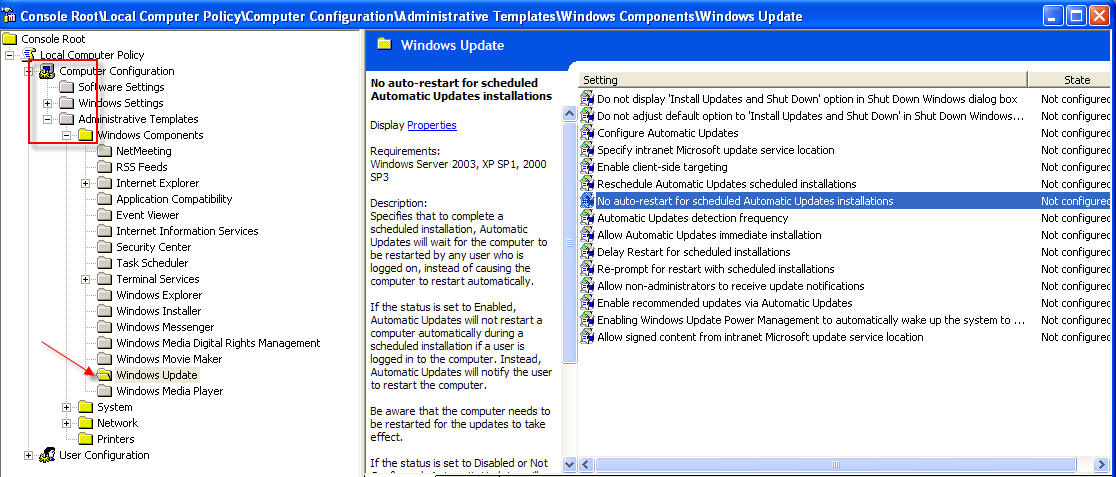
*Update 2/2010 In Windows XP Pro SP3, here are some different instructions:
- In the Start Menu go to “Run” then type “gpedit.msc” and press Enter
- Group Policy opens
- In that window, go to: Computer Configuration -> Administrative Template -> Windows Components -> Windows Update
- Double click on “No auto-restart for scheduled Automatic Updates installations”
- In the settings window Choose Enabled and click OK
- Close Group Policy Editor
Change your “No auto restart for scheduled automatic update installations” to “Enabled” by double-clicking on it on the right side. Save everything and reboot, and you’re good to go.
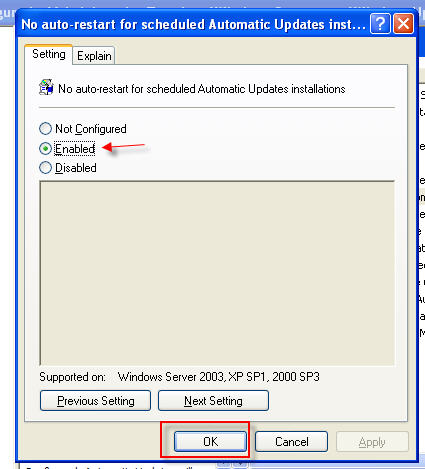
(When you close the “group policy editor” it will ask you if you want to save and yes I did, with the default location and file name)
PS – While I was in there, I poked around hoping to enable something like “no crashing software while in use” but I couldn’t find it. If anyone knows where that is please let me know 😉
more about Group Policy Editor at Microsoft














Now you know why Danny Sullivan finally left the dark side. When are you going to step into the light? 😉
Now might be the time to look at Google Docs. I found Google docs a few months ago, and have really found them to be an awesome resource. It’s just like having free access to Word and Excel. The only problem is that the Excel files don’t print out that well. And the best part is that it autosaves everything, you can see recent changes, share them with friends, etc.
Good Luck
Yep, I’m using Google docs more and more…
Thanks for the info. When I reach this destination in Group Policy, I do not have the option of *NO auto restart…* I have only 4 options. Yet my friggen XP pro SP3 still restarts automatically. Is there another area that can disable it?
Thanx mucho!
Hmm, I’m not sure – this was pre XPsp3 for me! Anyone else?
Looking under computer, and not users? 🙂
Very well explained,
thank you.
Thanks for the tips. I have followed your instruction and stop Reboot on Auto Updates. Let’s hope it works.
I think Microsoft should do something to prevent Reboots in the future versions of Windows like Windows 7. I have seen all over that people are tired of this.
Nice tip. Very useful.
Very much appreciated.
Thank you! Worked for me on XP Pro SP2
In GPedit it has been changed to “No auto-restart with logged on users for scheduled automatic updates installations” which means is a user is logged off and a backup running as a service is in progress and suto update runs and requires a reboot… your screwed.