
 Look how old this is!
 I post at SearchCommander.com now, and this post was published 19 years 8 months ago. This industry changes FAST, so blindly following the advice here *may not* be a good idea! If you're at all unsure, feel free to hit me up on Twitter and ask.
I found a code online that lets me add this feature to my Comcast remote.
What I liked most about my Dish DVR was the ability to press a button and skip forward 30 seconds in a recorded program. This feature allowed me to skip commercials, which was the main benefit to recording TV programs in the first place.
That’s why I was so surprised last week when we switched to Comcast that the feature was missing. Oh sure, I could speed up the commercials by 4x or so, then have to reverse again when I passed the return of the show, but there was no measured way to skip commercials.
Very disappointed, I casually mentioned it to Comcast on the phone during a call about another issue. After confirming with him that there was no “pre-programmed” feature on the remote to do that, I told him that I really hated it, and was considering switching back.
That’s when he told me that some industrious people had posted a hack for the remote online, and with “a little effort” if I “knew how to use a search engine well” I could possibly find it out.
Well, it actually took me nearly 15 minutes, but I found it, and here it is, for your TV commercial skipping pleasure (with a silver remote and a Motorola DCT3412 box)…
- Choose an unused or unneeded button on the “silver” remote to be the 30-second skip command. I used my “A-lock” button, and in retrospect (with two kids) that’s probably not the best choice, but I wanted it near the other DVR controls. Other choices are the PIP buttons at the bottom, (maybe there’s a hack for those too?) or the “help” button (there’s no help either).
- Press the “Cable” button at the top of the remote to put it into Cable Box control mode.
- Press and hold the “Setup” button until the “Cable” button blinks twice.
- Type in the code 994. The “Cable” button will blink twice.
- Press (do not hold) the “Setup” button.
- Type in the code 00173.
- Press whatever button you want to map the 30-second skip command to.
That’s it…you’re done!
*** Update 2010 **** (from comments below re: the new Platinum Remotes)
Ha! Take that, you…you… well, whoever you are that kept us from this feature in the first place…and thank you, to the AVS forum.
The Comcast guy on the phone claimed that they were “pressured” by Motorola to leave that off, but i have a hard time understanding why. It’s obvious why the networks and TV stations don’t like this feature, but why Motorola? Are they owned by (or own) a major media company?
Anyway, I’m happy again, and can now watch 2 hours of TV in an hour and 40 minutes, leaving me extra time to search the web for stuff I think I need…














Give the Comcast rep credit for telling you the “secret” but the dispute is between the networks and cable ops…not the manufacturers like Motorola.
You’re not alone in loving this feature, of course. In early trials of TiVo users, 88% skipped thru the ads. Hence, when DVRs expanded into the cable universe, the pressure was really on. Of course, given the amount of advertising that Comcast sells directly on their cable systems, you might say that they put the pressure on themselves!
Yes, I do give him credit for mentioning the hack in the first place, even if he wasn’t allowed to give me a URL.
Also a good point about them selling advertising too, on their own channels. I hadn’t even thought of that…
Not so new a development.
That and oh, so much more here:
http://en.wikibooks.org/wiki/How_to_use_a_Motorola_DVR
I have 2 Comcast Moto 6412’s and have had the skip hack on them for quite some time.
Also, its hard to take seriously the Comcast reps charge that Motorola asked that their product be defeatured by Comcast. Almost certainly, it was advertisers or networks asking Comcast to do it.
Thanks Bill G for the Wiki link – good stuff there for sure.
Awesome Tip Man! I actually had this feature when a very “cool” cable came to correct a DVR problem I was having. He hooked me up by programming the “A” button for the 30 second jump. He didn’t tell me how, he just casually said “..here I added a feature for you”. We just got a second DVR & the cableguy that installed that one was clueless when I asked him to set up the 30 second button??? SO… I started searching & found your blog! Cool man! Thanks Again!
Thanks so much! Love the 30 sec skip!!
I have comcast digital cable with HD and cable, and the program doesn’t work on my remote. the buttons blink like it received the command, but when I try to skip 30 seconds, it freezes for a second and then resumes play in the same place. I read something about the seattle area having the microsoft software that is not programmable, anyone can confirm/deny that claim?
Just a hint, try linking the 30 second skip to the “c” button. That way you can still use the lock button. I’m not sure if there is any use for the “c” button anyways.
I followed the instructions and it all went well until the last step, since then my remote had done nothing but blink and it will not transfer any commands. Have taken out batteries, unplugged everything, nothing is making it work. Any thoughts?
Hmm, well I guess I’d try it again, Jimmy, and see if it works a second time? I did end up having to do one of my remotes twice…
DO NOT use the “C” button!!!!!
The “B” and “C” buttons are very useful when you have the on-screen guide up!
The “C” button moves you forward ONE DAY
and likewise
the “B” button moves you back ONE DAY
That makes it very easy to look one or two weeks
ahead to search for something.
Does anyone know how to make the Motorola DVR fast forward faster while viewing on-demand programming? I have the 30 sec skip, but it doesn’t work for on-demand.
Wow, how awesome would that be?
Scott,
How funny is this! I was searching for a hack do just what you wrote about here. The funny part is that I landed on your site after we spent several hours talking with each other at pubcon last week.
This site looks good, I will take a longer look at it this week.
Thx for the tip!
Monte
Monte – Ha! Small world!
too funny…
Well, I feel stupid and I’ve screwed up my remote.
My brother gave me this info but I wasn’t aware that I should have used a “lettered” button. In the instruction I got was to use “any button” on the remote.
Well, for whatever stupid reason I used three. Now I can’t use the three button to put in a channel.
HOW THE HELL DO I DELETE THIS FUNCTION and start over again ?!?!?!?!?!?!?!?!?!
Hmm, I’m sorry to hear that –
I’d post your question here…
here to get a fix recommended.
I love you. One quick Google search and I am whole again. Thanks for the post!
I’m happy it helped!
The pressure to not “discuss” this wonderful feature comes directly from programmers. Go figure. We are told to not even talk about it with new hires.
As for those having issues with programming the remote with this, here is a hint. Look for the “ok” button in the center. If is colored red, you have a 5 number code remote, meaning you need 5 numbers to program various devices. These seem to have no trouble with the 30 second skip (I cannot speak for every single remote out there, every one I have seen has been fine) If the center “ok” button is grey, that is a 4 number code remote. A older remote that works just fine, but seems to have a issue taking the 30 second skip code. Probably half of the 4 number code remotes I have messed with would not take the code. A factory programming problem maybe
Wow, thanks for the input I.M. Your secret is safe with us 😉
Ahhh! This is great! I had that feature before I switched back to cable. Wow, didnt realize how much I missed it. Thank you so much!
I stumbled on this link while searching for how to program an older tv to work with the Comcast Cable Remote.
I’ve been wanting this “feature” ever since I say a friend do this “skip” routine with a Dishnet remote. I’ve been told that Comcast just didn’t offer this feature.
For some reason it took me 3 times before this hack worked. I GLAD I tried it on more time. I don’t know what DVR I have although it’s a new one and I think the latest model. My “OK” button is grey. I uses the “FAV” button for the skip since I don’t use it for favorites.
My advise is for anyone having trouble making this hack work, give it at least 3 attempts before giving up.
My advise
Note this tip also works on the later model Motorol DVRs, at least it did on my Motorola DCH3416. This is the second time I have had to locate this tip, I LOVE the 30 second skip! We had to get a new remote and needed to reprogram this feature. THANKS a million times over for the post.
Thanks, Worked like a charm!
I have tried these steps on both DCH3416 units (with Comcast remotes) and it does not work. I have tried to map over the B , C , PG UP , PG DOWN , and some of the unused pic-n-pic buttons. no affect. Doesnt matter if I do try on a DVR’d program or pause TV for 5min and try it. I have found that PG UP will skip 5min forward and PG DOWN will skip back 15sec.
I’ve been looking for this hack since switching from DirecTV, sweet!
Huh – sorry it didn’t work for you Ethan – others all seem to be having success though, and I’m glad you guys seem to like it. I would have likely gone back to Dish if I couldn’t find this…
Actually, I got it fixed. I must have had an odd case of dyslexia… twice our found these steps on a different page. Where your instructions say “994”, I was pressing “944”. I did this on 2 different units with 2 different remotes. After I actually tried “994”, it works perfectly… twice I might add.
You forgot a step…
1) Press the “Cable” button at the top of the remote to put it into Cable Box control mode.
2) Press and hold the “Setup” button until the “Cable” button blinks twice.
3) Type in the code 994. The “Cable” button will blink twice
4) Press (do not hold) the “Setup” button
5) Type in the code 00173 (for 30 second Skip)
6) Press whatever button you want to map the skip
Never mind, I missed it in your original post. Damn beer.
My page up buttons were 30 sec skip buttons they went forward and backward, but all of a sudden they were skipping 5 min – useless. I reprogramed one of them your codes for 30 sec works great, but only forward – any way to skip back 30 secs
I found my answer on http://en.wikibooks.org/wiki/How_to_use_a_Motorola_DVR/Programming_the_Remote
I put 30 sec skip on fast forard and 15 sec rewind on fast rewind
It worked great with dvr and tv havent tried it with on demand but you can use other arrows
This also works with the remote supplied for this box by Armstrong Cable (Ohio, Pennsylvania…). I mapped it to the “F2” button right above the “live” button. No idea what F1 and F2 do, but now at least one does something…
THANKS for the tip! I, too miss Dish Network…
Maxx and Ethan – were you guys drinking together? 😉
You’re welcome Mike – Glad to hear it’s not just good for Comcast!
Having a problem with the 30 second hack. It works okay by itself but not if I try to use fast forward or reverse afterwards. The DVR resets to the beginning of the program. Since the commercial breaks vary in length, I use several 30 second skips to go through most of the break, then try to use fast forward to finish out the break. Or if I used one too many 30 second skips you have to use fast reverse. I used the A button and the DVR is the DCH3416.
Anyone else having this problem? Anyone find a fix?
thanks for the info!!!!
Ya…I work for comcast tech support as well and we were told about this but told that we were not uspposed to let people know about it but if they were pretty “concerned” to let them know that if they search they can find what they want…
There is a skip forward and skip back…and can program these remotes for ALLLLLL kinds of stuff…just look up JP1 codes, its a bit techy, and a bit complicated, but lets you program these for ANYTHING you want!
After 2 years of using the awesome “secret skip 30 seconds forward” feature, my remote finally broke and I had to get a new one. I asked The Comcast guys about it and they told me in no uncertain terms that “the new remotes don’t allow that feature”. Stubbornly, I searched the internet and followed the directions on my new remote, and it still works! Thanks again for posting this!
But yeah, there’s definitely some strange politics going on about this feature.
Does anyone know how to program this feature for the Synergy U63CDR remote that comes with RCN’S DVR 3416?
I have a problem similar to Dave’s.
Skip works but now Replay does not work. I cannot reset Replay, yet.
Thanks Bill,
Glad to know I am not alone. I have found that the problem is intermittent. Most of the time I can use fast forward or reverse after skip(s) without a problem. I think I run into the problem if I do a lot skipping and fast forwarding/reverse. Leads me to believe there is some kind of hardware or software buffer that I am filling up and overflowing.
Got a new remote and had to re-program this. I have always used the PIP (+) button. It’s at the bottom and easy for the thumb to find and it is easy to remember that + means plus 30.
Hi Brian,
I receive four or five commercials in a row ! I need a two minute skip. I tried to write a macro for a skip of two minutes but I couldn’t get it to work.
Bill
I have a Comcast remote for a Motorola DVR. The page up and down buttons always fast forwards and rewinds 5 minutes. I have never programmed these buttons.
Can anyone tell me how to REMOVE the 30 Sec.SKIP COMMERCIAL function from a TV remote that was added using the instructions on this blog?
I want to
1)Remove it from the current button
2)Return the button to its DEFAULT function, and
3)Choose a DIFFERENT button to reset it for skipping commercials.
The person who set it used the CHILD SAFETY LOCK BUTTON! ‘Not a good idea.
To remove it from the current button add the DEFAULT function onto the current button. Then the DEFAULT function will write over the current button and return it to DEFAULT.
Just use the page down button. When you’re not in the guide it does the same thing. You’re just adding a second page down button.
Actually, when you press the page down button that forwards it, or rewinds when you press the page up button, by five minutes not just 30 seconds.
thank – you just made our night! we miss dish…but this makes it better.
it only works on te remote with the grey ok/select button there are two versions one has a red ok/select button it wont work with this one
This code does work with the red ok/select button
Did not work for me with a red ok/select button…dammit!!!
Just what I was looking for.
Thanks to many people.
Stan Buddle
Thanks for the 30 second skip instructions!
They worked great with the Motorola DCH3416 DVR.
I selected the “Help” button for the skip command as it was right above the 15 second rewind button.
Well I’ve run into the same problem with the Rewind key as mentioned above. Pressing it rewinds the program to the very beginning.
Has anyone figured out a workaround for this or a way to reset the remote to the original settings?
I followed your directions for the 30 sec. skip but I picked the wrong button. I tried to do the step over again and pressed a different button now the skip works on both buttons. How do I clear it out?
Comment number 50 here asks the same question, and in the next comment, “Cill” answered like this…
“To remove it from the current button add the DEFAULT function onto the current button. Then the DEFAULT function will write over the current button and return it to DEFAULT.”
Please tell me exactly how to return a button back to the default function.
You are a genius! Thanks so much. I just did it. And it worked!!!!!!!!
Hi there…just programmed my right cursor/forward key (white) for 30 second skip. Stupid me…I wanted my fast forward key (grey) and hit the wrong one. How do I take the 30 seconds skip off and restore the key to its’ original function?
Thanks!
Comment number 50 here asks a similar question, and in the next comment, “Bill” answered like this…
“To remove it from the current button add the DEFAULT function onto the current button. Then the DEFAULT function will write over the current button and return it to DEFAULT.”
I’ve not tried it, but others say it works…
I must be missing something here. Can someone please explain to me in simple words how to do this:
“To remove it from the current button add the DEFAULT function onto the current button. Then the DEFAULT function will write over the current button and return it to DEFAULT.”
Specifically what does “… add the DEFAULT function …” mean?
Thanks so very much – I scatter rose petals at your feet!
So I have a new cable box and programmed the remote the way I always have and it doesn’t work. I need my 30 second skip!!!
It doesn’t work with newer boxes??
Wow, I wonder if they’ve blocked it somehow?
I had a ‘new’ Comcast installation on Tuesday – Got two dual tuners HD DVRs and a ‘black’ box – Able to get ‘On Demand’ with all three boxes – I was unable to program the remotes for the ‘new’ dual tuners to do a 30 second skip – I was able to program the remote for the ‘black’ box to do a 30 second skip on the ‘new’ dual tuners. Used code ‘00173’, same one everyone writes about. Of course, the ‘black’ box doesn’t have a pause function.
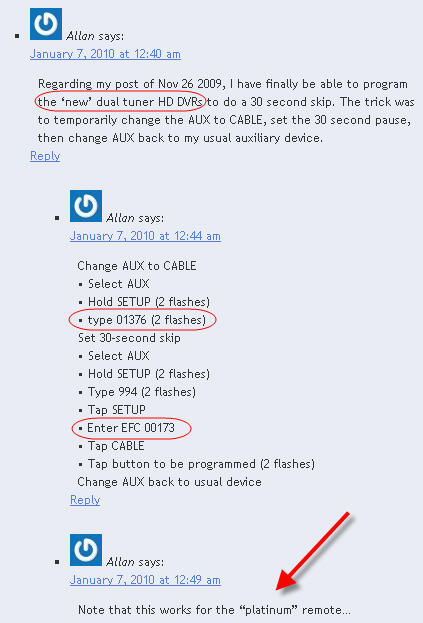
Regarding my post of Nov 26 2009, I have finally be able to program the ‘new’ dual tuner HD DVRs to do a 30 second skip. The trick was to temporarily change the AUX to CABLE, set the 30 second pause, then change AUX back to my usual auxiliary device.
Change AUX to CABLE
• Select AUX
• Hold SETUP (2 flashes)
• type 01376 (2 flashes)
Set 30-second skip
• Select AUX
• Hold SETUP (2 flashes)
• Type 994 (2 flashes)
• Tap SETUP
• Enter EFC 00173
• Tap CABLE
• Tap button to be programmed (2 flashes)
Change AUX back to usual device
What is EFC? My platinum remote does not have letters.
I think he may have meant to just punch the numbers – EFC looks like it means, “Extended Function code” – I’m not sure though, and still have the old ones… no platinum for me.
I have tried to program the platinum remote for the 30 sec skip what does the EFC before the 00173 mean I tried using all of the instructions but it will not program? please help
EFC looks like it means, “Extended Function code” – try skippinjg it altogether, since there are no keys with letters.
Yes, I just entered what I had received from the technician. The two lines of instruction are equivalent.
type 01376 2 flashes = Enter the EFC 01376
I agree with Scott, EFC probably means “Extended Function Code”.
Note that this works for the “platinum” remote…
Thanks… I have a few remotes lying around and using the two methods was able to get them all to work on 30 second skip.
I use the A-lock button on all 3 of them.
Any way to program a 2-minute skip function? Most breaks are at least that long, but rarely only 30 seconds. Seems like 2-minutes would be just right.
No way I know of – I just press the skip 4x
The PLATINUM remotes are the ones to keep. I cant get that GOLD remote to program the 30-s skip. Bastards blocking it on new equipment?
I realize the forum specifies the Motorola box, but Comcast gave me a Cisco RNG200 dvr with a platinum remote. I’ve had no joy programming a commercial skip using the above procedures. Anyone else have any experience/success with this box?
Works great for me on the PNG200 – Note that the page up and down buttons do the same thing – page up is skip ahead 30 sec, page down is skip back
How do I change from AUX to Cable? What if I’m not using the AUX button?
Allan, thanks so much for posting this info. I just programmed my remote for my HD DVR, and it works perfectly. As far as the EFC part to type in, I just typed in the 00173 and it worked. I, too, just switched from Dish and was really missing that skip feature. Thanks!!!
I followed these directions and now when I hit the red “all on” button, it either turns my box off and then on again or it turn my box on and then off again. Any suggestions?
I have my box set to record several programs, some of them begin recording about the time I go to bed. When I press the ‘red’ button I receive a message indicating that the recording will continue. My TV goes off and the ‘REC’ is still displayed. This leaves my DVR still on even thought the TV went off. Next day when I press the ‘red’ button the TV comes on, but the DVR goes off. The ‘red’ button just changes the state from on to off or off to on. If your TV and DVR get out of sync as mine does nearly every night when the DVR stays on to record, you have to ‘sync’ them by selecting the ‘power’ button, then the ‘red’ button.
Has anyone got this to work with a new Motorola DCT3416 I hd-dvr box? It seems to be an issue with the box rather than the remote (I can map 00179 just fine to a different button using either the original or Allan’s method).
I just cant get the 30sec skip code to ever work… Any ideas?
This is cox service south orange county california using this remote:
http://www.urcsupport.com/html.php?page_id=334
Thanks
Thanks!! so little of the customer service know how to do this! I just got the new red but the code for the grey ok worked fine!! THANKS!!! Your the Best!
Thank you so much! I’ve been searching for this info for awhile and I’m so glad I found it!!
I had the silver remote programmed to give me the 30 sec skip, and the page up gave me a 15 sec reverse. Now the page up is giving me 5 min reverse… wondering if the firmware got updated remotely, changing my page up functionality. This is true on two motorola cable boxes with two different silver remotes, so that’s more evidence of a firmware change. Anyone else experience this? Any way to reprogram the 15 sec reverse?
Yes, firmware upgrades took place – my remotes did the same thing, although i hadn’t reprogrammed those buttons – I’m not sure how / what to do about it, or if you can reprogram or overwrite them or not.
Just stumbled across this today looking for something else. I just had Comcast installed with the HD DVR and “platinum” remote and I used Allan’s tip and had it programmed in seconds!
As far as changing it to AUX from Cable, I didn’t have an Aux device set up but just selected the button like I would if I was going to power on/off my TV using the TV button. Not sure if it was needed or not but it was simple and figured if it worked I’d just go ahead and do it 🙂
I had programmed my old ATLAS OCAP 5 remote for a 20 second skip using 994 and 00173. I haven’t been able to do it with a new UR3-SR3 remote from Time Warner. Any help appreciated. Thank you.
You will find all the programming details here Including how to Default a button.
http://en.wikibooks.org/wiki/How_to_use_a_Motorola_DVR/Programming_the_Remote
The skip forward on the Comcast remote worked great. Does anyone have a skip back code?
Thanks!
Theres already a 15 sec default button…
On the Motorola 3400 for Comcast, if you have captions on, it is hard to see the menus. Any suggestions?
Does anyone know if you can rename recordings on your Comcast DVR? I was able to do this on DishNetwork and it was a great feature.
I work for Comcast and they offer us nothing about this. Been using for years and just got the new Platinum remote. This worked perfect. THANKS
Thanks! This definitely helps. The Dish DVR is soooo much better in many different ways. I’m not crazy about Comcast at all, but most homeowners and hoa’s don’t like dishes installed onto the building for the look and the damage (they believe) to the structure.
Hi Everyone! These instructions also worked for Buckeye CableSystem remote
So does this feature not work on the new comcast cable boxes?
I have the Platinum remote. How do I “temporarily change the AUX to CABLE”?
this works on the Platinum Remote with the Red OK button on the new Moto dual DVR box….
You must temporarily reprogram Aux to Cable, set 30 sec skip, then change Aux to your auxiliary device.
1. Press the “Aux” button at the top of the remote to put it into Cable Box control mode.
2. Press and hold the “Setup” button until the “Aux” button blinks twice.
3. Type in the code 01376. The “Aux” button will blink twice.
4. Press the “Aux” button at the top of the remote again
5. Press and hold the “Setup” button until the “Aux” button blinks twice.
6. Type in the code 994. The “Aux” button will blink twice.
7. Press (do not hold) the “Setup” button.
8. Type in the code 00173.
9. Press (do not hold) the “Cable” button.
10. Press whatever button you want to map the 30-second skip command to (ex: A / Lock). The “Cable” button will blink twice if successful.
I followed all of the steps above and received all of the responses, but I did NOT get the 30sec skip feature 🙁 I have new rng200 box and platinum remote with red select button. What gives???
Thanks for the tip, it worked perfectly for my remote the first time I tried it.
I have the Dual Motorola DVR and the Silver remote with the red bottom. As of March 23, 2011, the directions above (added below) worked perfect. Thanks!
1. Press the “Aux” button at the top of the remote to put it into Cable Box control mode.
2. Press and hold the “Setup” button until the “Aux” button blinks twice.
3. Type in the code 01376. The “Aux” button will blink twice.
4. Press the “Aux” button at the top of the remote again
5. Press and hold the “Setup” button until the “Aux” button blinks twice.
6. Type in the code 994. The “Aux” button will blink twice.
7. Press (do not hold) the “Setup” button.
8. Type in the code 00173.
9. Press (do not hold) the “Cable” button.
10. Press whatever button you want to map the 30-second skip command to (ex: A / Lock). The “Cable” button will blink twice if successful.
Thanks Herb!
I have the Dual Motorola DVR and the Silver remote with the red button. As of March 23, 2011, the directions above (added below) worked perfect. Thanks!
1. Press the “Aux” button at the top of the remote to put it into Cable Box control mode.
2. Press and hold the “Setup” button until the “Aux” button blinks twice.
3. Type in the code 01376. The “Aux” button will blink twice.
4. Press the “Aux” button at the top of the remote again
5. Press and hold the “Setup” button until the “Aux” button blinks twice.
6. Type in the code 994. The “Aux” button will blink twice.
7. Press (do not hold) the “Setup” button.
8. Type in the code 00173.
9. Press (do not hold) the “Cable” button.
10. Press whatever button you want to map the 30-second skip command to (ex: A / Lock). The “Cable” button will blink twice if successful.
Thanks Herb!
This is what I did:
Press Cable button
• Hold SETUP (2 flashes)
• type 01376 (2 flashes)
• Select Cable
• Hold SETUP (2 flashes)
• Type 994 (2 flashes)
• Tap SETUP
• Enter 00173
• Tap CABLE
• Tap button to be programmed (2 flashes)
Followed Rob’s post. Worked great.
Used the “Help” button for skip. Convenient location and since it didn’t seem to be used for anything else I figured it would be helpful to skip 30 seconds.
Thanks. Worked for two types of remotes. Now, is there away to go back 10 seconds, like Dish?
My remote has a built-in 15 second rewind… Does yours really not have that? If not, what’s your remote / DVR model?
Well, yes and no. Thanks. Turns out it does have that function for recorded programs, but unlike Dish, it does not seem to work for a program you are watching live. It looks like if you want to go back in live mode, you have to use the left rewind button.
Plus, in Dish, you can do manual record, so that you can record one hour of a two hour show for example. I can’t find this function in Comcast.
On the silver remote, directly beneath the left rewind button is the STOP button, and right beneath that is the 15 second skip back, right?
As far as I know, by default, that SHOULD work fine on live TV – I believe it is supposed to be “always on” – it is for me and other friends, anyone watching sportts live uses it often – If yours isn’t working, a call to Comcast support should help troubleshoot this for you…
In the event you find out that it really is *not* supposed to work, then please do let me know, along with the make / model of your DVR and also let me know the the city in which you have Comcast?
good luck!
I tried it again, and this time it worked. I did not think it worked before, but maybe I just didn’t press hard enough, or perhaps I just have “buyer’s remorse” over switching from Dish to Comcast.
I have the DCX 3400, I did the codes above and assigned my “lock or triangle button” to do 30 second skip. However, when I press this button instead of just skipping ahead 30 seconds it skips 5 minutes which I am already able to do with the page arrows. Any way around this? I have Comcast.
Sorry, I wish I could help…
Life-Saver! I’m so sick of Comcast I’m about ready to use TiVo. They work together, but it’s a tad more costly to do it…
My Mom switched from Dish to Comcast and really misses the 30 second skip. Does the instructions above work with the Cisco RNG200 remote? If I can get it to work for her I am sure I will be the favorite daughter!!! lol