
 Look how old this is!
 I post at SearchCommander.com now, and this post was published 18 years 10 months 16 days ago. This industry changes FAST, so blindly following the advice here *may not* be a good idea! If you're at all unsure, feel free to hit me up on Twitter and ask.
You’re not alone…
Users all over the country are finding out daily that suddenly, for no apparent reason at all, they are unable to send mail if they want people to reply to their business or personal e-mail addressed other than one that is @comcast.net. This is because Comcast is blocking port 25 , which is your default port for sending email through your mail software.
The error message says (fill in your own X):
The connection to the server has failed. Account: ‘XXXX’, Server: ‘xxx.xxx.xxx.xx’, Protocol: SMTP, Port: 25, Secure(SSL): No, Socket Error: 10060, Error Number: 0x800CCC0E
Gee that’s helpful, isn’t it?
If you are using mail.yourdomain.com for your SMTP outgoing mail server, then you get an error saying “unable to connect to the mail server” even though it just successfully connected to the mail server to retrieve your incoming mail. After wasting time calling your web host, and going through various troubleshooting techniques, they tell you to call Comcast.
To make matters worse, users are finding out one at a time, because Comcast is slowly rolling out these changes user by user in individual markets around the country. This month, it’s apparently Portland Oregon’s turn, where I live.
To cut to the chase, here’s the solution:
Change the port your computer is using for SMTP outgoing mail, from Port 25 to one that your hosting provider will allow. In most cases, this seems to be port 587 for Portland providers.
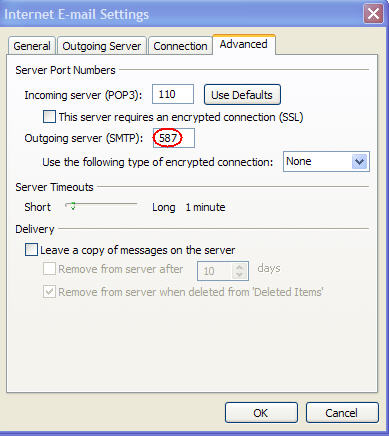
To do this in Outlook –
- Go to tools – e-mail accounts – view or change existing account
- Sselect the appropriate mail account and hit the change button
- Go to the more settings button, and into the Advanced tab
- Change your default port 25, to port 587, and you should be back in business in most cases.
Still broken?
- Added note from comments below – Some people in the midwest for whom 487 didn’t work succesfully chaged to 465 and picked SSL under the “use the following type of encrypted connection” drop down. They did not check the “this server requires an encrypted connection” box.
In Outlook express –
- Go to tools – accounts – Mail tab
- Choose Properties box – Advanced Tab – and from there you can do the same
The reason Comcast claims to be doing this is in an effort to prevent spam being sent by zombie/spyware/virus laden computers using their bandwidth and their Internet connection.
I suspect they are really doing it to limit liability for any future potential lawsuits, and not really to save bandwidth, but I have no problem with that.
The problem with Comcast doing this is that they do not seem to be telling all of their support people, and do not be notifying their customers. This has been going on around the country for MONTHS.
Instead, it takes the end user hours of frustrating time on the phone spent with lower-level tech-support who have no idea that this change has even taken place.
One can only guess how many individual users are still frustrated at this very moment because they are being forced to do their business e-mail from home using their @comcast.net accounts, after uninformed Comcast agents are able to help them?
As a web host, we were forced to spend hours dealing with Comcast before we got an actual answer, and we still lost a couple of hosting customers over it, who were convinced that it must be our fault, since Comcast told them it was.
Great customer service. If there was any competing product in my market I would switch in a heartbeat. I tried once before in 2005 after nearly an entire summer of poor Comcast connectivity.
Thanks Comcast, for valuing our time so very little, in your quest to make mega millions.














I’m am completly upset, outraged, teed off, enraged, and plain P_ S S ‘D (any other adjectives i missed place here) about comcast taking over. I’m in the Houston TX Market and aparently comcast has come and taken over Road Runner and with it all sense of stability in terms of email usage… port 587 doesn’t work for us and neither does port 25… i love my bb speed, but u know if i cant use it for what i want i might as well go to dial up.
I am with you. I spoke with some of their Tech people and one of the gals acted like she is teaching a Kindergarten class on what emails should look like. In fact she sounded more like a Politician. She skirted the main issue and she acted like you can’t understand me so I hung up on her. This upgrade from Comcast, is a Generic Piece of crap. They didn’t ask you if you liked it, they just ignore all of your criticism. I ask the last guy, I said your email format went from easy on the eye to something a 7 year old putting out a format this is so generic that after a while you wonder if it wasn’t something that they had back in the ’50s and they just put it out there when your paying for something that you like. I said well I changed from Google Chrome to Internet Explorer is that a problem? No he said that won’t fix the look of your emails. really. Then I guess I am stuck with this unless I change my ISP. He probably didn’t know what that meant either. Where do they hire these people.
They f—in’ morons. Overnight, my ability to send emails stopped on two computers. I spent 3 hours on the phone and they finally said “get a new email program”. When I asked what I needed to do to set up the program, they couldn’t/wouldn’t tell me. What actually happened is that a some time during the night the changed to requiring a secure connection on outgoing mail. I click on this in the advanced account setting and bingo.
Every time you call them about anything, it’s always your fault, or someone else’s fault. My contract is up in 6 months. I’m gone.
wow – It seems crazy that with a major change like that they’d not tell front line tech support. I feel your pain…
Yes, I am in Seattle and I have been getting the run around from COMCAST as well. Port 26 worked for an hour and Port 587 not at all. I wonder if anyone in the Seattle area is reading this and has good luck with an ISP not closing the outgoing line to their business. For today the address is [email protected]
Lisa,
you should check with your web host to see if THEY are allowing port 587.
I’ve found that many web hosts do by default, but it’s possible they have never had the need to do so.
If they do not, ask if they have another port they recommend.
Also, you might try setting your outgoing mail server to smtp.comcast.net, which seems t obe working again here in Portland (for now)
Finally, it may be possible to “upgrade” to a business service through Comcast, where they will not block your outgoing mail port.
Well I just ran into the same thing yesterday here in Boston, and talked to one completely-in-the-dark tech support person after another. My problem is I have multiple email addresses for different projects/clients/partners, and port 587 doesn’t work for any of them. I can’t go and ask each of them to open that port up, so I am trying to get comcast to open port 25 back up for me. I am about 24 hours into it with no resolution. I have 3 pcs on a secure wireless network here, each with up to date security software.
One tech support rep said “more than 100” emails had emanated from my connection, and I asked them for the IP address of the offending machine, but I don’t think he had a clue what I was talking about.
I wish I had seen this blog before I called Geeks on call. I am in the DC/MD area. I tried working with two Comcast techs on Live Chat. One tech had me switch to port 587 but gave me no reason why. In doing this it triggered some other settings that needed to be clicked which were not clicked when it was Port 25. Of course, the tech kept saying it was a firewall issue with Norton security software. I ended calling Geeks on Call and we went through every scenario on the settings until finally we picked the right combination and I could send e-mail. Why couldn’t Comcast send out a broadcast e-mail to everyone telling them to change their port to 587 or whatever?
Now the issue is why is everyone’s internet slowing down to a crawl or not even loading pages every night from 7 pm until 11 pm (peak internet traffic times). This has been happening since late July for me.
To not tell customers, or even all of their own technicians is totally ridiculous. sounds like it had nothing to do with your Norton. The “slow in the evenings” part is something I wasn’t (thankfully) faced with…
I am looking for a real fix. Switching away from Comcast may work for a while but this issue is a Virus.
I switched to 587 after Comcast Support told me to do so, and it worked for about 6 months ok. Now nothing works to send mail. Their support staff MUST know what it up, especially after Tech’s like me tell them what is up… SPAMMERS have somehow grabbed MY computer I think with a zombie virus, but Norton and Avast antivirus programs cannot fix or find the hidden file where its located. Its crazy.
There has GOT to be a way to clean and then protect my computer from hackers bots and viruses. Meanwhile switching ISP providers will not really help if its MY computer that is infected. If I change email addresses the virus picks up on that and continues on its merry way it would appear, problem is that I cannot be sure and cannot find answers.
aaaaaaaaaaaaaak… even the Tech’s are frustrated!
Don – I can’t believe that they have blocked port 587! UN-BE-leivable… What’s wrong with them?
You might try asking Comcast if upgrading to a “business account” will solve your problem.
Alternatively, you might consider custom A – MX records to host your mail directly with Comcast. I’m sure they would prefer you host your entire website with them, but that’s probably the last thing you want to do.
However, I’ve already decided that if they mess with me anymore, and disable port 587 on my account, I’m going to have no choice but to let them host my mail.
Does anyone have a port number for the Washington D.C. area?
The online Chat SUCKS! If I could have reached throught the computer I would have choked the online tech!!!!!
Ask your web host what alternative port you can use, then just try it…
Has anyone experienced this problem with Verizon?
If you are suddenly unable to send mail with Verizon wireless broadband, this moght help…
Early this month, Verizon started rolling out a change to their outgoing mail server, and I got a phone call from them telling me that I would be unable to send mail after September 6th, unless I change my outgoing mail server to authenticate using the same information to match vzw website login at http://www.verizonwireless.com/myaccount
If you are talking about a Verizon DSL landline though, then obviously that can’t help you, I’m sorry.
Yep it is Verizon DSL landline. And the online chat people keep telling me I just have my account setup wrong! For the short term I had the verizon account just bounce to a temp acct I set up through comcast.
Try this it works for me in Seattle
When you click the enable SSL it will change back to 25 so be sure its set to 465 after you check.
Change smtp port to 465, enable SSL
A Comcast tech writes:
Much of tech support is outsourced. It is up to the individual agents to ask floor support for assistance.
If the agent does not get the answer there, then it is up to them to Google the question.
However, the problem is that techs are officially not responsible for troubleshooting non-comcast email issues. And so they don’t. It helps keep their average handle time down.
Me, I don’t care. I’m here because I’m seeking more info on using port 26
Also, Comcast techs do not support other programs beside outlook express and mac mail. And most won’t touch mac mail even though they have access to walkthroughs.
Buying other service is not necessary. BTW, port blocking is by modem config.
I am a former RoadRunner user in Houston who got sold to Comcast. I thought there might be a problem with the chanheover so I set up a yahoo email account. We (the vast customer base) were promised an email with instructions on setting up our email. Mine never came. After much frustation and several calls to customer “service” I finally got my comcast box set up. I don’t use it. I prefer my yahoo mail. Today I started having trouble with forwarding emails. I suspected comcast so I googled a long question and arrived at this page. I guess I was right! hehehe
I am happy to report that port 465 has fixed my sending mail problem. Thank you everyone!
Ahh – port 465!
A new one to try… thanks for sharing
Man you hit it right on the head. I thought I was reading my own blog. Comcast bastards! The time and frustration they have cost me.
My ONLY problem is that even AFTER changing my settings to the 587 port, I’m STILL unable to send my mail (and I’m not sure why) hopefully someone out there will have figured this out because I sure can’t, I changed and reconfigured my settings in everyway I can think of to no avail. It is SO frustrating!
I was using 587 for one email, and 25 for others which are still working on port 25. 587 and 465 don’t work in NJ. What should I try next?
Well I figured it out…I had to change my SMTP settings to “mail.comcast.net” to SEND e-mail from home. Oddly enough, even though I had to make this change, the e-mail STILL appears to arrive from my work address. So, now I just have to change all me settings when I work at home. Pretty stupid really, but whatever. At least I got it worked out.
Hey, just for the heck of it, I changed my smtp settings to mail.comcast.net I still get the 0x800CCC92 error – email server rejected your login. Don’t understand. My other accounts still use ports 110 and 25 and this one had been using 110 and 587. Tried all the other ports recommended, and I still get the error. Comcast techs don’t support Outlook 2003 and told me to get mail from Comcast, but I can’t get into that either. They are upgrading their system, and the webpage that uses the email account in question is inactive too.
Did you change your log-in and password settings to coincide with your comcast account as well?
yes – after contacting several comcast techs, most of whom would not support outlook, one finally assigned a new password for my comcast account which I then changed in outlook and it works.
I can access both comcast email and outlook through this account. Don’t know why I couldn’t use my own pw, but at this point i’m grateful. they confirmed settings 110 and 587
I had some password issues with comcast.net when I was trying to get set up. It seems to me that I should have been told at the outset I couldn’t use all numbers in my password. I finally found a tech who reset my password .. guess what all letters.
I’ll keep you posted on my ongoing battle. I am not going to give up my yahoo mail.
passwords were all working fine until Comcast started to update their format – I didn’t change any settings. PW now need to be minimally 8 characters. Yes, when they reset my password, all letters too!!
Well. boys and girls, I did it! I am no longer under the heel of comcast! I have changed to AT&T for internet and phone. My condo fee covers basic cable so I’m stuck with that. I can use mt yahoo email with no tampering.
Jerry and HMR, congrats on getting past it.
Marty? Wow, good for you! Here in Oregon Verizon offers FIOS – 20 megs over fiber!
Verizon FiOS
I’d try it in a minute if I could get it, but i can’t –
IMPORTANT – PLEASE READ:
Comcast gave me the same BS story about spamming. I was running an email server at home, which does violate their policy. But it was not compromised, and only processed a few messages a day. They blocked port 25 and told me to switch to 587 *WITH AUTHENTICATION*. If you switched to port 587 and it still doesn’t work, go into the Account properties for your email, and make sure you check the authentication box under one of the tabs, and type in your Comcast username and password for the email account. Hit OK and close Outlook, then go back in and try to send a message.
If you have a non-Comcast email account, you must select its properties and use these same settings, with Authentication. This effectively logs you into your Comcast email account to send a non-Comcast email out. Sounds like they did not tell some of you that.
BTW, they are lying to people and saying that ALL customers have had port 25 blocked. None of my friends in my local area are blocked yet (Jan 2008) on port 25 – I have been blocked since April 2007.
Yes Bob, exactly – Thank you.
well, i don’t know if they’re “lying” so much as they just can’t get their story straight between departments and support levels, and there’s nobody addressing it for us consumers or even for the tech crowd.
I cannot find (and I’ve asked them this on the phone) ANYwhere they are publicly explaining or discussing what the heck they’re doing, or why.
NOR, will they offer any suggestions!
It’s REALLY frustrating people all over the country!
Thanks a lot, you really saved my day by fixing the comcast weird problem.
Read below, it worked for me, thanks bob.
imac G5 osx 10.4.10 Comcast user (reluctantly) using mail on the mac.
Bob Says:
January 10th, 2008 at 1:37 pm
IMPORTANT – PLEASE READ:
If you switched to port 587 and it still doesn’t work, go into the Account properties for your email, and make sure you check the authentication box under one of the tabs, and type in your Comcast username and password for the email account.
Yes, Arty is correct. Thank you, thank you, thank you. I immediately called Comcast support on told them to spread the word about the solution to all the upset calls, and then to pee in the breakfast ceral of the idiots that are making these changes without alerting their customers!
After much frustration after all my emails quit working 2 days ago I did as he suggested. Here’s how I did it in Outlook 2002 when Comcast had no idea how to help me.
Comcast email accts only need to change the Outgoing Server port from 25 to 587 under the Advanced tab in More settings
Other email accounts follow this..
Tools..Email Accounts..Next
Double click the email acct you want to alter
All email accounts must have smtp.comcast.net as the outgoing mail server.
Click More Settings..Outgoing Server tab
Check My Outgoing Server requires..etc.
Check Log On Using and type in your Comcast username and password.
Click Advanced tab and change your Outgoing Server to 587
Click OK and then click Test Account Settings and you’ll be fine.
Thank you for having this discussion on your site. It saved me hours of Comcast headaches. I found this discussion with a search in Dogpile.com for “suddenly unable to send email from outlook 2003”. Just for fun I did a Chat session with Comcast support. The person was confused, as they had no idea that there was an “Outlook” versus “Outlook Express”. She (I think) tried to give me a link for a “one-click fix” for express. I don’t believe English was the person’s first language, either. I can only imagine how long it would have taken to get this fixed had I not found your site right away. I work remotely most of the time, and due to restrictions on our hosted email server, allowing sending only from within the office’s range of IP addresses, I have to send through my comcast account. I asked the person to pass up the ladder that I was PISSED OFF that I was never notified of the change.
You’re welcome, Matt. Glad it helped 😉
I read this yesterday, after my husband and I discovered we could no longer send emails through Comcast here in FL. I spent the day trying to find out from Comcast what they had done. The first “tech” put me on endless hold until I hung up (and I was still being nice then!). The following “techs” were equally useless. Not a word about why our two different email programs — Eudora and Pocomail — had suddenly stopped sending mail. They wouldn’t even acknowledge the logic therein that pointed to the trouble originating with Comcast. “Comcast doesn’t support 3rd party email programs” was all they said, handing the problem back to me. “Use Comcast webmail instead.”
Then I found your write-up and all was revealed! A little SMTP port checking program verified that Comcast had indeed closed port 25 on us. I worked around it using AuthSMTP, which we have for our business laptop.
I called Comcast back this afternoon and gave them an earful. No warning that port 25 was being closed, no mention of it when I called looking for help. I’m still in fits over it. And I pity the Comcast customer who isn’t as dogged in hunting down the source of their send problem or computer savvy enough to rectify it.
And we’re paying nearly $50/month for this “service”. Unfortunately Comcast is our only realistic option at the moment.
Anyway, thank you so much for writing about this. Without it I’d probably still be pulling my hair out. 🙂
You’re welcome Mary. Did you note the date on my post? July of 2007?
I cannot believe Comcast is so unconcerned and uncaring about customer service.
Think of the hundreds or thousands of work-hours lost to this problem that they’re causing…
Someone should start a class action lawsuit against them, in my opinion.
Looks like Comcast has just turned off port 25 for the Baltimore area (April 2008). And it’s so sad that the support folks still have no idea. I e-mailed them about suddenly not being able to send mail, noting that nothing had changed on my end, and asked what was up with their server – I got the standard (scripted) reply, “check your firewall settings, etc.” Since I knew it wasn’t my firewall, I thought then to do a web search and found this answer. Funny thing is, I also found references to using port 587 on Comcast’s own website – and still, the support people don’t mention it! How can they make this kind of change and not tell the customers or their own support staff?? A simple e-mail to the customers, that’s all it would take.
I can no longer access my old webpages after comcast upgraded. The old webpage was transferred automatically, but it is not formatted the same. It cannot be edited either via the new system. So I need to redo, but I Can’t find the link to recreate new webpages -can anyone help?
Comcast just bought out Insight in IL and I hated to transfer over to their servers but finally had to. #1 I lost one of my absolute favorite e-mail nics. #2 It took a few tries to get e-mail to work in Outlook2003 but I did it-WOO HOO! BUT NOW…for days I can no longer send e-mail, only receive it.
Okay, so I called Comcast and got an Indian who spoke very poor English so I had to ask him to repeat everything-especially with his softer voice. So, I reset the 995/465 and checked the SSL’s. Then I could not send or receive. I called again, just for the tech to tell me this was all correct and finally said he would transfer me to tech II but warned me they do not have support for Outlook 2003. Okay..sooo while I was on hold, I was nice enough to open Outlook 6 and set up my default e-mail in there so they COULD talk to me with support. Sure enough same problem so this worked out great right? WRONG-the little twerp transferred me to MICROSOFT!!! AND of course they are not open at 2 in the morning! As if that was not bad enough, when I called Comcast back AGAIN…it said my phone number does not exist!!!
I went ahead and let the call go thru and told the rep I WANT A MANAGER! So, she said she would transfer me to Tech and ask for manager-ok fine. I did just that and the tech asked me why and got my info-continually telling me no manager was responding yet-which is probably true! So he asked if he could help me at all and I said ok…told him all. He said I cannot help with Outlook though but this one time I will try. I said I told you I set up Outlook Express 6 while I was waiting on hold the 2nd time around! So we went thru it all just to be told I need the 587 and 110 and do not check SSL. So I did all this and it “looked” like everything would be ok…
WRONG! I now cannot send or receive e-mail and I figure I better not call them again right now because if I do, I am going to let “someone” REALLY have it as if I was not blatant enough as it was!
And to make matters worse, I go to Symantec to see about maybe setting something to allow the ports-just a stab in the dark for selfteching…and their answer on their site?? Upgrade to 2007 and then after that you can upgrade to 2008. Well, I had recently done that and had to do online chat with them forever and let them do remote access and nothing has been the same! AND when I upgrade I lose my most favorite ad blocker and popup blocker. So I defintely went back to my old 2006 version!!! But they seem to have removed all the great 2006 tech support issues on their site!
So now I have been searching, well let’s see, it’s now 5:15 am-3 hours later…I finally found this site and I was SO hopeful I would get the magic cure…but it tells me the port and stops there LOL
But yes you are right, some people may be frustrated this VERY minute and BOY AM I!!!! (yes 4 !’s)
I am hopelessly stuck with NOONE to help me at this point and something has got to change soon…
I also am stuck with Comcast because my area is not wired for DSL and they are not going to come out just to wire my flat although I helped put one of their kids thru K-8 for all the years I had SBC who is now AT&T.
And get this, while on the phone they asked about my phone service and I said ah I do not have AT&T, I have Lingo VOIP. They said we have…I said I know but you also charge $40/mo. And so they asked my features with Lingo and I started naming them off…after I named off about 12 of them and he did not stop me…I finally got tired and said I get 21 features total. He said well, right now we have a special, since you are a valued customer, I can offer phone for $20/mo. It’s still $4/mo plus tax, more than what my service with Lingo is and I pay by the year so I am not cancelling a contract for this crap! I am smart enough to know I will have to call them for tech for the blasted phone as well, and with service I got today? NO WAY JOSE!!!
But back to the Outlook, NAV, Comcast issue…this is almost not worth it all!
Tracy – I’m with you! This makes NO sense…
HMR – I’m afraid this is completely off topic, and I can’t follow what you may be talking about. Does you comment have something to do with Comcast hosting your website? If so, you’ll have t ocontect them, or use the “Ask Scott” in the menu on the left of this blog.
Computer Junkie – It MAY be that your webhost just has not enabled port 587 for you yet. Give them a buzz, because it should work fine.
Also, don’t forget that in your swapping of Outlook and Outlook Express versions, MS has sometimes changed the order of listing your settings – putting POP3 before SMTP and SMTP before POP3 –
If you are not paying close attention, it’s easy to accidentally mix up the two ports – Outgoing SMTP should be 587, incoming POP3 is port 110
APRIL 10, 2008: SAME PROBLEM AS ABOVE – EVERYTHING IS OK EXCEPT CANNOT SEND MAIL UNDER OUTLOOK OR VISTA MAIL ON ANY OF MY 5 HOME COMPUTERS. I FOUND THE FIX. COMCAST HELP DESK FINALLY GAVE UP ON THE PROBLEM AFTER 30 MINUTES, THEY GAVE ME A TROUBLE TICKET AND THEN NEVER GOT BACK. WHEN I TRACED THEM THEY AGAIN PROMISED TO PHONE BACK BUT DID NOT. I MADE A CALL TO MY NEPHEW, STEVE, HE FIXED THE PROBLEM IN 1 MINUTE. 1 MINUTE FOLKS. COMCAST SHOULD PAY MORE TO THEIR HELP.
THIS FIX IS GOOD FOR COMCAST IN THE SF BAY AREA. GO TO MAIL PROPERIES TABS. UNDER SERVERS TAB CHECK THE BOX FOR “MY SERVER REQUIRES AUTHENTICATION”… UNDER “ADVANCE” TAB EXCHANGE THE DEFAULT OUTGOING PORT 25 WITH “465”. THEN CHECK BOTH BOXES FOR OUTGING MAIL “THIS SERVER REQUIRES A SECURE CONNECTION (SSL) AND INCOMING: “THIS SERVER REQURES A SECURE CONNECTION (SSL)
TRY IT NOW …. IT WORKED FOR ME FINE
GOOD LUCK
PS
MY BRAINY 38 YEAR OLD NEPHEW IS UNEMPLOYED IN SAN JOSE, CA. AND WILLING TO EXCEPT ANY WAGE… “ANY WAGE”… AND ANYONE WHO WANTS TO OFFER HIM A JOB MAY CONTACT HIM AT steve_w.morgan (at) sbcglobal.net YOU WON’T BE DISAPPOINTED… TRY HIM OUT
SINCERELY,
“59 YEAR OLD UNCLE” JOE BIELEFELD, CUPERTINO, CA
ed. – Scott fixed the email address for Steve
Well, Joe B. That only worked because your company’s mail server for the domain you were trying to use happened actually be secure.
I’m guessing your nephew was familiar with your domain, so that’s why he knew that.
This is certainly not to imply that he’s not well qualified though, and please, nephew Steve, tell us more about why port 465 worked for your uncle? (if you do, I’ll fix the email address that your uncle nicely posted for the spambots 😉
I welcome your input…
I lost the ability to send outgoing mail about 2 weeks ago in the Boston area (Needham). Receiving fine, but sending is out. After reading through prior posts I sense I may have some difficulty in finding a successful combination of settings to return email sending back to normal.
I’m using a Mac, OS X 10.5.2 and Eudora 6.2.1. Past settings of smtp.comcast.net and NO Authorization used to work fine. I’ve played with checking the “Use submission port (587)” but no luck. Any advice from others struggling and/or succeeding in the area?
If you’re trying to send through your own domain, call your webhost and ask them.
Undoubtedly, after 2 week in Boston, they’ve encountered others like yourself and can recommend another port to try besides 587.
(or, move your hosting to Comcast – yikes!)
Well, just went through this process myself. I’ll add just three things:
– For me, in downtown San Francisco, port 25 was the one that worked. 465 didn’t
– The agents on online “chat” are MUCH BETTER than the imbeciles on the phone. Click “chat now” on http://www.askcomcast.com/contactus.asp
– If you didn’t get an @comcast.net address originally, you have to to sign up for one for the SMTP credentials. Processing this takes 30 minutes to 48 hours. You’ll need to ask for a ticket # and contact them later to get the email / password.
Hi Scott,
I checked Outlook and Express and have the pop3 and smtp same on both so that’s good at least. But after many calls to them and online, they only send me to MS which I will not pay $40 per session to find out what’s wrong. Everything was working then stopped and I had not added anything different to my pc. I also disabled NIS and NAV and still get same problem…oh! btw, I have my HD partitioned so I reinstalled XP Pro, Norton’s etc on C: drive so this is also a very fresh install with all the updates and still same problem.
I just find this very strange
Good Job! That did it. whats odd is my condo acct works fine my country acct didn’t.
Scott,
I want to say thank you for this blog. I had the same problem with comcast exactly one week ago and after spending 1.5 hours online with comcast tech support, the problem resolved itself. The tech guy claimed that he did not do anything but I am not stupid and I know that he did since I did nothing different.
I use 3 computers with 5 different email address and use each email accounts pop3 and smtp info and have never had a problem before. I used outlook 2003 and XP for years until I upgraded to outlook 2007last year. I never had a problem sending email ever until 1 week ago.
I use comcast to connect to the internet, located in chicago, but do not use comcast for email at all. I have my own domain with 4 email address and another private email account that I use for all email.
I spent an entire Friday evening last week trying to figure out what was wrong (I knew it was not my email address) but thought it was my equipment (router, hub, cable modem. When that did not work, I called comcast and the guy was nice but was useless. I think he just reset my system and ended the call.
According to comcast website, they disable your email send capabilities for 24 hours if they sense that you are sending more than 1000 emails a day. I have no virus and do not send anywhere near 1000 emails a day.
I thought all was well until I tried to send email out last night. It was a no go. Could not send from any email address or computer. I could send if I went directly to the web based email but not from outlook. I thought it would fix itself but after 24 hours it did not. I tried shutting down the network and let it reset itself but that did not work either. It has been a week since the previous fix but I was not going to spend another friday night online with comcast.
So my search in google brought me to your site. I tried changing the outgoing port to 587 but that did not work so I kept reading and found port 465. OMG. It worked. The incoming port stayed 110, outgoing changed to 465 and I picked SSL under the “use the following type of encrypted connection” drop down. I did not check the “this server requires an encrypted connection” box.
So again I must say thank you so very much. I am up and running again.
Barbara from Chicago.
I’m so glad you took the time to comment, really. It’s amazing that Comcast does this without training their support people.
I have not read through the entire thread but I wanted to share what worked for me. I have comcast at home and am trying to setup my business email using Outlook 2003. I experience the same issues with the ports, and with comcast not being very helpful. After all my frustration I finally decided to use my incoming mail server as my outgoing mail server with the default ports(110 and 25). I have sent 5 differnt tests which have been successful. I hope this continues to work for me. I just wanted to share in case it can help anyone else.
Well, I just thought I’d chime in on this thread. I just experienced the issue this morning with this message:
“Dear Comcast Subscriber:
ACTION REQUIRED: Comcast has determined that your computer(s) have been used to send unsolicited email (“spam”), which is generally an indicator of a virus. For your own protection and that of other Comcast customers, we have taken steps to prevent further transmission of spam from your computer(s).”
I smelled the BS right away and did some digging around. Used the switch to port 587 in Outlook Express, and things seem to be ok for now.
But, this all comes at a time when I am very suspicious of these kind of “behind the curtain” changes with these giant conglomerates. Especially since I watched this:
http://www.edgemediatv.com/icke/index.html
It’s a video of a talk by a Brit named David Icke who has been researching this “Big Brother” phenomena for nearly twenty years. It is three hours of his detailed explanation of his research findings.
If you are at all concerned about the growing powers, not only of the U.S. government, but of the “hidden” power system behind it all, then this is a must see for you.
If you are just curious and interested in keeping an open mind, then this information will help you to weigh these kind of goings on, like this email issue for example, with a broader framework of possible reasons why this is happening.
Prepare to be shocked and angered by what he has to say. Indeed, perhaps that is a very good thing for us all. Like the bumper sticker says, “If your not angry, then your not listening.”
I particularly like the one from the video that says, “Politics may not be the oldest profession, but the results are the same.”
Why is Comcast so unresponsive and in apparent disarray about this issue?
As Scott says in a post above:
“…well, i don’t know if they’re “lying” so much as they just can’t get their story straight between departments and support levels, and there’s nobody addressing it for us consumers or even for the tech crowd.
I cannot find (and I’ve asked them this on the phone) ANYwhere they are publicly explaining or discussing what the heck they’re doing, or why.
NOR, will they offer any suggestions!
It’s REALLY frustrating people all over the country!”
What is going on?????
For myself, and especially after viewing the above video, my suspicion about Comcast’s motivations are very highly aroused. Confusion and secrecy are two “tools” commonly and succesfully used by manipulators and fascist regimes since time immemorial.
Our rights and freedoms are eroding by the hour, and this could be just another little example of something far deeper and far more sinister than you could even imagine.
Unless people start to step back, connect the dots, smell the bulls–t, get really pissed off and start doing something about it, it is only going to get worse.
Thanks James for weighing in. Looks like a great presentation at that video – now if I could just find 2 hours to watch it!
What a pain in the a$$?! This problem just started this week and after talking to a few different geeks in tech support they have yet to offer up anything that works. I have read through this entire blog and have tried everything mentioned and nothing is working. We are in Tucson, AZ so if anyone has some suggestions on how I can get my business email account to send from my Outlook 2003, I would be forever grateful. I would say email me direct but I currently dont have a way to respond! Thanks Comcast!
Hey,Matt
Not sure if it will work for you but it did for me. Just change the outgoing email in OE to port 587. If you don’t know how, a bit of Googling will turn up some instructions I’m sure….
It’s fairly simple. If that doesn’t do the trick, perhaps someone else has some suggestions.
Good luck!
If port 587 doesn’t work, simply call your ISP, and ask them what other ports you should try for SMTP.
Tell them you KNOW they’re blocking port 25 for sending mail with other than their server, and you just want top know what port you should use.
Get a supervisor involved if necessary – they DO know the answer, really.
Then, your web host may also have to enable that port for you too, but the answer is there…
Maybe this change constitutes a deceptive marketing practice on Comcast’s part and the following group should be alerted. See the article attached to teh following link:
http://www.multichannel.com/article/CA6581628.html
Comcast P2P Critic Launches Class-Action Bid
Lawsuit Alleges MSO Cheated Customers by ‘Blocking’ Internet File Transfers
In the article it states “Comcast knowingly caused its subscribers to pay for services that they did not receive”
Maybe the same here?
Guess what folks? Now they are targeting the Harrisburg, PA area as of last Saturday, August 16th! Went through FOUR techs in over FOUR hours, no result. Went through Norton IS and AV, uninstalled that, installed McAfee, nothing found, uninstalled that, went out and bought AVG (have been meaning to do that anyway since Norton is such a pain!), it found nothing (of course, because there is nothing there!), ran registry cleaner, found nothing! Unistalled Office for XP (I am running Vista now, but had XP when I bought my Office Suite), reinstalled, Outlook is clobbered, will no longer work (message says it was “damaged by another application”, so setup Vista’s Microsoft Mail ( Vista’s version of Outlook Express). Recovered my folders and their contents, but my address book is gone, STILL cannot send mail! So, will try one of the solutions above when I get home, but won’t call Comcast againg! Would rather get a root canal without anesthesia than call those idiots again!!
Thank you, thank you!!!
These changes just rolled through our area (Santa Cruz, CA). After a lot of trial and error and Google searches I was able to get our comcast addresses sending email again. The strange thing was our business domain addresses were not able to send to any comcast address. I even had our domain host open up port 587 on our email server. We could then email any other domain, just not comcast, which was a BiG problem as some of our clients have comcast email addresses.
This was the key to solving this issue:
Comcast email accts only need to change the Outgoing Server port from 25 to 587 under the Advanced tab in More settings
Other email accounts follow this..
Tools..Email Accounts..Next
Double click the email acct you want to alter
All email accounts must have smtp.comcast.net as the outgoing mail server.
Click More Settings..Outgoing Server tab
Check My Outgoing Server requires..etc.
Check Log On Using and type in your Comcast username and password.
Click Advanced tab and change your Outgoing Server to 587
Click OK and then click Test Account Settings and you’ll be fine.
This just started happening here in MN, Twin Cities area.
Fun stuff, FYI – port 587 seems to work for Network Solutions hosted email
I also spent hours and hours troubleshooting this at my Mom’s home office in OroValley Arizona.
After hours of messing around, uninstalling virus protection and firewalls, reading forums, I even tried the alternative port 587 but that didn’t work at first because in addition to having to use port 587 I found out later we now have to use Authentication and login with comcast username and password.
This is just an awful way of doing business. I just helped out a friend in Denver. She got the bogus email from comcast saying that a virus was active on her computer and that she needed to take action. Tech support recommended her to take her computer to the computer shop!
And all that she needed was change two email account settings (Outlook Express):
– Servers > Outgoing Mail Server > check “My server requires authentication”
– Advanced > Outgoing mail (SMTP): 587
Now I can understand why Comcast wants to limit their SMTP server to process outgoing mail from Comcast customers only.
But to implement this change WITHOUT notifying their customers, and – apparently – WITHOUT educating their customer support successfully is beyond my understanding.
Boohoo Comcast for pissing off your paying customer base when clear communication could have easily prevented tons of users from wasting hours and hours of unnecessary suffering.
I had the same error just come up and did the two things suggested above, change the port number and enable the box that says require authorization and VOILA…the problems disappear.
If I hadnt done a search for it I would have most likely gone to Comcast help for it. I did get an email stating something that said my email addy was being used to send spam and they reccommend that I use their McAfee, which I don’t like. I dont think I should have to use their firewall when the one I have (AVG) works perfectly fine!
i need alot of help i can not send or recieve any messages and i can’t carry the internet everywere i go and i do not know why and the box that lets the internet in the laptop and where it says message the light doesn’t turn on and i’m not even sure if this is my e-mail if you could please help i would be thankful
– wendy
Sorry Wendy, If “the light doesn’t turn on” then you’ll have to call your internet service provider, which I’m guessing is Comcast.
I’m in Maine and have the same problem. I spent days on end with Comcast with several different answers to the same question of why can;t I send email all of a sudden. I even spoke with a supervisor who was a real jerk. He came to the conclusion that it was my Mac Mail program that was the problem because I can log into there webmail and send email. i shouldn’t have to do that. I’ve never had a problem using my Mac Mail until they changed server port numbers, which do not work. I gave up talking to them and am now using AOL for email. It’s crazy that you pay so much for crappy service. I would switch but they are the only company that has bb in my area 🙁
It happened to me too! I hate Comcast so much I can’t stand it. I was fearing that I’d have to call tech support at Comcast and my email provider (register.com) and spend a long time on the phone with a foreigner with no knowledge. What a headache that is… but fortunately I did some Googling & found this topic before doing that. I just switched my port to 587 (from 25) & outbound mail started flowing again!!! I don’t know if they block port 25 based on geographic location, or on a customer by customer base. My guess is by customer… and they will probably eventually block port 587 on me in the future, but it works now. It is outrageous that they don’t contact their customers when changing aspects of their service. We run our office out of the house, and email is critical!!
Thanks to all above for the great info!!!
Thank you to everyone for your insights into this farce which is Comcast email. With all the excellent advice contained here, I was able to save myself many hours of frustration and get my email up and running again in a relatively short amount of time. A fruitless chat with Comcast techs lead me to search on my own and I was fortunate enough to find the answer here!
For those in the Philadelphia area, the fix for me was to have the outgoing mail server to require authentication (with the settings being my comcast.net address); change to port 587 and have it require a secure connection (SSL checked).
The amazing thing about this is the length of time this has been unraveling… more than 16 months and Comcast is no better dealing with this issue.
THANK YOU SCOTT FOR THIS SITE!
I’ve been email-less at home for 6 months. Thanks to this site, and all the user comments, I can send email again!
I use email from my domains, using Comcast as the conduit to connect with the remote domain servers. In May, I received the same “Action must be taken–your computer is sending spam” email from Comcast that another commenter mentioned above. And, no more email could be sent.
Then I moved–and much to my surprise, I was able to send 3 emails–I thought the move fixed it, but 2 hours later, it no longer worked. And most recently, I bought a new computer. I was able to send 1 email, and it shut down again. Then I found this site.
My Fix:
I’m in the San Francisco-Oakland, CA area.
In the receiving portion, use your usual domain’s POP mail servername, ID & password.
In the sending portion, change the port to 465, set the SMTP server name to “smtp.comcast.net,” check the box or button to require SMTP Authentication. For SMTP user ID and password, you enter your COMCAST EMAIL ADDRESS and its accompanying password.
Then, email goes out!
I had to try about 20 combinations of info (from all the suggestions above) before it worked, but I’m back in business all thanks to YOU all.
You saved me calling and wasting hours with Comcast.
Let’s hope these solutions keep working. It’s ridiculous that they did this, but I’m just thankful that there WAS a workaround.
Thanks,
melne
Okay I am so grateful to have found this site and have made the appropriate changes and now I have email going in and out but I still have one challenge with my outlook on a vista computer and that is the password verification box popping up everytime I send and receive and since it is my business account sending I have to type in that info and than when I receive I have to type in my comcast info! I have tried clicking the box that says save password and it is still making me fill out those boxes every time!! HELP PLEASE I am at wit’s end!!!!!!!!!!!!!!!!!!!!!!!!!!!!!!!!!!!!!!!!!!!
courtney
Well that’s unrelated to Comcast – it’s an Office / Vista issue. My wife had the same problem – try this and see if that helps…
Apparently I just got hit with this too. I run a mail server in my garage and was using it for inbound mail. My computers in the house suddenly stopped being able to send mail through my remotely hosted server also due to Comcast blocking port 25 both in and out of my residence. No warning or notice at all. Unacceptable. Maybe I’ll stop tossing away all those FIOS offers from Verizon… Comcast will soon be losing my Internet business account, as well as phone service, and cable TV.
How I was able to again send mail through my remotely hosted server running linux was to bring up another port (587 seemed to be what people are using) and do the changes mentioned by others here to the client settings.
I’m running postfix on my server and to redirect incoming traffic on port 587 to port 25 I added this:
iptables -t nat -A PREROUTING -p tcp –dport 587 -j REDIRECT –to-ports 25
I put it in my /etc/rc.local so it will be there on next bootup.
I had this problem in NJ and I changed the port, its weird just out of no where it didnt work.
I have had this problem in Delaware since the beginning of 2008 and have spent countless hours troubleshooting assuming it was a problem on my end (firewalls, malware, you name it) before I stumbled across this site. Thanks all for producing such a helpful resource for all us poor Comcast users! Up until recently, Comcast has been the only game in town. Maybe now that Verizon FiOS is here, it’s time to switch to a provider that still believes in customer service!
My Outlook Express quit cooperating on my main PC. I have a couple so determined the OE worked on other PCs.
Been driving me nuts for a while, but not important. Today I finally nailed it by uninstalling IE7. IE7 boinked it. Uninstalling that fixed it. No Comcast here – Verizon for now. Good luck.
Comcast hosts our website & we have 4 emails with that domain name. Since comcast’s migration we haven’t had a day without issues. I have account #1 on a desktop, laptop & blackberry. I have accounts #2, #3 & #4 on 1 desktop & only #2 was not working properly. Had a lot of hap-hazard cannot connect sometimes with #2 as well as the #1. I had comcast on the phone atleast 6 times & talked to 11 different people. At 1 point they told me my addresses were too long (can only have 34 characters in an address) & had to use the alias then “trick” it. This worked but only for #2 not for #1 which was not working on the desktop. I came upon this site & tried the fix for #1 & so far for the past 1/2 hour it has worked on the desktop. Strange is that I don’t need the fix for #2, #3 & #4 (atleast so far) and the desktops are in the same office on the same router.
I’ve tried all combinations of 587, 26, 465, with and without SSL, with and without SPA. Nothing. Still can’t send email using Outlook 2007. I’m in Indianapolis, if that helps.
I had the same problem. Try this:
Incoming Mail Server= mail.comcast.net
Username= [email protected]
Password= yourpassword
Outgoing mail server= mail.comcast.net
Server Port= 587
Authentication should be set as password
Username= [email protected]
Password= yourpassword
The port change came to parts of NE Florida. After viewing & downloading every tip, trick & hint from this blog, I still ended up no-where. We were able to send email, but not with attachments. Tried several different mail programs, spent at least 4 hours total time on the phone w/ Comcast to no avail. Had resigned ourselves to having to log on to the net to send files. Then, our old router died (Linksys BEFSR81 v2). Sought out a new one on eBay & had to upgrade to the v3. Looked a little different than the old one, but nothing radical. Lo & behold, we were suddenly able to send attachments. So, at least w/ Linksys, it may be the version of the router & not something software related.
Okay, here’s the weird thing…I’m also in the Portland OR area, but today is the first day I knew anything about the Port 25 problem. And it only happened after I was helping someone with *his* Port 25 problem. After fixing his email account I sent a test message from his email to mine, and when I tried to reply to it I got the error message.
It’s got to be more than coincidence…
I am having intermittent problems sending, replying, or forwarding mail. No problem receiving.
I’m using 3 different versions of Mac Mail on 3 different Macs, same problem.
Using port 587 as Comcast told me to. Had a nice rep who understood Mac Mail, and I got it working. But its still intermittent. See that other people with different mail programs are having the same problems. I am so glad I found you here with Google. I am going to try some solutions this morning. I will add as I go along, if I get it working.
Thank you for having this discussion!
Jane
I just solved the same problem talking to a Comcast representative. My Mac account comes into my Mail account. Until recently – I had not problems sending email from the Mac account. Recently error messages occurred.
Long story – short, after 2 phone calls, and a representative who finally understood my question – I changed settings of port server on the Mac account from 25 to 587. Now I can send emails from the Mac account again.
I think that was what solved our problems around here too. The Comcast Rep who I talked with, told us to go to port 587 also, and that worked for a while. Sadly, it was intermittent.
But for the last 2 weeks, its worked perfectly, so I think that Comcast has been working on the problem, even tho the reps are unaware that they are.
So from what you say and from our situation at the moment, I think its been solved, at least here in the East.
Thanks,
Jane
None of this solves the problem if you want to get your email from your work account and the port for that SMTP is 25. I got hit by this today with no warning. Now I cannot answer my work emails. Thanks Comcast.
A 1.5hr chat with tech support ran me through all sorts of changes to no avail. They finally said I’ll have to reboot to change the settings.
Ticked off in Massachusetts,
Doug
Well sure it does Doug – Just get your IT guys to either open up port 587 for you, or more likely, tell you what other port they’ve got open. You can solve this wiothout Comcast – (you sort of have to! )
Yeah, I had to get one of my business email providers to give me an alternate port, which was ok, but the other one refuses. I’m still working on them.
If you are using Macs, I can guide you thru how to change your server settings for outgoing mail, and how to change your ports. The instructions for doing this if you use a PC are back in the beginning of this thread.
You can do it yourself.
Jane
Jane,
I guess I wasn’t quite clear in my post. I already know how to change port settings on PC’s and had to do that for Comcast and several of my other mail providers.
However, that does absolutely no good if the mail provider ONLY uses port 25 with no alternative port. Therein lies the problem and why I am putting on the pressure for an alternative port asap. I think they will cave shortly and open another port since several other employees, including several muckity-mucks at work, are or will have the same port 25 problem crop up shortly.
Doug
I can’t imagine that any business provider wouldn’t have an alternate port to offer you Doug – They’re simply going to HAVE to!
Hi Doug,
I guess I didnt read carefully, but I sure hope you get them to fix it.
Not having email work correctly is certainly a pain.
Good luck with them,
Jane
Okay, Comcast sent me a notice last week that they were closing Port 25 and that I should start using 587 instead. So I set my personal email to 587. But my business email comes from a third party provider, and it was stopped cold. I can actually receive emails from the business account, but I can’t send them, no matter what I do. I even got my business provider to open up Port 587. One email went through, but then I couldn’t send any more. I was online with a Comcast tech yesterday about this when Comcast simply went down, and it was down for 24 hours. I am FROSTED!!
I don’t know what else to do. I’ve tried every suggestion on this forum, but NOTHING works! Comcast is the only provider I can use around here. DSL or sattelite are out of the question, so I’m royally stuck, and I’m terminally frustrated. How are small businesses supposed to survive with Comcast as their ISP??
If anybody has anything to suggest, I’m all ears.
Judith
Outgoing was “stopped cold” on port 587? Is there an error message? Has Comcast verified this to be true? What city are you in, Judith?
Judith,
My guess is that your work ISP did NOT open port 587 and that is why you cannot send email. I would check back with them and ask again for an alternate port.
Or it could be that in your email program the option “outgoing server authentication is required” is not selected. It should be selected for most email accounts. In MS Outlook you’ll find this under Email accounts -> more settings -> outgoing server. You should have a similar option in your email program.
I was finally able to get my work ISP to provide an alternate port (not 587) and all is well again.
Doug
In case helpful to those in SF Bay area: Comcast stopped sending all our outgoing email this morning, thanks to the helpful chain here we got it working. We have had to use port 587 (no encryption) for email outgoing through our Google and Well accounts, and port 465 with SSL (but not checking the Encryption Required box) for email outgoing through our business accounts at GoDaddy.
I just temporary relocated from Detroit to Austin and I am having trouble sending email out with OE. I can receive it fine and I can go on-line to the Comcast website and work my email from there but I want to use IE.
Any suggestions?
I’m in Portland OR, and I too went through the unannounced change with Comcast, fortunately my web host and Comcast supports using port 587 for my web host SMTP server. However I recently ran into a problem sending mail to liveoffice clients. Using my Comcast account mail is received and processes just fine. But when I send mail via my web host smtp server, it never gets to my recipients and no bounce message. According to liveoffice their RBL service McAfee TrustedSource has my Comcast provided IP marked as malicious. My IP recently changed with Comcast and both the old and new are listed as malicious. I tested several IP’s within the range of both my current IP and my previous IP, they all come up as malicious. Any ideas why mail sent using smtp.comcast.net initially coming from the same IP works but using my web host SMTP fails? Or better anyone got an easy solution or fix to this? This started in the fall of 2008.
@Glen – You’ll have to provide details of what “having trouble” means for anyone to offer any help.
@Phil – If mail arrives at liveoffice client fine, but when using your web host’s SMTP it fails, then it sounds like RBL service McAfee TrustedSource has THAT IP address marked as malicious.
This seems on the surface to have nothing to do with Comcast, and everything to do with McAfee TrustedSource and your host’s mail server.
You can verify this by testing a liveoffice message using your webhosts webmail going through a proxy like hidemyass.com. If the message arrives that way, then i’m wrong. If not, then Comcast is innocent (this time).
@ Scott,
I fixed my problem. In my OE account properties, Servers tab, I needed to check the “My server requires authentication” box under the Outgoing Mail Sever.
I think this has something to do with Comcast and some anti-spam prevention method.
Same problem here in SW MI – couldn’t even send with port set at 587. Comcast has been no help in past 2 weeks. With the help of all your comments was able to get Outlook to send. Strangely, it took this sequence: uncheck outgoing server (SMTP) requires authentication, change port to 587, then check outgoing server (SMTP) requires authentication, then click use same settings as my incoming mail server. Somehow, I’m not surprised Comcast couldn’t fix it even though they caused it.
I just got hit this morning in Salem, Oregon, and have gone through the process, but still nothing. I am using Outlook 2003. What are you using?
Outlook 2007 has an autoconfigure function, which asks you to put in your email address and password and proceeds to search for the correct settings. When I tried this, it not only used 587 for outgoing, it changed my incoming to 997, required an encrypted connection (SSL), required logon using secure password authentication, and used TLS type of encryption. Servers are mail.comcast.net for incoming and smtp.comcast.net for outgoing, so no change there. Perhaps these settings will help some people.
Thanks, they’ve been slowly disabling ports first 25, then 587 with authentication now, 2525. I’m getting pretty fed up truth be told.
Ladies and Gentlemen,
I am in the Northern Virginia are. Does anyone know which port should I use for comcast smtp for the outgoing mail for this region?
Thank you in advance for your help.
Sincerely,
Alix
put 1025 for outgoing SMTP. this is what comcast told me and it works
I am in southern MD, so 1025 should also work for you
try using smtp port 1025, i am in southern md and it works for me
Give 587 a try, just might work.
But do give them a call, because you just might get someone who knows something.
I was lucky. Though I dont understand why they dont let their customers know what to do.
I should sell my Comcast stock, as they seem to not be doing that well,,,,,,,,,
Anyway, give 587 at whirl,
Jane
Got the Comast note – made the changes to 587 for outgoing port. Now, as far as we can tell everyone is getting our e-mails EXCEPT anyone on Verizon.net. That’s right – we can send and receive to/from all our contacts via Outlook Express 6, BUT to our contacts who use Verizon, they do not receive any mail from us.
Any thoughts? Of course Comcast says it’s Verizon’s fault, Verizon says they are not receiving the mail to their servers.
TDK,
did you ever find a solution/get your issue with not being able to send emails to Verizon customers resolved?
I’m having the exact same problem right now.
Thanks,
Bill
[email protected]
I was able to at least figure out the problem if you are using Outlook and a solution, but not a great solution. It seems that using Outlook with Comcast looks like spam to Verizon. Verizon customers’ default configuration blocks the spam. If the individual user goes to Mail Settings –Blocking- Safe List and adds “Comcast.net” it will work, but there has to be a better solution. If you have one please let me know.
p.s. We are in the Baltimore area.
I am in the NW suburbs of Chicago and nothing above worked except SSL on port 465. Not even port 1025 worked. How frustrating, because when I log into any other ISP or use my Verizon wireless USB card the normal port 25 works great the first time. What a crock that Comcast does this.
I am located far west of the western suburbs of Chicago and began having the same problem – just started last night.
I tried all of the recommended ports until I saw your post and YEA ! It worked.
So any Chicago / Suburban users might want to try the settings you gave – SSL on port 465.
Thanks so much.
I feel sorry for all those users who don’t understand the whole port thing and will be wasting gobs of time trying to get it corrected.
Shameful of Comcast to put people through this.
Thanks for the Chicago post, living in Northern suburbs and 465 works great, thanks
In the Denver area, try port 3535. This works 50% of the time for me. Annoying as hell, but at least it SOMETIMES works.
I’ve tried most of this…and can receive email from Yahoo, but can’t send to Yahoo. Annoyingly enough, I can send to Yahoo from my Blackberry (same Comcast Account). Any thoughts?
sorry, but “Can’t send to Yahoo” doesn’t exactly give us many details. 😉
Although it sounds unrelated to the port blocking issue subject of this post, please share the details of your error messages or bouncebacks and someone can likely seteer you in the right direction.
Does anyone know which port should I use for Comcast IP in Chicago for going and coming in mail. What settings should I use for Outlook 2003. I have tried every possible info, called Comcast they do not know S..or they just don’t want you to know but my Outlook mail is not working
Thanks
Call the host of your domain – Perhaps you’re not the first Comcast user they’ve had the issue with?
Initially, I changed the SMTP port while not changing any of my other settings. It didn’t work but the error message mentioned something about authentication, so I went back into the settings and enabled the option to signify that my outgoing mail requires individual authentication and I selected the option that my log on information is the same as it is for my incoming mail. I tried again and it worked. I am able to receive incoming email.
Thank you SOOO much for this post. It had helped me a lot. I am using Domino server to send and receive e-mail with my own domain. Right around Christmas, I noticed I was not able to receive or send e-mail. I finally figured out how to send an e-mail (port 587) but still having problem receiving e-mail. Can anyone please help me with that. Called comcast so many times but NO help. They couldn’t even tell me which port are they using for SMTP inbound (listening port). If you ask them, they tell you 110 which is for pop3. ANy help will be greatly appreciated.
I can see a nice little class action law suit here. 😉 We pay Comcast for internet service, it’s well known that ports 25, 80 and 110 are the most commonly used and “needed” ports to browse the internet. And they block port 25? I don’t think so, we’re not getting what we pay for!
I have chnaged outgoing server to port 587 as requested. but still – anyone with a verizon.net account doesnt receive my emails and of course I’m never notified that they dont go thru..I’m in MA area- any suggestions?
? I was able to at least figure out the problem if you are using Outlook and a solution, but not a great solution. It seems that using Outlook with Comcast looks like spam to Verizon. Verizon customers’ default configuration blocks the spam. If the individual user goes to Mail Settings –Blocking- Safe List and adds “Comcast.net” it will work, but there has to be a better solution. If you have one please let me know.
very helpful article.
Today is Friday Jan 22. My first exposure to any of this was Mon Jan 18 when I suddenly could not send out anything. I started calling Comcast Monday evening. They offered the 587 fix and it didn’t work, which only managed to block my incoming mail,and suggested it was my other email provider which is RCN. Called RCN who put the burden back on Comcast. Then I thought, maybe it was a Microsoft problem with Outlook. After checking with MS sites and posting messages, I started looking up port 25 and 587 since that is what Comcast was working with. Discovered this Port 25 issue regarding spamming and saw that it went back more than a year. Went back to Comcast and talked with 2 more techs (including one in the Phillipines). All 3 said the same … if 587 doesn’t work then we can’t help you, those are the only options.
Acquired more information and was more irate. Wrote back to Comcast who suggested to call customer service. I wrote back and refused, I wanted all this in writing and expressed a lot of anger. Lo and behold, a full explanation about spamming, the possibility of a virus and another port suggestion … 465, which also included referring to my comcast email address which I never used. Hmmm, so I re-established that and that combination finally worked. (That was Wednesday). It took a lot of ranting and raving to get a solution, which was so simple and basic. My concern was that my outgoing mail would reflect my comcast address, but it didn’t. My other domain address still showed.
Thanks Steve, you are the second person to report that port 465 and “verify outgoing” with your comcast email address / password works. Amazing that they can’t Share this with most of the comcast support.
Just a follow-up to that. When everything started working again, I wrote a thanks to the rep but STILL blasted Comcast. 2 days since then and I haven’t gotten an acknowledgement. What a surprise. This what I wrote:
“I am still very angry at the incompetence of the technical assistance, which as it turned out was very basic changes, to which they had no clue, including a re-direct to customer service in the Philipines. Evidently this port 25 issue and, it seems, by my experience 587, has been going on for some time … more than a year and I found several techincal websites of many angry comcast customers who were treated just as poorly with no forewarning of service interruption or an explanation of what triggered their outgoing blockages. I am telling you this right now. This NEEDS to be addressed to the entire Comcast community and a letter of explanation in the next billing and is the least that should be done. Like me, not everyone exclusively uses comcast email, but rather another domain through your server and they are going to be just as angry and frustrated by the lack of resolution they will try to get. It’s terrible that I had to rant and rave to get this accomplished.”
On deaf ears, probably :-0
I have tried all of the port changes with no luck. I am in central CT and began experiencing the “no send” problem a week and a half ago. Comcast was no help. Can anyone suggest a viable STMP port for my part of the country?
Hi Donn,
I could only give you the specifics of what I use and what I did using Outlook Express 6. Don’t know what you are using. JUST changing the number wasn’t enough.
In any case the outgoing port number, again, was 465, noted under the advanced tab. On the servers tab… Outgoing mail checks “My server requires authentication”. Clicking the settings tab next to that, brings up the logon info screen with the option to logon using …. and that is where I put my comcast user name and password. “Remember password” is checked.. “logon using secure password authentication” is not checked.
That’s all I did and everything worked after that.
I am using Outlook (NOT Express). Today was the first time I had sending errors from Comcast. I called their support and was told they could not help me. I have tried all of the FIX numbers suggested on this site and none have worked. I live in the midwest. Has anyone been able to solve the number quest?
Well, outgoing SMTP server should be set to port 1025 and it’s work fine with comcast e-mail, it’s explain very clearly here in this blog.
Thanks for this valuable notification.
All,
I live in Indianapolis and am experienced the same issues with Comcast. I had everything running through my Exchange Server using port 25 and smtp.comcast.net as my relay. Every e-mail passed through until today when suddenly all outbound e-mails got stuck in my queue. I have tried the various ports listed above in the suggestions but they have been unsuccessful. Curses Comcast!
correction “am experiencing the same issues”
Any resolution yet for you, @miguel? Have you phoned Comcast?
Scott,
I bypassed going through Comcast as it might not get me anywhere. I got an e-mail account through my domain registrar and bought a SMTP relay to “workaround” the blocked port issue.
I’m now getting this in the South Bay Area/Silicon Valley. My port was already set to 587. In the settings options in Outlook 2010 Beta, when I click the Test Settings button it ok’s both out going and incoming mail, but will not send out going mail. The error message is the server timed out… Just wait or is this a port number issue? Thanks.
I have Comcast and I assure you that all emails going to anywhere other than verizon.net go through. I have just file a complaint against Verizon and you should too at :
https://esupport.fcc.gov/sform2000/formB!input.action?form_page=2000B
I can receive emails from Verizon, I can send emails to Verizon only through SmartZone.
I believe this is unrelated to the port 25 change, but yes, I’ve seen this before – not a bad idea to get your voice heard – thanks for leaving the link for others…
i, too, was suddenly blocked for outgoing mail on 2/9/20 at 3:29am–am in detroit area. comcast tech assured me i was NOT blocked, but…changed to port 587 out & 995 in. fine. still interested in why this happened, though, and found comments/blogs going back to ’07. if interested, check out this link: http://www.comcast.net/terms/network/
don’t know why it won’t highlight, but, anyway…very enlightening.
In New Jersey. Sometime during the week my email was blocked for outgoing mail. Called Tech Support and they told me it’s not a Comcast problem. Anyone in NJ experiencing these problems and do you have a fix yet? How frustrating this is!!
You need to buy Comcast business class and a static ip to send mail. Read your contract. Residential Comcast sending mail is not allowed.
Same issue with Outlook 2003 and Outgoing mail on Comcast in Ypsilanti, MI. Started April 14th 2010. My Wife called Comcast support and they had her check “all” the Outlook settings. No changes made, and outgoing mail still didn’t work. Comcast told her to call Microsoft tech support and even gave her the number to call. (this has the makings of a Saturday Night Live piece)
Many THANKS! for the port 587 change information which resolved the Outlook outgoing mail issue. (apparently this port 587 issue STILL has not made it to Comcast tech support.
Again, many Thanks!!!
Anyone know the port to use in South Jersey?
Previously I was using Outlook 2003 which was pathetic. I faced the same problems using Comcast, but after reading your post and user’s comments I am able to solve my problem. My problem was I was trying to use smtp port 1025, but it is working fine for me.
Im using Outlook and comcast. I just got off the phone with Comcast, they told me I had spyware and that is how my port got changed. Told me to change to 587, didnt work – so they told me to call Microsoft. I came here, used the SMTP port 465, works great!
But, my POP is still 110, and it will not receive. Can I possibly change that to something else? or do I have something else wrong?
Ok, solved my own problem. De-installed that &^%$* Norton that Comcast is now giving out free, and now everything is working great!!!
6-29-10 I just got new computer w Office 2010 preinstalled. I cannot send OR receive email via Outlook 2010 and Comcast. Settings are correct. Nothing shows up in Inbox, but I do have unread emails. It IS already set to POP3 995 and SMTP port 587. I get no error messages. I deleted both email accounts, rebooted, and added them back. Same result. D’ya hHave any other ideas, plz? Thx!
Hello,
I have similar issues; 553 sorry #5.7.1
This ONLY happens when I hit reply, or forward. Effectively this means I can forward nothing and must always reply by creating a new message. In every other case, the mail goes through.
Comcast is no help whatsoever. They are condescending. I have Outlook 2007, I have port POP3, incoming 110, outgoing is 587
I use cybersitter 10 but they know of no issues.
This one sounds to me like it’s not a Comcast issue, and your web host is requiring authentication – It’s a checkbox in the advanced settings of Outlook – “My outgoing server requires authentication” –
M having more or less the same problem which vivian has been facing. Hope u guys come up with a solution. Thanks, and good job!
Mine is a little different- I can send but can’t RECEIVE anything. I use Outlook and Outlook Express and have the same problem, can’t receive. I have gone through all the suggestions above and changed all the ports as suggested. Anyone have any other ideas???
Well I’ve had the same issues that happened only suddenly – in the last month. Been using the 587 with little problem. First, I was able to receive but not send – I would send and think it went out fine – no error messages.. but no one was receiving my Comcast emails. Then this week, I cannot receive OR send… so WTF Comcast???
I wonder if this was resolved> – A different port?
Solution Found: After hours of searching someone finally figured out the problem with Comcast not sending emails: disable signature on outgoing emails. Don’t know what is blocking it but this solved the problems. Tried so many different combinations of ports –finally ended up with 995 incoming, 465 outgoing with SSL enabled on both. Everything works.
Thanks, but how ridiculous is this?
C’mon Comcast, tell us why – or better yet, tell your support staff!
Fix. Remove any signature on outgoing mail. It seems comcast flags your signature as spam.
Out of nowhere I also had problems with outgoing mail only. Mac mail and comcast. I tried every port. Comcast 1st level folks don’t have a clue as they kept suggesting port 25. I worked on this for 2 days and 3 techs before realizing my test mail i sent to myself could be found in smartzone under spam.
Nice workaround, and thanks for sharing –
That’s hardly a “solution” but i suppose in a pinch at least your mail can go out.
This seems pretty unacceptable, Comcast!
I AM ON THE PHONE WITH COMCAST NOW. 1.5 hours. What idiots.
Anyone in the Boston area have any idea what the port should be for outgoing emails on Comcast. I have tried all of the above mentioned ports with SSL on and off and nothing works. Once again, I got no help from Comcast.
I have been having difficulties with sending work e-mail through my home Comcast account for a long time now and this is EXACTLY what fixed the issue for me! Thanks for sharing!!!! Summarizing the four parts to the “Fix”: (1) changing the SMTP port to 587 and (2) the SMTP server to smtp.comcast.net (these work in the Denver area), (3) checking “My server requires Authentication”, and (4) entering the Comcast username and password for your normal Comcast e-mail in the “Log on using” area. Again, hats off to you for finally bringing this to light!!
Help! Tried everything. Every combination. Still stuck.
Running Entourage 12.2.7 on Mac OS X 10.6.4 – unable to send e-mail using BUT able to receive.
Please help!!
* correction. …. Using [email protected] But able to receive on this address
reading your blog, thought you might give me some advise please. comcast says im running email client not configured right, but i dont have any. none at all. dont even know what they are..
http://www.apews.org/?page=test&C=130&E=249303&ip=68.55.88.6
Entry created 2010-03-25 ( i didnt have a computer or internet at this time)
http://www.mxtoolbox.com/SuperTool.aspx?action=blacklist%3a68.55.88.6
the first listed also is dated years ago before i even had a computer!
the second listing pbl..
why 68.54.0.0/15 is listed on the Policy Block List (PBL) if ive never used email client? there for i never violated policy?
how do i handle this?
thanks for your time
Well it’s NOT your issue, since this is a COMCAST ip address – 68.55.88.6 –
(you can look it up here – http://ip-lookup.net/index.php)
THEY are being blocked, and must get their IP address off the blacklist – If I were you, I’d “handle it” by talking to a supervisor, because the issue is that THEIR IP address is on a blacklist. – I’m not sure why they’d tell you your email client isn’t configured right, but that’s certainly unrelated to this problem!
i have no mail server, no client, nothing to configure. all i had was a free sign in account from computermail.net and yahoo. i never got a bounce back, no error message, nothing, but these two emails repeatly gave us these “time outs” for no reason at all. their only reason was that comcast needs to get their ip off blacklist. when i do blacklist searches, im on them, comcast tells me every ip is? that they have no control if other email want to suspend me. im clueless. i dont know about these things. i feel i was given ip by comcast that was reported before i had it, thus they need to give me a clean one, right?
Yes, Comcast has given you a blacklisted IP – however, they dont need t ogive you a clean one, they need to get that one removed…
There are dozens or perhaps hundreds pf people on that IP – it’s not yours alone
delete my comment please, i posted but when it did it listed out earlier messages, i didnot choose to have these public with my ip in it and all.
Does anyone know which port should I use for Comcast IP in Chicago for going and coming in mail. What settings should I use for Outlook 2003.
Thx
I just set up outlook 2007 a couple of weeks ago and i can’t send emails with it. I can receive them though. I’ve tried all of the fixes listed here, but they dont’t work. I live in the seattle area, is there maybe an outgoing port that’l work for this area?
I just fixed my Outlook 2007 unable to send issue with the information from Scott that I’ll paste below.
Summarizing the four parts to the “Fix”: (1) changing the SMTP port to 587 and (2) the SMTP server to smtp.comcast.net (these work in the Detroit area), (3) checking “My server requires Authentication”, and (4) entering the Comcast username and password for your normal Comcast e-mail in the “Log on using” area.
Thanks to this site for saving me so much hassle talking to help desks!
We live in Portland and my husband bought a Defy. We changed to the ports you said on his I touch and it worked, but it won’t work on the Defy now. Any other ideas? He called both t-mobile and Comcast and no one had any ideas.
Using Comcast as an ISP in Colorado.
Try SMTP Ports: 2525 and 8889
Scott,
Thank you so much! I am also in PDX and started experiencing this problem with Comcast yesterday.
I used 465 and picked SSLI and that fixed it!
I can’t believe I found this! I’m in Portland, OR, and it worked just as stated above. Thank you for the information and for shareing.
I live in Houston, Texas, and changing the outgoing server to “587” worked for me too. Thanks!!
Thanks VERY much! I started experiencing this problem in Tucson today – and changed my port to 587 and this fixed the outgoing mail problem!
We have a lot of residential Comcast customers that have just started reporting connection issues due to Comcast restricting both inbound and outbound communications over the standard SMTP port 25. We offer a SMTP Relay service for individuals that allows you to send mail over alternate ports which are not blocked by Comcast. If you are running an on-premise mail server and can’t receive eMail any longer, we also have a Store and Forward service that will redirect your mail to a different TCP port.
For more information:
http://www.unifiedemail.net/Service/Default.aspx
That’s not quite the end of the story.
In addition, it’s important to point out that you MUST use Comcast’s domain to send mail now. (Previously you could send using your own e-mail server as the SMTP server.
You MUST have a Comcast e-mail account (you got one when you signed up…and if you forgot your password because you never use it, you may need to get a reset.
SENDING MAIL:
SMTP Server: smtp.comcast.net
Advanced Sending Options:
x SMTP Service requires secure connection (SSL)
x Ovderride default SMTP port: 465
x SMTP server requires authentication
x Log on using
Account ID: [email protected]
Password: your-comcast-password
x Save password in my Mac OS keychain
I am in Atlanta area and encounter this problem a few days ago. Mine didn’t support 587 but I tried 465 with SSL and use Comcast ID and password to log on as described and it worked! Thanks a lot!
Also, you must ensure that your e-mail hosting service supports the ports that Comcast provides.
Mine did NOT support 587. However they DID support 465 using SSL.
Check with your own hosting company.
I made 15 calls to Comcast before I could find a competent customer service rep who could help me. Even then she didn’t have all the answers, but she spent over an hour with me until we DID get the answer.
They really want to sell you Xfinity Signature Services to fix your problem. Create the problem, then sell the solution…. great business plan, right?
Don’t let them get away with it!
587 worked like a charm. THANKS!
Great job – port 587 worked in Southeastern Massachusetts
Plugged in 587 and it worked!! THANKS!!
I don’t think my problem is related to the one you just described, but I was wondering if you are aware of this one. The company I work for in Exeter, NH has Comcast business class for our emails. Two days ago I went on the website to set up an email account for a new outside sales person and was told that, at this time, Comcast cannot set up new emails. (This is related to emails using our own domain name, not comcast.biz) I was told they did an upgrade about a month ago and have been having problems ever since. Comcast has been working on it 24/7 and they have no idea when it will be fixed. Not good news for us and certainly reflects badly on them.
So did you get anywhere with this, Linda?
Thanks so much, that has bugged for weeks!
587 worked for me as well.
Every time that my Internet Browser gets hi-jacked, so does the password that I save to the XFinity settings. I have a unique set-up for the default Programs settings on my Vista HP computer – I can toggle between Microsoft IE, Chrome, or Apply Safari and then top the browser with Incognito so that I can search anywhere without leaving Tracking History or Cookies. I created Incognito by the same name and suggested it to Google. I will turn 82 in June and I have 52 years of daily IT work. Want to join a totally free white paper forum? Drop me a note.
Thanks so much. I now can send email. Xfinity said if i pay the $14.95 a month, they will help me with any email problems. Yea, right. Wish I had another connection available. DSL here is slow so we are stuck with Comcast/Xfinity.
587 worked for me in Georgia. Thanks!
I have been helping a friend who was getting the Port 25 error. She has an old Windows XP computer and was using Outlook Express. A Comcast tech came out and told her that she shouldn’t use that program for email and changed her to the Comcast site to get her mail. This was a real problem for her because she was so comfortable with Outlook Express. I took your advice and switched to Port 587 and “BAM” it connected immediately. She is thrilled to be back on Outlook Express! Thanks so much for this tip.
You guys all need to calm down! This is just the way it is now.. All ISPs are starting to block outgoing port 25. Comcast is actually late to the party. The reason for the change is because email is being abused by spammers. Back in the day email used to be completely open.. no encryption, no username and password support and now here we are today with most open relay’s squashed by smtpauth. Now we have the problem with end users downloading malware that uses their computer to send email. So to stop that ISPs started blocking outgoing 25 and REQUIRE you to use their smtp server. But all you have to do is configure your mail client to use their smtp server for outgoing mail and problem solved! Something like smtp.comcast.net and enter your user name and password (provided by comcast). Just call them and ask for your email credentials, then go into your mail client.. let’s say outlook… and edit your smtp settings… require authentication, and enter your credentials. I’d say I’m surprised that their support couldn’t provide this information but I’m used to dealing with low level techs that barely know how to boot their computer!
Don’t forget this post was written “back in the day” David 😉
Hello Scott! Help… iMac 10.10.3 OS X Yosemite ~ No incoming / outgoing mail. I have connection to internet but mail is “offline” … I have tried everything… Comcast customer service (Philippines) was clueless… need step-by-step instructions for Mail>Preferences>Accounts (POP or imap?) then what? for Account Information tab and Advanced tab? Location: south Flor-i-dah (just kidding)
I’m sorry, I’m not a Mac user, and you didn’t mention your email software. That’s the likely culprit, not a Comcast issue – Try this search – http://bit.ly/1EOb7wv and see if anything helps you narrow it down…
thank you…
thank you for the great info. I have another internet service provider and as soon as I changed to Comcast, my Window Mail stopped sending. I changed my outgoing from 25 to 587 and right away it was fixed. thanks so much for the help
587 worked well for Win 7 but when I upgraded to Windows 8.1 I can only get one email to work. Even though I use the same exact settings, I cannot get another one to work correctly. I tried for over a year with Comcast to help me solve the issue but to no avail. I just upgraded the Win 7 cpu to Windows 10 and same email issue. Can receive all mail but cannot send any. BTW, using a roadrunner email in Comcast territory and I don’t want to change!! Any suggestions other than read on cpu and send replies on iPad??