
 Look how old this is!
 I post at SearchCommander.com now, and this post was published 16 years 1 month 5 days ago. This industry changes FAST, so blindly following the advice here *may not* be a good idea! If you're at all unsure, feel free to hit me up on Twitter and ask.
Qwest Internet service here in Portland Oregon has apparently begun to randomly block port 25 for its customers, just like Comcast did last year. This renders users helpless to send email using their own domain from their web host’s email server like most businesses do.
Also just like Comcast, they are not doing it to all users yet, and they have provided no notice to users for whom they have done this. It’s only due to spending several hours on the phone last summer that I can offer this solution.
If this has happened to you, simply open your mail client, go to the advanced properties of the mail account, and change your outgoing mail server (SMTP) from Port 25, to port 587, then save configuration, and restart your Outlook or Outlook express.
Port 587 is another port that many web hosts provide for exactly this situation. While I can attest to its success on the majority of hosted mail servers (including our web hosting servers in Portland), it may not work for everyone.
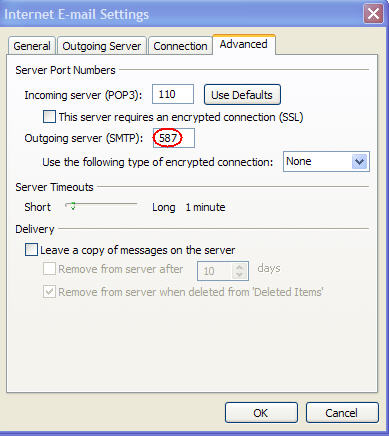
In the event changing to port 587 does not solve your problem, rather than calling Qwest, call your web host, and explain that “you suspect that your ISP has blocked port 25 for outgoing mail. What other port do they recommend you try?”
At that point, they will either open another port, or tell you the existing passport to use for their Web hosting.
The reasons Qwest (and Comcast) have done this to people with no notice escape me, but there ya go!














This port is intended for SSL connection so you have to check SSL button.
Minca, thanks for commenting –
What you claim may be so, about the intended port use, however, checking the SSL box will then not work for users unless their host is requiring them to use SSL, which in most cases, they’re not.
I never claimed this made sense – only that it works – 😉
There is a useful discussion of this at http://flyertalk.com/forum/showthread.php?t=793397, a forum of frequent travelers who often have this problem.
The reason port 25 gets blocked along with a lot of other common ports (80 is a prime example) is it’s VERY easy to setup a mail server in you house that spams email, blocking port 25 makes it more difficult to accomplish this. Usually you just route smtp (outgoing mail) traffic through ur ISP’s server. this will work with any alternate email you may have.
You’re right Jeremy, it’s VERY easy. Almost as telling all of your support people that you’re now blocking port 25, so they can fix it when people call!
I think you’ll soon find, if you haven’t already with your ISP, that if you want to send mail from yourdomain.com but through your ISP’s mail servers is no longer possible, and using other ports is all you can do.
Another easy fix is to go to gmail.com and setup an account, and then use their outgoing mail servers for sending email in your mail client.
Thanks –
Good idea Brian, but actually, if someone is a victim of their ISP blocking port 25, then using Gmail servers changes nothing, and they’re still blocked.
Gmail servers use port 465 for outgoing mail, not port 25. This means that ISP block on port 25 would not affect using gmail server to send mail.
I guess I didn’t understand that by “use their outgoing mail server”, you meant to change the mail client to SMTP over port 465.
Gmail is supposed to either use port 465 or port 25, but I’m guessing they have port 465 for this exact issue.
Thanks for adding this as another option…
Thanks for the tip Brian. It’s a shame how the quality of Qwest’s ISP services continues to get more and more shoddy. I can’t imagine they’ll be able to stay in business this way!
I am with Qwest for ISP, and yes… they just blocked our access out on port 25 today, and when we called, they said ‘We have made no changes to that.’
But your fix of using port 587 works perfectly, so OBVIOUSLY they did make a change and block port 25. Their customer service rep should have known this. If I had any other choice of ISP than them, I would go with someone else in a heartbeat!
Thanks for this post… it really saved me a TON of trouble getting my email routed out.
Wow in Baker City using Qwest my outgoing mail quit also. Port 587 is not working for me. Any ideas?
Thanks
Try searching for “port 587 options” or try all the suggestions in this post?
Thanks
Trying to send email with my own domain. Worked fine up until now. Still can’t figure it out. Changed port to 587 still not working. Strange that port 587 works in Portland but not baker City.
I’m stuck too. Tried changing port to 587, but no luck. Jeeze. Would appreciate any alternatives that allow me to send my messages from Outlook for PC and Mac; not from webmail. Webmail so clunky/bad.
and where are you located?
I emailed Qwest and told them port 25 was blocked and they happily fixed it. I was impressed.
They UNblocked you? Nice…
Port 25 blocking is a big problem for anyone who travels – at airports, coffee shops, hotels, etc. we’re away from our home networks and often face other kinds of firewall blocks. Gmail is not the answer if you’re trying to preserve your branding, etc. And 587 can be spotty at some ISPs. I found a good discussion of how to get around these blocks at an oddly-named blog at http://bit.ly/G46Pm. It deals with some ISPs other than Qwest, but the issues are the same.
Thanks for posting the alternate port (587) solution. Worked perfectly for me!
This article pops up at the top of my Google search and helped me figure out how to work around the port blocking by Qwest (I ended up using Google SMTP info). Thanks!
And I also wanted to pass along an email I received back from Qwest today that provides more info about the why (I have static IP addresses). It also shows a quick email to Qwest tech support solved the problem.
—
Thank you for contacting Qwest, soon to be CenturyLink.
In order to improve network security, reduce the spread of email-borne
viruses and reduce the overall volume of spam on the Internet, Qwest enables
‘port 25 filtering’ on Qwest High-Speed Internet Services using dynamic IP
addresses.
Internet email (SMTP) is routed over port 25. It is the port used for
communication between email servers (what the ISP has) and email clients
(what you have on your desktop). Most common email viruses are sent using
port 25 to infect your computer. So, filtering out traffic on port 25 helps
to protect your computer(s) from being used by a virus (or other malware) to
send or relay spam (unsolicited email). Port 25 filtering also prevents your
computer(s) on Qwest network from connecting to servers outside the network
via port 25. It has become a recognized industry best practice on the
Internet for service providers like Qwest to filter traffic on port 25.
Qwest recommends that port 25 filtering remains enabled unless you are
running your own email server or have Qwest static IP addresses.
In looking over your account I have decided to remove port 25 filtering. For
more information please visit http://www.Qwest.com/internethelp/email.html
and see the section on Port 25 Filtering FAQs.
I hope this helps. If not or if you have any further questions that we can
be of help with, please feel free to reply back to us, chat with an online
agent by going to http://www.qwhelp.com and clicking on the ‘Need Help – Click for
Online Agent’ or to contact our Technical Support @ 1-800-247-7285 for
support 24 hours a day, 7 days a week.
interesting that they’d say this with no explanation…
After using the port 587 work-around for a short time (I mentioned above that had worked for me), that stopped functioning. A few weeks back, I ended up having to call Qwest tech support and get them to remove the port 25 filtering on my account. Has worked without issues since then. Hopefully this will not change once CenturyLink is running the show…